Boost Team Knowledge with wiki for slack - Centralize Answers Fast
A Slack wiki does more than just organize information; it transforms your team’s main communication hub into a single source of truth. It puts an end to the constant app-switching and frantic searches by bringing answers directly into the conversations where work actually happens.
Imagine a Day Without Chasing Information

Think about your workday. How much of it is spent toggling between apps, searching through endless folders, or interrupting a coworker just to find one piece of information? That familiar, frustrating routine—scrolling through old Slack channels, hunting in a shared drive, pinging a colleague and waiting—is a silent drain on everyone's focus.
Each search feels minor, but the cumulative effect is a massive tax on your team's productivity and creativity.
The Real Cost of Disconnected Knowledge
When your team’s collective knowledge is scattered, the consequences are real and they hurt your bottom line. Critical information gets trapped in different apps, old email threads, and people's heads.
- Wasted Time: Employees burn hours every week just looking for standard operating procedures, project specs, or company policies.
- Broken Focus: Jumping between Slack, Google Drive, Notion, and other tools makes deep, concentrated work nearly impossible.
- Conflicting Information: Without a definitive source, team members get mixed signals and work with outdated information, leading to mistakes.
Now, imagine a completely different reality. Instead of opening a dozen browser tabs, you simply ask a question in Slack and get an instant, correct answer. This isn't about adding another tool; it’s about making your team's existing workflow smarter and reclaiming their day.
The table below contrasts the daily frustrations we've all felt with the seamless experience a Slack wiki provides.
The Daily Cost of Scattered Information vs A Centralized Slack Wiki
| Daily Challenge | The Experience With Scattered Information | The Transformation With a Slack Wiki |
|---|---|---|
| New Hire Onboarding | New team members repeatedly ask for the same links and documents, interrupting seniors. | They ask the wiki for the onboarding checklistor VPN setupand get what they need instantly. |
| Finding Project Specs | A developer searches three different channels and a Google Drive folder for the latest project requirements. | The developer simply asks in their project channel, What are the Q3 project specs?and gets a direct link. |
| Answering HR Questions | An employee DMs three different people to ask about the updated vacation policy. | They ask the wiki, What is our 2024 vacation policy?and receive the official document immediately. |
| Prepping for a Client Call | A salesperson frantically searches for the latest case study right before a call. | They ask, Show me the latest case study for the finance industry,and get it without leaving Slack. |
This is a fundamental shift in how your team accesses and uses information.
A New Way to Work
A powerful Slack wiki changes the game by weaving your team’s knowledge directly into the platform they already live in. With the average user sending 92 messages daily, Slack is the undisputed center of collaboration. This makes it the perfect place for a smart, integrated knowledge base. You can read more about the platform's incredible adoption in this analysis of the Slack ecosystem.
Ultimately, it’s the difference between a frantic, multi-app search and a single, simple question. It's about empowering your team to find what they need, when they need it, so they can get back to doing their best work.
What a True Slack Wiki Feels Like
Forget the technical jargon. What does a real wiki for slack feel like on a hectic Tuesday morning? It's like your company's collective brain is suddenly online, right there in the chat window, ready to help.
It’s the end of the information scavenger hunt. Imagine your day without opening three browser tabs, a messy shared drive, and two old project management boards just to track down one answer. Picture a workflow free from those constant, focus-shattering interruptions. Instead of digging for information, you just ask.
From Searching to Asking
The biggest shift is moving from searching to asking. Searching forces you to guess keywords, remember which folder something lives in, and hope the document you find isn't outdated. Asking is completely different—it's conversational and immediate.
Here’s what that looks like in the real world:
- A new hire asks:
Where can I find the W-9 form?
and instantly gets the correct, most recent document, not a link to a sprawling HR folder. - A project manager types:
What are the latest specs for the Omega project?
and the exact requirements pop up in the channel, verified and ready to go. - A support agent wonders:
What's our policy on refunds for annual subscriptions?
and receives a clear, concise policy statement in seconds, letting them resolve a customer query on the spot.
This isn't about learning yet another system. It's about weaving knowledge directly into the fabric of your team's daily conversations. You never have to leave Slack, break your focus, or interrupt a colleague just to ask where something is.
The Feeling of Confidence and Flow
When knowledge is this easy to access, it creates a powerful sense of momentum. Your team operates with more confidence, knowing they’re always working with the right information. That constant, low-level anxiety of not being sure where to look simply vanishes.
The real goal is to build a single source of truth that your entire team instinctively trusts and uses. It’s the difference between a messy garage full of unlabeled boxes and a personal assistant who knows exactly where everything is.
This seamless access to information builds a more resilient and efficient team. When everyone can find what they need on their own, frustrating bottlenecks disappear. Work doesn't grind to a halt while you wait for a response from the one person who knows where everything is. Instead, you create a state of flow, allowing your team to focus on meaningful work, not the soul-crushing admin of finding stuff. That is what a true wiki for slack really feels like.
Choosing Your Path to Instant Knowledge
Building a knowledge base inside Slack isn’t a one-size-fits-all project. The right approach depends on how your team works and how much friction you're willing to tolerate. The goal is always the same: get people fast, accurate answers so they can get back to their real work without ever leaving Slack.
Let's walk through the main ways you can make this happen. Each path offers a different trade-off between manual work and automation, between simple docs and a truly intelligent system. Ask yourself, How much time are we willing to waste just to find an answer?
The Manual Methods: Curation and App-Switching
First are the built-in Slack tools, like Canvas. Think of Canvas as a digital whiteboard pinned to a channel. It's fine for static information—like a project brief or office WiFi password. The catch? It's entirely manual. Someone has to build it and keep it updated, and your team has to remember to go look for it.
Then you have classic third-party integrations with tools like Confluence or Notion. With over 750,000 custom apps and integrations active in Slack, it’s clear people want their tools connected. But these integrations often just turn Slack into a notification feed. Your team gets an alert, clicks a link, and gets pulled out of their workflow into another app. That context-switching is a productivity killer.
This flowchart shows the mental journey an employee takes every time a question pops up, highlighting the difference between slow searching and getting an instant answer.
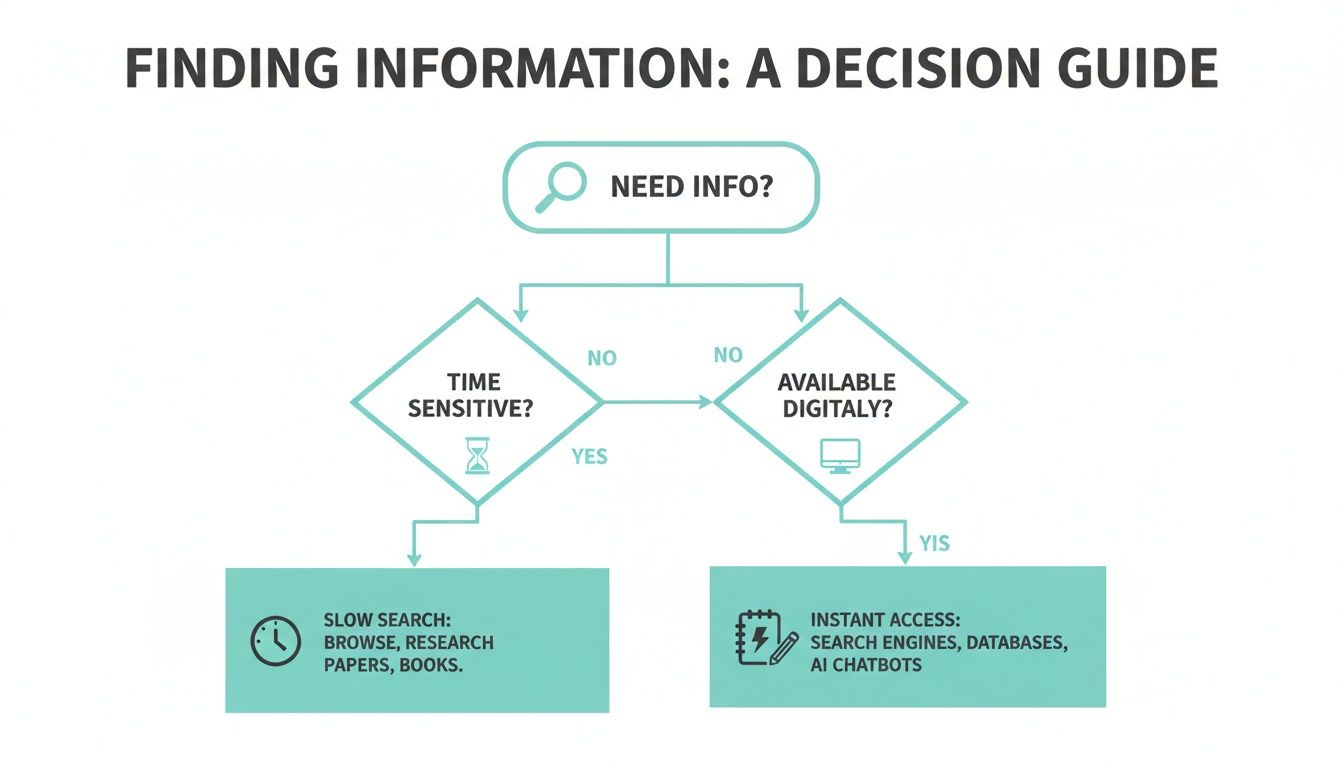
As you can see, the old ways often lead you down a rabbit hole. A direct, conversational approach, on the other hand, gets you an answer right away.
The AI-Powered Way: Conversational Knowledge
The third path is a completely different way of thinking. Imagine never having to open another resource or search multiple places for information again. An AI-powered assistant like SAI becomes an on-demand expert right inside Slack. It plugs into all your company's knowledge—wherever it lives—and delivers answers conversationally.
The real magic happens when your team stops thinking about where information is and simply starts asking for it. It’s the difference between fumbling with a library's card catalog and just asking the librarian for the exact book you need.
There’s no manual curation or jumping between apps. A team member just asks a question in plain English, and the AI delivers a direct answer, instantly, right in the conversation.
This is less about building a wiki and more about creating a true knowledge management system that adapts to how your team already communicates. You can learn more about what is a knowledge management system in our guide.
Comparing Slack Wiki Implementation Methods
To make the choice clearer, let's break down how these different methods stack up against each other.
| Approach | How It Works | Best For Teams That... | Key Limitation |
|---|---|---|---|
| Slack Canvas | A native document editor pinned inside a channel for static, manually-created content. | Need a simple, no-cost way to store unchanging info like policies or project outlines. | Requires constant manual updates and proactive searching by users. |
| Third-Party Integrations (e.g., Confluence, Notion) | Connects an external wiki tool to Slack, allowing link sharing and notifications. | Already have a deep, well-organized knowledge base in another platform and need to bridge it to Slack. | Forces context-switching; users must leave Slack to find and consume information. |
| AI Knowledge Assistant (e.g., SAI) | An AI bot that automatically learns from conversations and documents to answer questions directly in Slack. | Want instant, conversational access to knowledge without manual curation or leaving the workflow. | Relies on the quality and accessibility of existing team knowledge to learn effectively. |
Ultimately, picking your path comes down to what you value most: control or convenience. While manual wikis offer precise control, the immediate, conversational access from an AI assistant offers the fastest and most natural way to a smarter, more productive team.
Why an AI-Powered Wiki Changes Everything

Let's be honest, traditional wikis are clunky. They force you to think like a search engine—guessing keywords, clicking through folder trees, and praying the document you find is the right version. That whole process is a constant drain on your focus.
An AI-powered wiki for Slack completely flips that experience. It's a huge shift from the frustrating chore of searching to the simple act of asking. This changes how your team interacts with and values its own collective knowledge.
The End of the Keyword Guessing Game
Imagine your workday without ever leaving Slack to find something. No more sifting through shared drives or getting lost in Confluence. You just ask a question, the same way you’d ask a coworker.
- Instead of typing
refund policy document
into a search bar, you just ask,What's our policy on customer refunds?
- Instead of digging for the
Q3 marketing plan,
you ask,What are the main goals for the Q3 marketing campaign?
This is about more than saving a few clicks. It’s about freeing your brain from the job of being a digital librarian for your company's scattered files, letting you stay focused on the work that actually matters. It's no wonder that as more teams work remotely, Slack's projected revenue is set to hit $4.22 billion by 2025. You can find more details on the growth of collaborative tools on electroiq.com.
An AI-powered wiki feels less like a database and more like that one expert teammate who is always online, instantly available, and knows exactly where everything is. It’s your organization’s brain, accessible 24/7.
A Conversational Knowledge Experience
This new approach makes interacting with your company’s knowledge feel like a genuine conversation. The AI is smart enough to understand your intent and the context of your question, delivering a precise answer instead of just a list of links you have to sort through yourself.
That’s the real difference between a dusty, static repository and a living, breathing knowledge source.
This shift empowers everyone, from a new hire to a senior leader, to get what they need without friction. It’s the secret to building a more self-sufficient, confident, and nimble team. Take a look at this detailed example of an AI knowledge base in Slack to see exactly how this works in the real world.
How to Build a Lasting Knowledge Culture
A powerful tool is useless if nobody uses it. Your wiki for Slack has the potential to become your company's central brain, but that won't happen by accident. A great knowledge base thrives when sharing and capturing information becomes a daily habit—woven right into your team's workflow, not just another task on a to-do list.
The goal is to build a culture where information flows freely. This isn't about forcing new behaviors, but about making knowledge sharing so frictionless that it feels completely natural.
Picture a day where every important decision or brilliant solution shared in a chat doesn't just vanish into the scrollback abyss. Instead, it’s captured and instantly becomes a permanent part of your team's collective intelligence. That’s the dream.
Make Capturing Knowledge Effortless
The biggest hurdle to building any knowledge base is the effort it takes to contribute. If it feels like a chore, it won't get done.
To get around this, you have to make adding knowledge as easy as sending a Slack message. A simple but effective strategy is to create a dedicated #knowledge-capture channel. Whenever a valuable conversation happens or a key question gets a great answer, someone can easily share a link to that thread in the capture channel.
This one small act transforms fleeting conversations into durable assets. Over time, this channel becomes a living archive of your team's best insights, guaranteeing that great ideas are never lost again.
The most successful knowledge cultures are built on small, consistent habits, not grand initiatives. It’s about making it second nature for your team to think,
This is useful, I should save it,without ever breaking their stride.
Appoint and Empower Knowledge Champions
To make this stick, you need to identify and empower knowledge champions within your team. These aren't necessarily managers; they're the people who are naturally good at connecting dots and enjoy helping others find what they need. Their job is to lead by example.
These champions can keep the momentum going by:
- Celebrating Wins: Publicly thanking team members who add valuable information to the wiki.
- Identifying Gaps: Noticing when common questions aren't documented and taking the initiative to get them answered and saved.
- Modeling the Behavior: Being the first to use the
#knowledge-capturechannel or add new insights to the wiki.
By making knowledge sharing a recognized and valued part of your team's identity, you ensure your wiki for Slack grows more valuable every single day.
Your Blueprint for a Smarter Workspace

Picture a workday where your team never has to hunt for information again. No more digging through convoluted shared drives or pinging a coworker for a password that's been shared a dozen times. That's the reality a real wiki for Slack can create.
Instead of interrupting someone else's focus, your team can get instant, reliable answers right where they're already working. This isn't just about shaving off a few minutes; it’s a total upgrade to your operational rhythm.
The impact is immediate. Onboarding new hires becomes a breeze because they can find answers themselves. Processes gain consistency because everyone is working from the same source of truth. And the best part? Your team gets back countless hours to pour into the creative, needle-moving work that truly matters.
A New Standard for Productivity
This is so much more than just another app—it’s about building a smarter, more self-sufficient organization. By centralizing your team's collective knowledge, you get rid of the little daily frustrations that grind productivity to a halt. When answers are just a quick search away, your team can move with a whole new level of speed and confidence.
You’re essentially trading a chaotic, siloed environment for one where knowledge is a shared, effortless asset. It’s the difference between guessing and knowing, between waiting and doing.
Curious about what other tools can do for your workspace? Take a look at our list of the 12 best apps for Slack to transform your business in 2025.
Frequently Asked Questions
Still have questions about how a wiki for Slack really works in practice? Let's tackle some of the most common concerns teams have before they get started.
Will My Team Actually Use It?
This is the make-or-break question for any new tool, isn't it? The biggest reason company wikis fail is that they’re a chore to use. They live in another tab, require a separate login, and break the flow of work.
A Slack wiki flips that script entirely. It meets your team right where they are, eliminating the friction of context-switching. When finding an answer is as simple as asking a question in a channel you already have open, it stops feeling like a task and starts feeling like a natural part of the conversation. Adoption happens organically because it's just easier than the old way of doing things.
How Do We Keep Information From Getting Outdated?
A stale knowledge base is a useless one. The secret to keeping information fresh is a mix of smart tech and simple, human-led habits.
Many modern AI-powered wikis can automatically flag content that hasn't been touched in a while or identify knowledge gaps based on questions people are asking. This takes a lot of the manual grunt work off your plate.
From a team perspective, it’s about building a culture of ownership. Assign knowledge champions
to specific topics—your go-to experts who are responsible for keeping certain documents current. You can also set up a lightweight quarterly review for your most critical info, like company policies or key project briefs. Most importantly, make it dead simple for anyone to flag outdated content right from within Slack.
A great Slack wiki isn’t a static library; it’s a living, breathing part of your team's workflow that gets smarter with every interaction. It reflects your team's most current knowledge because it's constantly being used and refined in real time.
Is a Slack Wiki Secure for Sensitive Information?
Security is non-negotiable. The best approach is to choose a tool that piggybacks on the security measures you already trust within Slack. By inheriting Slack's native permissions, you ensure people can only see the information they're already cleared to access in your workspace. It's the simplest and most effective way to manage access.
If you're looking at a third-party app, do your homework. Check for standard security compliance certifications like SOC 2 or GDPR and read their data-handling policies carefully. A well-chosen Slack wiki can be every bit as secure as the other cloud-based systems your company relies on.
Ready to stop chasing down answers and give your team a single source of truth? SAI learns from your existing conversations to provide instant answers, right inside Slack. Get started for free today.
