How to onboard remote employees: A Practical Playbook for Smooth Onboarding
Kick off three simple yet powerful moves on day one and watch your business transform. Imagine new hires never leaving Slack—just asking SAI and getting role-specific answers instantly—so they dive into meaningful work without hunting down info.
Quick Start Guide For Remote Employee Onboarding
The graphic below shows how a seamless onboarding experience feels when everything happens in one place. No more toggling between tools—just ask SAI in your dedicated Slack channel and get exactly what you need.
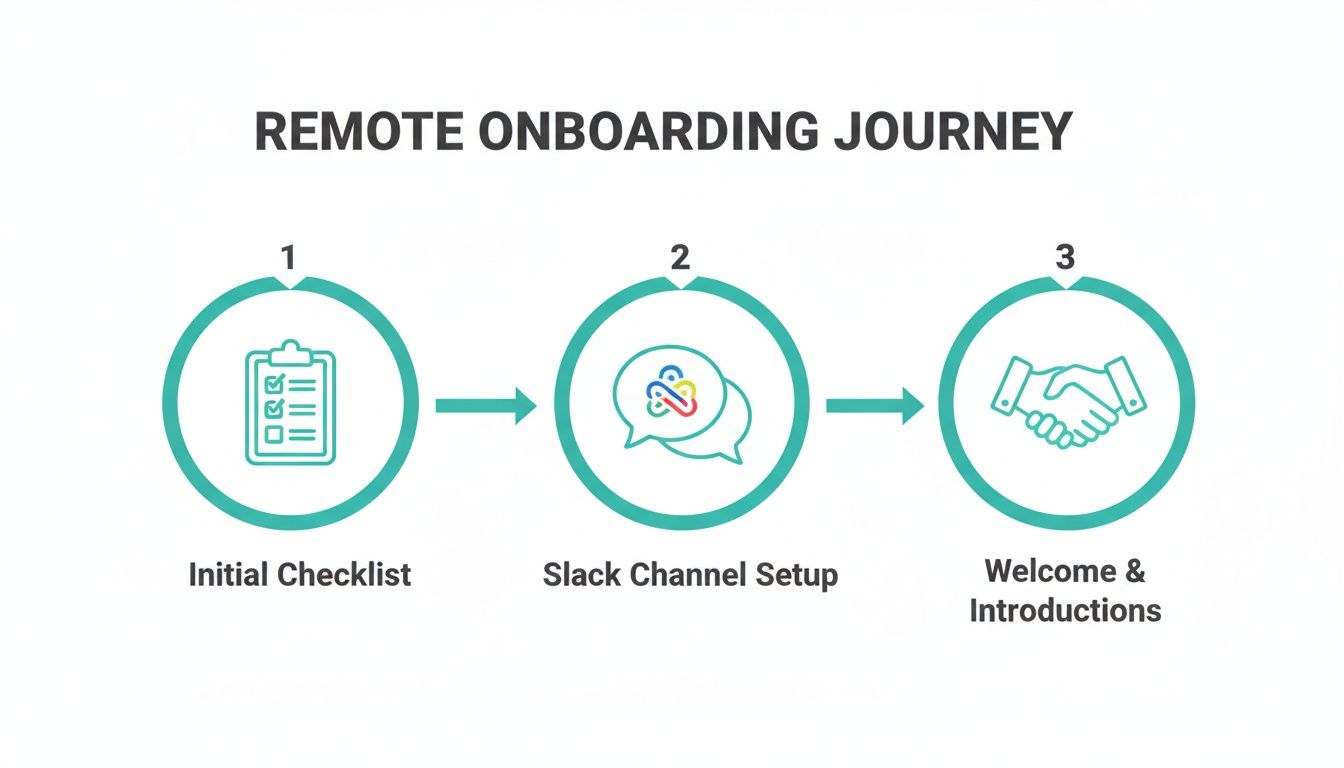
It shows how a centralized checklist, live AI-powered Slack support, and warm welcome messages turn Day One into a launchpad for productivity.
Key Components At A Glance
- Unified Checklist: All tasks live in Slack. New hires tick off forms, access, and compliance items without leaving the chat.
- AI-Powered Support: Ask SAI in Slack any question—role guidance, policies, tool links—and get precise answers instantly.
- Heartfelt Welcomes: Automated greetings that reflect your culture and link directly to critical channels, docs, and people.
Pulling every step into Slack means new hires never lose momentum—and your team spends more time coaching, not chasing tasks.
Companies adopting this approach see up to a 54% jump in new-hire productivity within six months versus scattered onboarding Learn more about these findings.
A single source of truth in Slack turns confusion into clarity—and accelerates time to contribution.
Quick Onboarding Steps Overview
Use this snapshot to connect each phase with the impact you’ll measure in days and dollars.
| Phase | Key Actions | Expected Outcome |
|---|---|---|
| Checklist | Launch unified checklist and assign tasks in Slack | All preboarding done before Day One |
| Slack Setup | Create onboarding channel and add SAI | Answers at the speed of chat, zero tech delays |
| Welcome | Send tailored message, introduce buddy | Instant sense of belonging and direction |
Keep this table visible in your Slack workspace to track progress and celebrate milestones.
Applying The Quick Start Guide
Before Day One, load your checklist template and prepare Slack so that new hires ask questions, not submit tickets. Configure SAI to deliver team-specific context the moment they type a query. Then craft a welcome note—complete with jump links to channels and resources—that feels like a handshake.
Next Steps
Assign each phase to an owner in Slack. Automate reminders with Workflow Builder so tasks never slip. At the end of Week One, gather feedback via a quick SAI-driven poll. Tweak checklists and messages based on real insights—right where you work.
Key Metrics To Track
- Completion Rate: Percentage of items done by Day One.
- First-Week Engagement: SAI question count and channel activity.
Celebrate progress by sharing stats in your team channels and running a one-question pulse survey.
Building Preboarding Foundations

Remote hires often feel adrift before Day One. Imagine shipping gear with a note: “Ask SAI in Slack if you need anything else.” No more emails chasing attachments or links. One startup cut first-week support requests by 60% by empowering hires to ask instead of search.
Studies show a holistic preboarding process can boost retention and engagement by up to 82% compared to ad-hoc starts. Read these insights on Second Talent.
Craft Personalized Welcome Packets
A thoughtful packet sets the tone. Include:
- Branded Swag: Notebook, stickers, a desk plant—all announced in Slack with a surprise unboxing moment.
- Personal Message: CEO and manager drop in a virtual card via Slack DM.
- Easy Access Guide: “Just ask SAI” instructions alongside any login details.
- Culture Highlight: Links to your top Slack channels and upcoming social events.
Seeing a real package and knowing SAI is their go-to creates excitement and confidence.
Assign Virtual Buddies
Pair each new hire with a peer to build trust fast. Buddies:
- Schedule two quick “coffee chats” via Slack huddle in Week One.
- Encourage “Just ask SAI” so both buddy and new hire have support.
- Share project histories through Slack threads for instant context.
This approach halves question resolution times and frees managers for strategic discussions.
Streamline Early Check-Ins
Pre-start clarity prevents bottlenecks:
- Complete digital paperwork and confirm by pinging SAI.
- Ship preconfigured hardware with an illustrated guide—and a Slack link for missing items.
- Invite new hires to key channels before Day One.
- Block a 30-minute culture intro with People Ops, then ask SAI follow-up questions.
One consultancy saw a 40% drop in delays by embedding e-signature reminders in Slack. Automate these nudges so every form finds its way home.
Prepare Culture Orientation Sessions
Live sessions help newbies decode your team’s vibe. Blend formats:
- Real-story slide decks with colleague quotes.
- Short videos released in Slack with an SAI Q&A thread.
- Interactive polls on communication preferences.
A first-week session sets collaborative norms. Then, run a Slack survey via Workflow Builder to refine next time.
Preboarding rituals slash Day One jitters and prime hires for success.
| Phase | Action | Outcome |
|---|---|---|
| Paperwork | Send forms with Slack nudges | Zero missing docs by kickoff |
| Equipment | Ship gear in advance | Ready-to-go setup on arrival |
| Check-Ins | Schedule culture and buddy meetups | Questions resolved proactively |
Run a quick SAI survey to uncover equipment needs and scheduling preferences. Automate reminders and centralize updates—so logistics fade away and excitement builds.
Setting Up Tools And Integrating Slack
Getting everything in place inside Slack means new hires start contributing from Day One. They no longer chase invites—they just ask SAI for access or instructions.
One engineering team replaced 15 email threads with a single Slack channel—then added SAI. Stand-ups automated, FAQs answered in seconds, and syncs now happen in one place.
- Instant provisioning tasks kick off when onboarding starts.
- Slack workflows remind everyone of unfinished steps.
- AI bots in the channel field questions around the clock.
Slack Onboarding Tools Comparison
| Tool | Purpose | Key Impact |
|---|---|---|
| Admin Permissions | Grant access smoothly | New hires get the right rights immediately, cutting wait time drastically |
| Workflow Builder | Automate reminders and forms | Tasks stay top of mind without manual follow-up |
| Onboarding Bot | Answer new-hire questions | Instant, context-aware replies eliminate confusion |
Use this quick view to choose the mix that delivers the fastest ROI for your team.
Integrating Examples
That view shows how SAI replies pop right in Slack—new hires never open a browser tab again.
Organizing Channels By Role
Structure channels so newcomers know exactly where to go:
- Prefix channels by function:
#onboard-dev,#onboard-marketing. - In headers, list goals, key contacts, and SAI prompts like “Ask me anything about your role.”
Structuring channels by role cuts discovery time and reduces repetitive questions by up to 30%.
Learn how to centralize answers fast with a Slack wiki in our guide on boosting team knowledge with a Slack wiki.
Embedding interactive prompts makes self-paced onboarding feel personalized. New hires simply type a question, and SAI delivers the right resource link or next step.
Automating these routines inside Slack means no tool-switching fatigue—everyone stays in one flow. Track metrics like invitation acceptance and bot response counts, then refine templates based on real data.
- Review permissions quarterly to match evolving roles
- Archive unused channels to keep Slack lean
- Monitor bot accuracy and update sources as needed
- Celebrate onboarding milestones with quick Slack shout-outs
This blueprint unites tools and knowledge for a seamless remote experience. Start automating today.
Crafting Role Specific Learning Paths
A clear learning roadmap ensures your new hires know exactly what to tackle—and in what order. Imagine a series of prompts in Slack: “Next: Sales demo training,” and SAI delivers the right link, quiz, or peer mentor intro.
Audit Role Requirements
Identify core skills and processes for each position—and equip SAI to field questions about them on demand.
- List essential tools, logins, and workflows.
- Tag proficiency levels so SAI recommends appropriate microlearning.
- Assign peer mentors via Slack so newcomers get hands-on guidance.
This upfront clarity removes bottlenecks and keeps momentum high.
Sequence Micro Learning Modules
Bite-size lessons staggered over days maintain focus. New hires see progress bars in Slack and get prompts like, “Ready for the next quiz?”
- Start with on-demand videos outlining essentials.
- Follow up with quick SAI-driven quizzes in Slack.
- Schedule peer shadow sessions to apply learning in context.
In pilots, teams saw ramp-up time drop by 25% when microlearning was paired with chat prompts.
Blend Live Workshops With On-demand Content
Mix live sessions with self-service materials to suit any schedule:
- Small-group Q&As to deepen understanding.
- Project-based tasks shared in Slack channels.
- Recorded demos posted with SAI instructions on how to revisit them.
A sales team combined a 45-minute live pitch workshop with on-demand negotiation scenarios—and saw call success rise 18%.
| Template | Purpose | Cadence |
|---|---|---|
| Progress Tracker | Track completed modules and quiz scores | Weekly |
| Manager Check-In | One-on-one feedback | Bi-weekly |
| Roadmap Adjustment | Update timelines and resources | Monthly |
Track Progress And Adjust Roadmap
Regular check-ins powered by Slack polls keep managers in sync:
- Pulse surveys after each module capture confidence levels.
- Code-review or project milestones ensure quality.
- Refresh content when satisfaction dips below 80%.
Publicly share progress in a Slack channel to boost accountability and trust.
Effective roadmaps blend autonomy with support so new hires feel empowered every step of the way.
Read our guide on how to write a standard operating procedure for step-by-step documentation that complements these blueprints.
Promote Continuous Improvement
Gather feedback at Day 30, 60, and 90—then let SAI summarize trends in Slack. Rotate mentors to introduce fresh perspectives. Archive outdated modules so everyone accesses only the latest insights. This cycle keeps your onboarding current and engaging.
Fostering Culture And Social Connection
Screens become social portals when simple rituals spark real conversation. With SAI suggesting icebreakers and event ideas, you build trust and belonging without heavy planning.
Virtual Small Group Rituals
Unstructured coffee huddles and rotating AMAs break down barriers:
- Three random coffee huddles per week, scheduled by SAI.
- Rotate AMA hosts among five participants to ignite curiosity.
- End each week with a show-and-tell—shared as Slack threads with images and reactions.
“Connecting over hobbies turned colleagues into collaborators,” shares Lina from Acme Inc.
Designing Engaging Events
Use Slack channels to keep the vibe going:
| Channel Name | Activity | Engagement Rate |
|---|---|---|
| #hobby-photos | Photo sharing | 65% weekly |
| #daily-puns | Morning jokes | 40% daily |
| #book-club | Monthly discussions | 25% monthly |
When you run events—coffee chats, trivia, game nights—SAI can send reminders, share agendas, and even suggest icebreaker questions. This frictionless support boosts participation and morale.
Sustaining Community Momentum
Celebrate small wins in #wins channels. Have SAI draft shout-outs like:
- “Huge thanks to @name for closing their first deal—🎉!”
- Tag everyone involved to amplify the moment.
Rotate a “Culture Champion” role so each teammate curates rituals and polls. Quarterly virtual retreats, monthly surveys, and quick Slack pulses keep your culture alive and evolving.
You might also explore our guide on building team connection in Slack for more inspiration: https://sai-bot.ai/slack/team-connection/new
Measuring Social Connection
Track:
- Posts per user per week in social channels
- Event attendance rates
- Pulse-survey scores on belonging
SAI can automate data collection and deliver summaries in Slack—so you always know which rituals resonate and where to adjust.
Tracking Success With Metrics And Checklists

Measuring remote onboarding isn’t about checking boxes—it’s about business impact. When hires hit full stride faster, report higher satisfaction, and stay beyond 90 days, your ROI speaks for itself.
Key Onboarding Metrics
- Time to Productivity: Days until first solo contribution.
- Satisfaction Scores: Average rating (1–5) from SAI-driven surveys.
- Completion Rates: Checklist items done on or before target.
- Early Attrition: Hires leaving within 90 days.
These four metrics give you a clear window into onboarding health.
Pulse Surveys And Feedback Loops
Automate a 3–5 question check-in every Friday via Slack. Branch prompts when concerns arise, and post anonymized results in a channel. Managers then act on themes in real time—before minor issues become major.
Onboarding Metrics Dashboard
Onboarding Metrics Dashboard
The table below highlights key indicators to evaluate your remote onboarding program.
| Metric | Description | Target Range |
|---|---|---|
| Time to Productivity | Days until first solo contribution. | 14–21 days |
| Satisfaction Score | Average rating on weekly surveys. | 4.0–5.0 |
| Completion Rate | Percent of checklist items completed. | 90–100% |
| Early Attrition | Hires leaving before 90 days. | <5% |
Share this dashboard in Slack—so everyone from managers to executives sees progress and priorities.
Iterating On Data For Improvement
Numbers spark action when you review them regularly:
- Weekly huddle to address red-flag metrics.
- Monthly leadership sync for deep dives.
- Quarterly workshop to refine checklists, surveys, and Slack workflows.
Celebrate progress in #onboarding-updates with quick shout-outs and let SAI draft summary notes.
Dynamic Onboarding Checklists
Living checklists adapt as roles and tools evolve. With SAI, tasks auto-generate in Slack based on job tags. Each item links directly to the right resource or channel. Automated reminders and branching workflows keep everyone moving forward—cutting manual upkeep by 30%.
When metrics, pulse surveys, and dynamic checklists converge in real-time dashboards, you build a self-correcting onboarding engine. New hires settle in faster, managers stay aligned, and you prove clear ROI across the company.
FAQ
Facing a new remote hire can feel uncharted, but with Slack and SAI, every answer is a message away.
Essential Preboarding Steps
- Ship Equipment: Laptops, headsets, chargers—covered before Day One.
- Share Access: Post credentials and links in Slack so no one hunts for emails.
- Assign Buddy: A dedicated peer speeds up ramp time.
Using Slack AI
Add SAI to your onboarding channel for 24/7 help. New hires ask any question—no doc flips, no tickets—and immediately get context-aware replies. One team saw a 70% drop in repetitive queries in two weeks.
A well-trained AI assistant in Slack cuts troubleshooting time in half.
Culture And Retention
Culture is the secret sauce that keeps people engaged. Try:
- Biweekly coffee chat rooms in Slack
- Rotating show-and-tell sessions
- Hobby channels—book club, fitness, cooking—to spark genuine connections
Measuring Success
Don’t stop at task completion. Track:
| Metric | Target Range |
|---|---|
| Time to Productivity | 14–21 days |
| Satisfaction Score | 4.0–5.0 |
| Completion Rate | 90–100% |
| Early Attrition | <5% |
Glance at this dashboard weekly and let SAI send you push summaries so you can course-correct before hiccups grow.
Add SAI in Slack for instant onboarding help and endless AI-powered support: SAI
