How to Write Standard Operating Procedures: A Practical Guide
Tired of being the go-to person for every little question? Imagine a day where you're not constantly interrupted by pings asking how to do something you’ve explained a dozen times. This isn't just a dream—it's what happens when you get serious about creating Standard Operating Procedures (SOPs).
End the Chaos of Repetitive Questions and Build a System
Let's be real: the constant interruptions aren't just annoying. They're productivity killers. Every time you have to stop what you're doing to dig up an old Slack thread or re-explain a process, your focus shatters.
This guide is your way out. We're going to walk through how to write SOPs that do more than just sit in a folder. We'll show you how to build a system that empowers your team to find their own answers, instantly, right where they work. The goal is to transform your business from relying on scattered tribal knowledge
to operating from a single, reliable source of truth.

Reimagine Your Team's Workflow
Think about the hidden cost of disorganization. It's not just the time spent repeating yourself. It's the deep work that never gets done because of constant task-switching. It's the bottlenecks that form when crucial information lives only in one person's head. When your team operates on guesswork, you get inconsistent results and costly mistakes.
In fact, some studies show that just one hour of unproductive work per week can cost a midsize company nearly $6,000 annually for every single employee.
That's where truly effective SOPs change the game. They create a new reality where:
- New hires get up to speed in days, not weeks. They have a roadmap to follow instead of constantly needing to shadow someone.
- Your team feels confident and autonomous. They're empowered to solve problems on their own without waiting for your approval.
- Consistency is the standard. Every client gets the same high-quality experience, every single time.
This is about more than just writing things down. It’s about building an intelligent, self-service knowledge base that actively helps your team. Imagine never having to hunt through Google Drive again. Your team just asks a question in Slack and gets the right answer, right away.
From Static Documents to an AI Assistant
The real magic happens when your SOPs become a living, breathing part of your daily workflow. Imagine a day where your team doesn't have to open a single drive, folder, or wiki. They don't have to search in multiple places or wonder if they have the latest version of a document. They just ask a question in Slack and get an instant, accurate answer.
By mastering how to write standard operating procedures, you capture every critical process—from how to handle a tricky customer complaint to the right way to submit an expense report. Once that knowledge is documented, it can be surfaced on demand.
The shift is profound. You stop being a human search engine and start being the strategic leader your business needs. This guide will show you exactly how to build that system.
Identifying Which Processes Need an SOP First
The secret to great SOPs isn’t trying to document everything at once. That's a classic mistake and a fast track to burnout. You'll just end up with a folder full of documents nobody uses.
Real transformation starts when you pinpoint the high-impact, recurring tasks that are quietly draining your team's focus and energy. You have to start smart.
So, where do you begin? The answer is usually hidden in the friction you feel every day. Think about the processes that cause the most headaches, generate the most questions in Slack, or create the biggest bottlenecks. Those are your goldmines for immediate efficiency gains.
Find the Hidden Time Drains
Your first goal is to find the workflows that will give you the biggest return on your documentation time. These are the processes that, once you clarify them, will free up your team to do meaningful work instead of getting bogged down in repetitive, low-value tasks. You’re not just writing instructions; you're buying back hours of lost productivity.
Start by looking for these common culprits:
- High-Frequency Tasks: What does your team do over and over, every single day? It could be processing a customer refund or publishing a new blog post. If a task happens daily or weekly, standardizing it is a no-brainer for consistency and speed.
- Multi-Person Processes: Any workflow that involves a handoff between two or more people is a prime candidate. This is where things fall through the cracks—when a task moves from sales to support, or from marketing to design. An SOP acts as the glue.
- Critical Impact Workflows: Which mistakes cost you the most? Tasks tied to compliance, new client onboarding, or financial reporting absolutely need crystal-clear procedures to get rid of the risk of expensive errors.
A Framework for Prioritization
Once you have a list of candidates, you need to prioritize. Not all processes are created equal. Some are minor conveniences; others can fundamentally change your team's capacity.
I always think about it in terms of the pain vs. gain
ratio. A process that’s a huge pain but only happens once a quarter is less urgent than a moderately annoying task that happens ten times a day.
The core idea is simple: start where the pain is most acute and the potential gain is largest. Documenting how to handle after-hours support tickets will likely have a much bigger impact on team morale and customer satisfaction than documenting how to order office supplies.
This isn't just a gut feeling; the data backs it up. Teams that lack clear SOPs constantly struggle with consistency. One study I came across highlighted that detailed SOPs boosted process reproducibility by 40% and cut deviations by 30%. For teams that live in Slack and use tools like SAI to field repetitive questions, getting this right from the start is huge. You can find more on the importance of this clarity from Statistical Solutions.
From Identification to Action
To put this into practice, make a simple list of all the processes you're considering. Then, have your team rate the pain level
of each one from 1 to 5. It’s a quick exercise that will instantly surface your top priorities. To get a better feel for how to turn those priorities into solid guides, it's worth exploring a few practical process documentation examples.
Pick one or two of those high-priority processes and start there. Your initial success will build momentum and prove the value of the system to your team. That buy-in will make it much easier to tackle more complex workflows down the line.
Crafting an SOP Your Team Will Actually Use
Let’s be honest: a perfect SOP that nobody uses is completely worthless. The real challenge isn’t just learning how to write standard operating procedures; it's about creating a living document that your team instinctively turns to for answers. We need to move past dry, robotic templates and build guides that provide real context and clarity.
Think about the end goal. Imagine a new team member getting stuck and, instead of tapping a colleague on the shoulder, they just ask a question in Slack and get an instant, accurate answer pulled from an SOP. That's not a fantasy. It’s what happens when you build a system so intuitive it becomes an extension of your team's collective brain.
Start with the Why
Before the How
Every great SOP starts by answering a single, crucial question: Why are we even doing this?
Before you detail a single step, you have to frame the entire process with a clear purpose statement. This gives your team the context they need to make smart decisions and understand how their work fits into the bigger picture.
This isn't just fluff—it's foundational. Research shows that starting with the why
drives adoption because it treats your team like intelligent problem-solvers, not just task-doers. In fact, well-structured SOPs have been shown to cut compliance deviations by as much as 30% in larger companies, a direct result of people actually understanding and following the process. You can dig into the research behind effective SOPs if you want to see the data for yourself.
After establishing the purpose, you need to define the scope. Be crystal clear about when this process applies and—just as critically—when it doesn't. This simple step heads off a world of confusion.
Finally, assign clear roles and responsibilities. Ambiguity kills execution. Spell out exactly who owns each part of the process so there’s never a moment of I thought *you* were doing that.
Make Clarity Your Obsession
Once the foundation is solid, it's time to write. Your one and only rule? Be relentlessly clear. Pretend you're writing for someone who has never seen this process before in their life. That means killing the jargon, ditching the acronyms, and using language anyone on your team can understand without a second thought.
Here’s how to make your SOPs incredibly easy to follow:
- Write in the Active Voice: Instead of
The invoice is sent by the account manager,
writeThe account manager sends the invoice.
It’s direct, it’s punchy, and it makes it obvious who does what. - Show, Don't Just Tell: Why describe a complex step in a software tool when a screenshot can show it instantly? Use visuals—images, simple flowcharts, or even short video clips—to make instructions impossible to misinterpret.
- Keep It Simple: Use short sentences. Break up long instructions with bullet points and numbered lists. Your goal is scannability. Someone should be able to find what they need in seconds.
To make sure your SOPs are truly comprehensive, they need to include a few key elements.
Essential Components of a High-Impact SOP
This table breaks down the key sections every SOP should have to be clear, usable, and effective.
| Component | Purpose | Example |
|---|---|---|
| Title | To provide a clear, concise, and searchable name for the procedure. | How to Onboard a New Client in Asana |
| Purpose Statement | To explain why the process exists and what it aims to achieve. | To ensure every new client has a consistent, positive onboarding experience. |
| Scope | To define when the SOP applies and any specific conditions or limitations. | This process applies to all new B2B clients after the contract is signed. |
| Roles | To explicitly assign responsibility for each part of the process. | Account Manager: Creates project. Project Manager: Assigns initial tasks. |
| Step-by-Step Guide | To provide clear, sequential instructions for completing the task. | 1. Open the 'Client Templates' folder. 2. Duplicate the 'New Client Project' template... |
| Visual Aids | To supplement text with screenshots, diagrams, or videos for better understanding. | A screenshot showing exactly where to find the 'New Client Project' template in Asana. |
| Revision History | To track changes, updates, and who approved them over time. | v2.1 - Updated by Jane Doe on 10/26/23 to include new security checklist. |
Building your SOPs with these components creates a reliable and trusted resource for your entire team.
An SOP isn't a novel; it's a quick-reference guide. If someone has to read a paragraph three times to understand a single step, the document has failed. Your team should be able to glance at it, get the information they need, and get back to work.
By focusing on these core elements, you’re not just writing instructions—you’re building a system of trust and clarity. If you're ready to go deeper, check out our full guide on how to write an SOP your team actually uses. This is how you turn static documents into a dynamic knowledge base that empowers your team, cuts down on interruptions, and helps everyone execute with confidence.
A Practical Process for Writing and Refining Your SOPs
Alright, let's get into the nitty-gritty. You've pinpointed the processes causing the most headaches, and you have a clear picture of what a great SOP looks like. Now it's time to actually build one.
But forget about locking yourself in a room for a week to emerge with some perfect, thousand-page manual that gathers dust. That’s not the goal.
We're creating a living document, not a stone tablet. This is a collaborative effort that will completely change how your team finds and uses information. Imagine a world where, instead of digging through endless folders or bugging colleagues, your team can just ask a question in Slack and get an instant, spot-on answer pulled directly from the SOP you're about to create. That’s the end game here.
Start with the Experts: Your Team
The single biggest mistake I see leaders make when writing SOPs is trying to go it alone. The most valuable insights will always come from the people doing the work, day in and day out. Their hands-on experience is pure gold.
Your first move is simple: schedule time with the employees who own the process. Ask them to walk you through it, step-by-step. Listen closely to the small details, the clever workarounds they’ve invented, and the questions they still have.
This isn't just about gathering information; it's a critical step for buy-in. When your team helps build the SOP from the ground up, they’re far more likely to trust it and actually use it. You're capturing the real process, not the one you think exists from a 30,000-foot view.
This approach lays the groundwork by defining the purpose, scope, and key players involved.
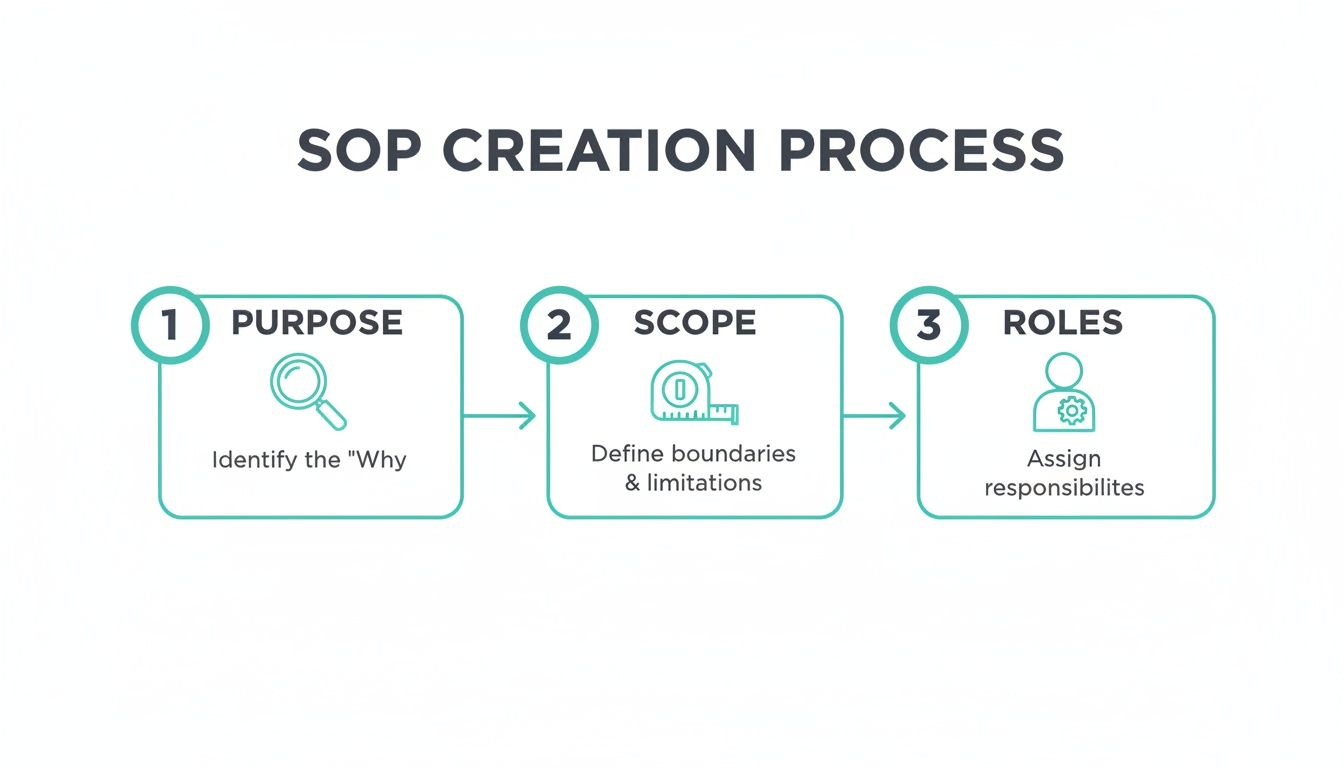
Starting with these foundational elements ensures your SOP is built on solid ground, making every subsequent step much more effective.
Draft for Clarity, Not Perfection
With fresh notes from your team, it's time to hammer out the first draft. Your guiding light here should be absolute clarity. Seriously, write as if you’re explaining it to a brand-new hire on their very first day.
A few tips for this drafting phase:
- Think sequentially. Use a numbered list to walk the user through the task from start to finish.
- Kill the jargon. If you absolutely have to use an acronym, define it the first time you use it.
- Keep it simple. Use short sentences and an active voice. Think
The manager approves the request,
notThe request is approved by the manager.
Look, the first draft won’t be perfect. Its only job is to get the process down on paper in a logical order. You’re building the skeleton; your team will help you add the muscle. Don't get bogged down in perfect grammar or fancy formatting just yet.
Your goal is progress, not perfection. A messy but accurate first draft is infinitely more valuable than a beautifully formatted but incomplete document. You're building a tool, not writing a novel.
Build a Simple Feedback Loop
Once you have that draft, it's time to put it to the test. This is where your SOP transforms from a document into a trusted resource. You need a dead-simple feedback loop with your team to vet and refine the procedure.
Send the draft back to the same people who helped you create it. But don't just ask them to read it over.
Give them a very specific instruction: Next time you do this task, follow this SOP exactly as written and tell me where it breaks.
This simple prompt turns a passive review into a real-world stress test. It will immediately expose any confusing steps, missing information, or incorrect sequences. As you incorporate their feedback, the SOP becomes sharper, more practical, and—most importantly—trusted.
After a couple of these refinement cycles, your SOP will be battle-tested and ready for prime time, because you'll know it reflects how the work actually gets done.
Making Your SOPs Instantly Accessible in Slack
Let’s be honest. Even the most perfectly crafted SOP is useless if it’s gathering digital dust in a forgotten Google Drive folder. You’ve put in the hard work to document how your team gets things done. Now comes the real win: making that knowledge impossible to miss, right where your team lives and breathes—Slack.
This is all about bridging the gap between brilliant documentation and the messy reality of day-to-day work. The goal is to create a world where your team never has to hunt for information again. No more clicking through ten tabs, digging through nested folders, or guessing which version of a document is the right one.
They just ask a question in Slack and get the answer. Instantly.

From Buried Files to Living Knowledge
Think about the last time you saw a great question asked and answered in a busy Slack channel. Maybe someone figured out a clever fix for a tricky customer issue or shared a new shortcut for pulling a report. That nugget of wisdom is pure gold.
But within hours, it’s buried under an avalanche of new messages, GIFs, and project updates. Lost forever.
This is the core problem. Your team’s most practical, up-to-the-minute knowledge lives—and dies—in Slack. Your official SOPs, meanwhile, are tucked away in a separate system. This disconnect is where inefficiency festers, costing businesses an incredible amount of time and money.
The solution is to build a bridge. It’s about creating an intelligent layer inside Slack that learns from your team’s daily conversations and connects that tribal knowledge back to your official SOPs.
The Power of On-Demand Answers
Picture this. A new hire, still finding their feet, needs to submit their first expense report. Instead of tapping their manager on the shoulder (virtually or otherwise) or posting in a public channel, they just ask a bot like SAI directly in Slack: “How do I submit an expense report?”
Instantly, the bot pulls up the exact section from your expense SOP, complete with a link to the software and a checklist of what receipts they need. No searching, no waiting, no context-switching. Just a question followed by an immediate, accurate answer.
This is the transformation we’re after. It isn't about creating another system for your team to search. It's about empowering them to find anything they need without ever leaving Slack. Imagine your team never having to open another knowledge base, wiki, or drive today—they just ask SAI and get the answer they're looking for.
The real magic happens when the system starts capturing new knowledge on its own. When a senior teammate answers a question in a channel, an intelligent assistant can recognize it, save the solution, and serve it up the next time someone asks. Your SOPs become a living, breathing resource that gets smarter with every single conversation.
Putting It into Practice
Making your knowledge instantly accessible doesn't require a massive technical overhaul. It’s more of a mindset shift, supported by the right tools. Here are a few practical ways to embed your SOPs directly into your Slack workspace:
- Dedicated Channels: Create specific channels like
#how-toor#process-q-and-awhere key SOPs are pinned and discussed. This gives you a central, searchable hub. - Workflow Builder: Use Slack's built-in Workflow Builder to create simple slash commands that pull up key SOPs. For instance, a user could type
/request-pto, and a workflow could automatically post the link to your time-off policy. - Intelligent Assistants: This is the real game-changer. An AI assistant like SAI plugs directly into your channels, learning from conversations and automatically answering repetitive questions by referencing your documented procedures.
The difference this makes is profound. Interruptions plummet. New hires get up to speed much faster. And your senior team members are freed from being human search engines, letting them focus on the high-value work they were actually hired to do. This is where an effective Slack knowledge management strategy really proves its worth.
By making your SOPs a seamless part of the daily conversation, you turn them from static documents into a dynamic tool that actively makes your entire team more efficient and autonomous.
Keeping Your SOPs Fresh and Reliable
An outdated SOP isn't just useless—it's actively harmful. A single wrong step can derail a critical workflow, crush team morale, and make everyone give up on the very system you worked so hard to build. The final, and arguably most important, part of creating SOPs is realizing they aren't static documents. They’re alive.
This isn’t about adding another tedious task to your plate. It's about protecting the value you've created. Think about it: your goal is a team that gets instant, accurate answers right inside Slack, months or even years from now. That only happens if they trust the information. And that trust is built on a simple, consistent maintenance plan.
Set a Simple Review Schedule
Your SOPs need to mirror how your business actually runs, day in and day out. As your company grows and changes, your processes will too. You don’t need some convoluted, enterprise-level audit system. All you need is a lightweight, consistent schedule.
A great way to start is by sorting your SOPs by how often they're likely to change:
- Dynamic Processes (Review every 3 months): These are the fast-movers. Think marketing campaign workflows, processes involving a new piece of software, or client-facing procedures that adapt to feedback.
- Stable Processes (Review once a year): These are the bedrock procedures. Things like your core financial reporting, HR onboarding, or annual performance reviews don't change very often.
For each SOP, assign an owner and have them put a recurring event on their calendar. A quick 15-minute check-in is usually all it takes to either give it a thumbs-up or flag it for a refresh.
An SOP is a promise you make to your team:
This is the best and correct way to do this.A regular review schedule is how you keep that promise. It's the most critical habit for building a single source of truth that people actually rely on.
Use Clear Version Control to Avoid Confusion
When you update an SOP, the old version has to disappear. Instantly. Nothing kills trust faster than a team member finding two conflicting sets of instructions for the same task. When that happens, they'll trust neither and fall back into old habits, like shoulder-tapping a colleague and undoing all your progress.
A simple version control system is non-negotiable.
This can be as easy as a clear naming convention like “ClientOnboardingSOP_v2.1” and immediately archiving the old file. But the real key is communication. When you publish an update, announce it. A quick message in a relevant Slack channel—Heads up team, I've just updated the process for handling refund requests. The new version is live in our knowledge base!
—does wonders.
This simple act prevents confusion and constantly reminds your team that the documentation is active, managed, and trustworthy. It empowers them to act with confidence, knowing they have the right information at their fingertips.
Common Questions (and Real Answers) About Writing SOPs
We've helped countless leaders roll out SOPs. Along the way, we've heard the same questions pop up time and time again. Here are the honest answers to the most common hurdles you'll face.
How Do I Get My Team to Actually Follow These Things?
This is the million-dollar question, isn't it? The truth is, adoption has very little to do with enforcement and everything to do with ownership and access.
First, stop writing SOPs for your team and start writing them with your team. Pull in the people who actually do the work every single day. When they have a hand in building the process, they'll have a stake in its success. It becomes their guide, not just another mandate from management.
Second, you have to make the SOP easier to find than asking a coworker. If your documentation is buried in a labyrinth of folders, people will always take the path of least resistance—which usually means tapping a colleague on the shoulder. Embed your SOPs where the work happens, like making them instantly searchable in a tool like Slack. When the right answer is just a quick search away, people will use it.
What's the Best Format for an SOP?
There's no magic bullet here. The best format is simply the one that makes the process crystal clear for the person doing the task. The format should serve the content, not the other way around.
Think about the job to be done:
- Simple Checklists: Are you running a pre-flight check before a product launch? A simple checklist is perfect for routine, linear tasks where you just need to confirm every step is done.
- Step-by-Step Guides: Need to explain how to process a customer refund? This calls for a more detailed guide, probably beefed up with screenshots or even a quick Loom video to show exactly where to click.
- Flowcharts: Dealing with a complex
if-this-then-that
scenario, like troubleshooting a customer complaint? A flowchart is your best bet for mapping out branching paths and decision points.
The goal isn't a beautiful document; it's immediate comprehension. Pick the format that leaves zero room for misinterpretation.
Seriously, How Long Should an SOP Be?
As long as it needs to be, but as short as you can possibly make it. You're creating a quick reference guide, not writing War and Peace.
Your job is to be ruthlessly concise. Stick to actionable steps and slash anything that isn't absolutely essential. Use bold text, headings, and bullet points to guide the reader's eye to what matters most.
If you find your document is turning into a monster, that’s a huge red flag. It almost always means you’re trying to cram multiple processes into one SOP. Break it down. Create smaller, more focused guides for each distinct part of the workflow.
Stop being the human search engine for your team. SAI turns your SOPs into an AI assistant that lives in Slack, delivering instant, accurate answers to repetitive questions 24/7. Get started for free and reclaim your focus.
