How to Write an SOP Your Team Actually Uses
Writing an SOP, or Standard Operating Procedure, is all about documenting a process with crystal-clear, step-by-step instructions. The whole point is to make sure anyone on your team can nail a task consistently and correctly, which cuts down on mistakes and saves a ton of time.
Why Most SOPs End Up Forgotten in a Drive
Let's be real for a second. Most SOPs are dead on arrival. We spend hours crafting the perfect document, file it away in some shared drive, and then… crickets. It’s almost never seen again. The problem isn't the SOP itself; it's that it’s completely disconnected from where work actually happens. This guide is all about fixing that.
Imagine your team never having to dig through another folder. Imagine them never opening another wiki or SharePoint site. Imagine never having to interrupt a manager just to ask a question that's been answered a dozen times before. Instead, they just ask a question in Slack and get an instant, perfect answer pulled straight from your team's collective knowledge. That's what we're aiming for—turning static documents into instant answers that let your team stay in their flow.
The Hidden Cost of Buried Knowledge
The old way of managing SOPs creates a digital graveyard. A manager writes a brilliant guide, uploads it, and announces it in a channel. It's useful for maybe a week. Then, it vanishes into the archives. So when that same question pops up a month later, you know exactly what happens.
- Work Grinds to a Halt: A team member stops what they're doing to go on a frustrating treasure hunt through drives, old messages, and wikis.
- Managers Become Bottlenecks: After failing to find the answer, the employee messages their manager, pulling them out of deep work to answer a question that’s already been documented.
- Knowledge Decays: The process becomes outdated as tools and workflows change, but nobody remembers to update the buried file.
This endless cycle of searching, interrupting, and guessing is a silent killer of productivity. It’s the friction that holds teams back from ever reaching their full potential.
Transforming SOPs from Archives to Answers
The solution isn't to write better documents; it's to completely change how your team accesses them. You have to start thinking of your SOPs less like files and more like a collective brain for your team—one that's always on and instantly available right where they're already talking.
The true power of an SOP is unleashed when it becomes the path of least resistance. When asking a question in Slack and getting an instant answer is faster than manually searching or interrupting a colleague, adoption becomes effortless.
This mental shift is everything. The most perfectly written process is worthless if finding it takes five minutes. But when that same process is surfaced by an assistant like SAI in seconds, it becomes an essential part of the workflow.
A great structure is the foundation, but its real value comes from being reused at scale. This idea is even proven in competitive academic circles. An analysis of 25 successful PhD SOPs for top universities found that 87% used a nearly identical narrative pattern. It’s proof that a high-quality, standardized structure is a repeatable formula for success. You can see the documented patterns yourself on this research page from Iowa State University.
This guide will show you exactly how to write an SOP built for this new reality—clear, concise, and ready to be plugged into the tools your team already lives in.
Laying the Groundwork for a Useful SOP
Hold on. Before you type a single word, let's talk about what makes an SOP actually work. The best ones aren't born from a blank document; they start with a bit of smart planning. If you skip this part, you're not really creating a helpful guide—you're just making more noise in a shared drive. This initial groundwork is what separates a game-changing resource from a digital dust collector.

Think of it this way: you're not just adding to the bureaucracy. You're strategically removing friction. A well-planned SOP is the secret weapon against those repetitive Slack questions, inconsistent outcomes, and the black hole of time people spend just trying to figure out what to do next. The end game is to create something so clear and useful that following it is simply the path of least resistance.
Who Is This SOP Really For?
First things first: get crystal clear on your audience. Who are you writing this for? Is it for the new hire who still can’t find the right login page, or the seasoned pro who just needs a quick checklist for a process they only do once a quarter? The tone, language, and level of detail you use will be completely different depending on the answer.
Let’s break down the usual suspects:
- The New Hire: They know nothing. Assume they need every click, every acronym spelled out, and links to other foundational guides. For them, this SOP is a lifeline.
- The Cross-Functional Collaborator: This person is from another department and needs to interact with your process. They get the company culture but are clueless about your team's specific workflow. They need clarity, not condescension.
- The Experienced Pro: Your senior team member doesn't need their hand held. They know the why behind the task. They just need a quick, scannable checklist to make sure they don’t miss a critical step on a complex task.
Writing for an expert will leave a newbie totally lost. Writing for a newbie will make an expert want to tear their hair out. Nail the audience, and you're halfway there.
Define the Goal and Scope
Okay, now ask yourself: what specific problem are you solving? A great SOP doesn't have a fuzzy goal like improve our social media.
It has a sharp, measurable objective, like, Ensure every new blog post is shared on LinkedIn and Twitter within **1** hour of publication, using the correct UTM parameters.
That clarity is your ticket to defining the scope. The scope draws a hard line in the sand, telling the reader exactly where the process starts and where it stops. For that social media SOP, it might start after the blog goes live and end once the social posts are scheduled. It doesn't need to cover blog writing, image creation, or anything else.
A tightly defined scope is your best defense against creating a monstrous, 20-page document that no one will ever read. Keep it focused on a single, achievable outcome.
This focus is what prevents scope creep
—that dreaded moment when a simple guide bloats into an unreadable manual for everything.
Tap Into Your Team’s Expertise
This might be the most important step of all. Get out of your chair and go talk to the people who actually do the work. They are your subject matter experts. They know the shortcuts that work, the common traps to avoid, and the little details that make all the difference.
Trying to write an SOP in a vacuum, without their input, is a surefire way to create something that’s impractical and will be completely ignored.
Set up a quick chat. Ask them to share their screen and walk you through it. You'll not only get a far more accurate process but also give them a sense of ownership, making them way more likely to actually use and champion the document later. This is how you capture that invaluable, hard-won expertise and make sure everyone on the team benefits from it. To dive deeper, check out our detailed guide on how to capture and preserve team expertise.
Crafting Your SOP for Clarity and Action
Alright, let's get down to actually building an SOP that your team will use. The real goal here isn't just to document a process; it's to create a guide so clear and scannable that following it is genuinely faster than asking a coworker for help.
We need to ditch the bureaucratic jargon and the dense paragraphs that nobody reads. We're aiming for a structure built for immediate action and understanding. Think of it like a recipe. You don't want a long-winded story about the history of baking—you want a list of ingredients and a set of simple, direct instructions. This is exactly how you design an SOP that makes any task foolproof.
Start with a Title That Actually Solves a Problem
Your SOP’s title is its first and most important job. It has to stand out and be instantly recognizable. A vague title like “Client Process” is a surefire way to get your SOP lost in a digital filing cabinet forever. Nobody is searching for that.
Instead, put yourself in the shoes of the person who needs help. What specific phrase are they frantically typing into the search bar?
- Instead of: “Social Media Tasks”
Try: “How to Schedule a LinkedIn Post in HubSpot”
Instead of: “Refunds”
Try: “How to Process a Customer Refund in Stripe”
A great title is descriptive, uses active language, and includes the names of specific tools or platforms. This small change makes your SOP easy to find and immediately signals its value.
Frame the Purpose and Nail Down Responsibilities
Right under the title, add a one or two-sentence purpose statement. This isn't just fluff; it's your chance to immediately confirm to the reader that they’ve found the right document. It should quickly answer the question, What problem does this solve?
Here’s an example: “This document outlines the exact steps for escalating a high-priority customer support ticket to the engineering team to guarantee a response within 1 hour.”
Next, and this is crucial, clearly state who is responsible for what. Ambiguity is the enemy of consistency. Don't just list steps in a vacuum; assign them to specific roles. This completely removes the guesswork.
A Simple Way to Assign Roles:
* Task: Tag and escalate the ticket.
* Owner: Tier 1 Support Agent
* Task: Review and assign to the correct engineer.
* Owner: CX Team Lead
* Task: Provide an update to the customer.
* Owner: Assigned Engineer
This simple format creates instant accountability and makes the entire workflow transparent.
The most effective SOPs eliminate ambiguity at every turn. By clearly defining the purpose and assigning every step to a specific role, you transform a simple document into a powerful tool for operational alignment.
Write for Scanners, Not Readers
This is where most SOPs fall flat. Here's a hard truth: people don't read instructions online; they scan them. You absolutely have to write for the scanner. That means ditching long paragraphs and embracing a more visual, step-by-step approach.
Here are a few techniques I always use to make instructions impossible to misunderstand:
- Start with Active Verbs: Begin every step with a command. Instead of
The file should be uploaded,
just write**Upload** the file.
It's direct and clear. - Keep Sentences Short: One idea per sentence. That’s it.
- Use Visuals Generously: An annotated screenshot is worth a hundred words of text. A quick screen recording demonstrating a confusing step can save hours of back-and-forth.
- Emphasize Key Details: Use bold text to highlight critical information like deadlines, specific button names, or required inputs.
Let's take a look at the key pieces that make up a truly effective SOP.
Key Components of an Actionable SOP
This table breaks down the essential elements every SOP should include, from the title all the way to the review process.
| Component | Purpose | Quick Tip |
|---|---|---|
| Actionable Title | Makes the SOP easily discoverable and communicates its value instantly. | Use a How to...format and include keywords and tool names. |
| Purpose Statement | Quickly confirms the SOP's objective and the problem it solves. | Keep it to one or two sentences. Get straight to the point. |
| Scope & Audience | Defines who the SOP is for and which scenarios it covers. | Be specific. Example: For Tier 1 agents handling billing questions. |
| Role Assignments | Clarifies who is responsible for each step, eliminating confusion. | Use a simple table or bulleted list to assign tasks to roles. |
| Step-by-Step Guide | Provides clear, sequential instructions for completing the process. | Use numbered lists, active verbs, and lots of white space. |
| Visual Aids | Screenshots, GIFs, or short videos that illustrate complex steps. | Annotate your screenshots with arrows and callouts to highlight key areas. |
| Review Process | Outlines when and how the SOP will be updated to stay current. | Set a recurring calendar reminder (e.g., quarterly) for the SOP owner. |
Having these components in place ensures your SOP is not just a document, but a reliable tool that your team can count on.
For teams in competitive fields—especially customer support, operations, or IT teams living in Slack—standardizing expectations is what separates a good team from a great one. For example, adding a step like include **2–3** quantified project outcomes
in a reporting SOP helps produce more results-oriented work without constant micromanagement.
By focusing on these core elements, you create a guide that's not just informative but genuinely helpful. To see how all these pieces fit together in a finished document, check out our complete guide on the ideal SOP documentation format that simplifies your workday.
Bringing Your SOPs to Life Where Your Team Works
Let's be honest. Even the most perfectly crafted SOP is completely useless if it's collecting dust in a forgotten folder. The real magic happens when you stop thinking of SOPs as static documents and start treating them as living, on-demand resources, right inside your team's daily workflow. This is where all your hard work pays off, turning documentation from a chore into a frictionless source of truth.
Picture this: a new hire joins your customer support team. On their second day, they get hit with an unusual refund request. Instead of pinging a manager or digging through a shared drive for 15 minutes, they just ask in their Slack channel, How do I process a refund for a subscription downgrade?
Instantly, the correct steps pop up right there in the channel. Nobody has to stop what they're doing, hunt for a link, or re-explain the process for the hundredth time. This isn't some futuristic dream; it's what happens when you embed your knowledge exactly where your team lives and breathes.
Shifting from a Document Library to an Instant Answer Engine
The old way of doing things was all about storage. You'd write a guide, save it to a drive, and just hope people would remember where to find it when they needed it. That entire approach is fundamentally broken because it adds friction to everyone's day.
The new model is all about access. It's obsessed with getting the right answer to the right person as quickly as possible. Imagine a world where your team asks a question in Slack and gets an instant answer from SAI. No more opening other apps, no more searching through drives, and no more interrupting coworkers. Just answers, right where the conversation is happening.
You're not just creating a guide; you're building an intelligent system that surfaces the right information at the moment of need. This is the difference between a team that’s constantly sidetracked by shoulder taps and one that stays in a state of flow.
Of course, the foundational process of writing a good SOP—nailing the title, outlining the instructions, and adding visuals—doesn't change.
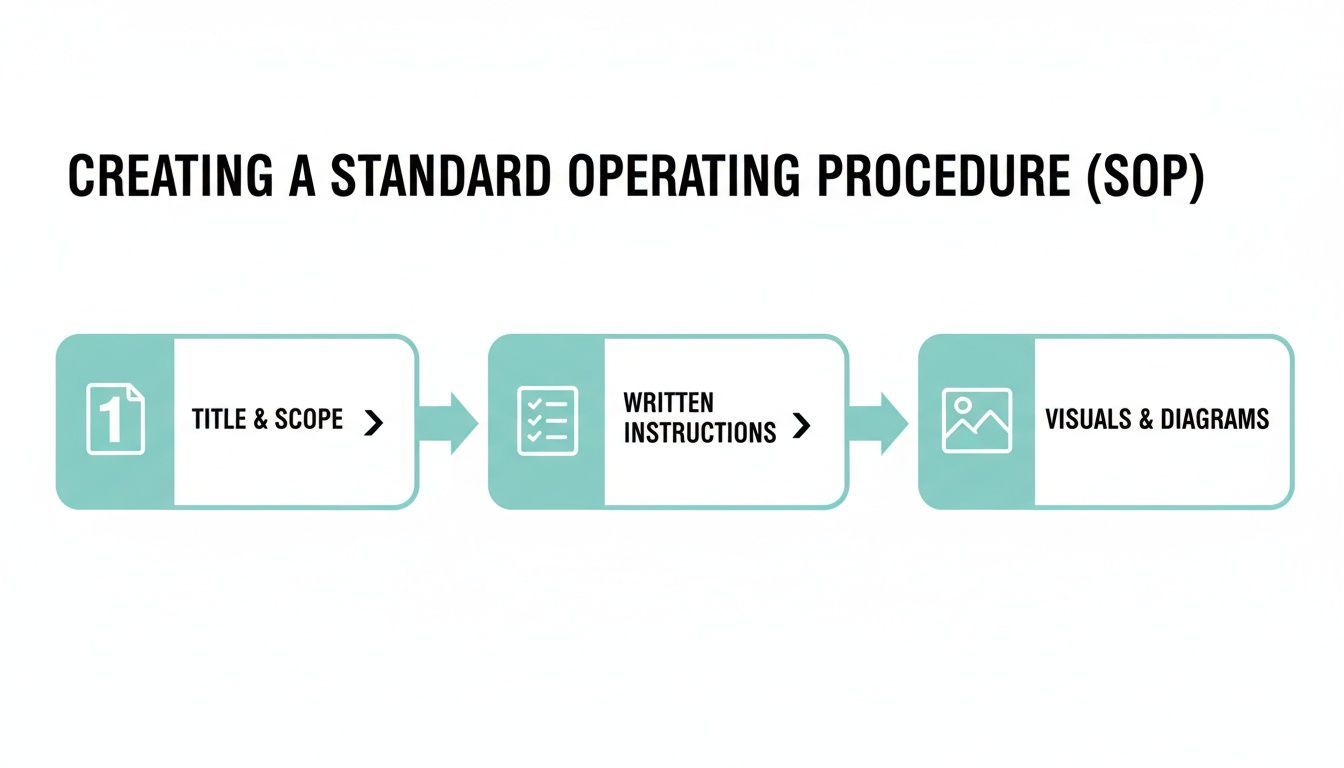
This simple flow covers the basics, but its real power is only unleashed when it's instantly accessible in your team's main communication hub.
The Real-World Impact of Accessible SOPs
Let's get practical. What does this actually look like for your business day-to-day? When your SOPs live where the work happens, you'll see immediate and tangible shifts in how your team operates.
- Drastically Reduced Onboarding Time: New hires can find answers themselves, building confidence and becoming self-sufficient in a fraction of the usual time. They stop feeling like they're bothering everyone and start contributing faster.
- Fewer Repetitive Questions: Your managers and senior team members are finally freed from being human search engines. Think about this: studies show knowledge workers spend nearly 20% of their time just looking for information. That's a full day every single week you can give back to your team.
- Greater Consistency and Fewer Errors: When the correct procedure is the easiest option available, people will naturally follow it. This leads directly to higher-quality work, a more consistent customer experience, and fewer costly mistakes that someone has to clean up later.
This isn't about adding another clunky system to the tech stack. It's about meeting your team exactly where they are and demolishing the barriers between a question and its answer.
The ultimate goal is to make your team's collective knowledge so readily available that it feels like an extension of their own memory. An SOP isn't just a document; it's a guaranteed answer waiting for a question.
Turning Slack into Your Single Source of Truth
Your team is already in Slack all day. It's where projects are hashed out, decisions are finalized, and questions are asked. By weaving your SOPs directly into that environment, you're not fighting against your workflow—you're aligning with it.
This simple shift means you can stop worrying about which wiki is up-to-date or if everyone knows where the latest version of a process is saved. Your Slack channels become the living, breathing repository for how your business actually runs.
Think about the ripple effect across different departments:
- Sales teams can instantly pull up the latest battle cards or objection-handling scripts without ever leaving a customer chat.
- IT teams can deflect common troubleshooting requests by letting an AI assistant serve up step-by-step guides for password resets or software setup.
- HR teams can answer the same questions about benefits, time-off policies, or expense reports automatically, freeing them up for more strategic initiatives.
An AI assistant like SAI learns from every question and answer, ensuring your knowledge base grows smarter and more comprehensive over time—all without you lifting a finger. For a deeper look, check out our guide on building a Slack knowledge management strategy that actually works.
At the end of the day, learning how to write an SOP is only half the battle. The real victory comes from making that knowledge so ridiculously easy to access that your team can't imagine working any other way.
Keeping Your SOPs Relevant and Up-to-Date
You’ve done the hard work. You’ve mapped out the process, brought your team into the loop, and hammered out a clear, actionable SOP. But here’s the reality check most teams miss: an SOP isn't a set it and forget it
file.
Your best procedures should be living documents, evolving right alongside your business as you adopt new tools, tweak strategies, and restructure teams.
Without a simple plan for maintenance, even the most perfect SOP will eventually become a relic. It'll be a piece of digital clutter that causes more confusion than clarity. This final part of the process is what keeps your knowledge base valuable instead of letting it slowly turn into a digital graveyard. The goal isn’t to pile on more admin work; it's to create a lightweight system that keeps your processes sharp with minimal fuss.
Building a Simple Review Cadence
First things first, you need a predictable review schedule. This doesn't have to be some overly complicated, bureaucratic process. For most SOPs, a quick check-in once or twice a year is plenty to catch outdated steps before they become real problems.
Think of it as a quick health check for your company's operations. By setting a recurring calendar reminder for the SOP's owner, you turn a vague intention (we should probably update that someday
) into a concrete action item.
- Quarterly Review: This is perfect for your fast-moving processes. Think about your marketing campaign launch checklist or your sales qualification criteria—workflows tied to tools and strategies that are constantly being refined.
- Annual Review: This works best for the stable, foundational stuff. Things like new employee onboarding, expense reporting, or IT security protocols don't tend to change month-to-month.
Assign an owner
to each SOP, usually the team lead or the person who lives and breathes that process. Their job is simple: when the reminder pops up, they take 15 minutes to read through the document and make sure it still matches how things are actually done. This small, consistent effort is your best defense against knowledge going stale.
Let Your Team Guide the Updates
Your folks on the front lines are your single greatest source of truth. They're the first to notice when a screenshot is from a previous version of your software, a link is broken, or a step is just flat-out wrong. You need a frictionless way for them to flag these things the moment they spot them.
Don't make them fill out a formal ticket or draft a long email. That's a great way to ensure you never get feedback.
Instead, create a dedicated Slack channel like #sop-feedback. Encourage everyone to drop a quick message when they see something that needs a tweak. This creates a real-time feedback loop that feels collaborative, not like a chore.
The moment a team member says,
Hey, this guide is missing a step,you've struck gold. That feedback isn't a complaint; it's a free, high-value audit of your process, delivered by the person who cares most about its accuracy.
This approach flips the script on maintenance. It stops being a top-down chore and becomes a bottom-up, team-driven habit of continuous improvement.
Using AI to Pinpoint Outdated Knowledge
This is where things get really interesting. Imagine never having to guess which of your 100 SOPs are gathering dust. What if the data could just tell you? This is exactly what AI-powered assistants like SAI are built for.
By analyzing the questions your team is already asking in Slack, these tools can spot patterns and automatically flag knowledge gaps for you.
- It spots high-friction topics: When five different people ask variations of the same question about
how to process a refund,
the AI knows your existing SOP on the topic is either hard to find, confusing, or just plain out of date. - It flags conflicting information: If team members consistently get a process wrong, the tool can highlight the disconnect between your documented procedure and how the work is actually being done on the ground.
- It turns questions into update prompts: Every question is a signal. An AI assistant brings these signals to the surface, helping you focus your update efforts on the documents that will have the biggest impact on your team's day-to-day.
This data-driven approach means you stop wasting time reviewing SOPs that are working just fine. Instead, you can focus your limited time and attention exactly where it’s needed most. You're no longer just maintaining documents; you’re actively improving your company’s operational intelligence, making sure your team always has the right answer, right when they need it.
Common Questions About Writing SOPs
Even with a great game plan, you're going to hit some snags when you start documenting how your team actually works. Learning how to write an SOP is one thing, but weaving that process into the fabric of your company culture? That's a whole different ballgame.
Let's walk through some of the most common hurdles I've seen teams face and, more importantly, how to clear them. Think of these less as roadblocks and more as opportunities to really sharpen your approach.
How Long Should an SOP Be?
Honestly, an SOP should be as long as it needs to be to get the job done right—and not a single word longer. The real test of a great SOP isn't its word count; it's how fast someone can find the answer they're looking for and get back to work.
For a simple task, like submitting a PTO request, a single page with a few bullet points and a screenshot is probably perfect. But for something more involved, like a multi-stage client onboarding, you're better off breaking it down into smaller, linked SOPs. Always, always prioritize clarity and scannability over burying someone in exhaustive detail.
What’s the Difference Between a Process and a Procedure?
This one comes up all the time, and it's a crucial distinction. A process is the big picture—the what
and the why.
It outlines the major sequence of activities that achieves a significant business goal. Think of your entire sales cycle, from generating a lead to closing the deal.
An SOP, or a procedure, is the nitty-gritty, step-by-step how
for a single task within that process. For example, How to Create a New Deal in [HubSpot](https://www.hubspot.com)
is a procedure that lives inside your larger sales process. The process is the map; the SOP gives you the turn-by-turn directions.
How Do We Get Our Team to Actually Follow SOPs?
This is the million-dollar question. Adoption is everything. The most perfectly crafted SOP in the world is completely useless if it just sits there collecting digital dust. The secret isn't about enforcing rules; it's about making your SOPs the absolute path of least resistance.
I've found it boils down to three key things:
- Involve the team in creating them. When people help build the guide, they feel a sense of ownership. It becomes their process, not just another mandate from on high.
- Make them ridiculously easy to find. This is the big one. If an SOP is buried three folders deep in a shared drive, it will be ignored. You have to put your knowledge right where the work is happening—like inside Slack—so answers pop up instantly.
- Lead by example. When leaders and senior team members consistently reference SOPs, it sends a clear message about their importance. It sets the standard for everyone else.
When your SOPs answer questions faster than a coworker can, your team will use them. It’s not about forcing compliance; it's about providing a better, faster way to work.
What Are the Most Common Mistakes When Writing SOPs?
The biggest mistakes almost always happen when we forget who the SOP is for: a busy person who just needs to get something done. The most common pitfalls I see are making them way too long, packing them with jargon, and—a big one—failing to get input from the people who actually do the work every day.
But the single most fatal flaw? Treating an SOP as a one-and-done project. An SOP isn't some static document you write, file away, and forget. It's a living piece of your team's collective brain that has to be accessible, visible, and constantly maintained to be worth anything at all.
Imagine never having to search through another drive, interrupt another coworker, or answer the same question twice. SAI transforms your Slack into a single source of truth, delivering instant answers from your team’s existing conversations and SOPs. Add SAI to a channel for free and see the difference today.
