SOP Documentation Format: The Blueprint for a Simpler Workday
A solid SOP documentation format is so much more than a fill-in-the-blanks template. Think of it as the architectural blueprint for your entire operation—the key to turning scattered tribal knowledge into a single, reliable source of truth.
When you standardize how you document everything, from onboarding a new client to processing a simple refund, you bring clarity and consistency to the forefront. The end goal isn't just to write things down; it's to build a predictable, repeatable workflow that lets your team move forward with confidence.
Stop Answering the Same Questions and Start Scaling
Can you picture it? A day where you're not getting pinged with the same questions over and over again. Imagine never again having to open five different browser tabs, dig through old Slack threads, or navigate a labyrinthine shared drive just to find one simple answer. This isn't a fantasy; it's the reality a well-defined SOP documentation format delivers.
This is about creating a workday where answers find you. It’s about building a living, breathing knowledge base right where your team already works, like in Slack. When every process follows the same structure, you cut out the guesswork and ambiguity that secretly fuel expensive mistakes and frustrating delays.
The True Cost of Tribal Knowledge
When you don't have a standardized format, crucial information ends up locked away in the heads of your most tenured employees. This tribal knowledge
is a huge operational risk. If that one key person is swamped, out sick, or on vacation, entire workflows can screech to a halt.
That
quick15-minute question isn't just 15 minutes. When you account for the time it takes for both people to stop what they're doing, context-switch, solve the problem, and then try to get back in the zone, it's often closer to a 45-minute productivity hit. A few of those, and the whole day is shot.
Standardizing your procedures breaks that vicious cycle. You’re essentially democratizing information, making everyone on the team more self-sufficient and capable. That's how you build an operation that can actually scale.
A New Way of Working
A great SOP format is your first real step toward creating a knowledge management system where answers are instantly accessible. By giving your processes a home and a structure, you build a system where information isn't just recorded—it’s discoverable.
Imagine what your team's day looks like with this shift:
- From Interruption-Driven to Proactive: Instead of constantly reacting to shoulder taps and endless DMs, your team gets to do the deep, focused work they were hired for. The information they need is just a quick question in Slack away.
- From Waiting to Doing: No more bottlenecks. Anyone on the team can confidently step in and handle a task correctly, without having to wait for the
one person who knows.
- From Confusion to Confidence: A clear, consistent format provides that single source of truth everyone craves. It empowers people to take ownership and act decisively, knowing they’re doing it the right way.
The Anatomy of a Perfect SOP Documentation Format
Let's be honest: a great SOP is so much more than a glorified to-do list. It’s a complete communication tool, painstakingly designed to stamp out any chance of confusion or error. To get there, you need a standardized SOP documentation format—a predictable structure that tames every process, from the ridiculously simple to the painfully complex.
This isn't just about being tidy. It's about crafting documents so logical and clear that anyone, from a rookie to a veteran, can follow them without having to ask a single question.
Think about a new hire trying to process their first customer refund. Instead of nervously Slacking a manager and waiting, they pull up the SOP. It doesn't just give them a dry list of steps. It explains why the process matters, what its boundaries are, and exactly who owns each part. That moment of uncertainty? It just became an act of confident, independent work.
The Non-Negotiable Core Components
Every truly effective SOP is built on the same handful of foundational elements. The specific details will obviously change from task to task, but the core structure should feel familiar and reliable. It’s like a map—each section acts as a landmark, guiding the user straight to their destination without any wrong turns.
To get this right, you can't skip these key sections. They are the bedrock of a useful SOP.
Here’s a quick rundown of the essential building blocks that turn a simple document into a powerhouse of clarity and consistency. Think of these as the absolute must-haves for any SOP you create.
| SOP Section | Purpose and Key Content |
|---|---|
| Clear Title | Be specific and action-oriented. How to Onboard a New Enterprise Clientis far better than Client Onboarding. |
| Purpose | A one or two-sentence summary explaining why this process exists and the goal it helps the team achieve. |
| Scope | Clearly define the start and end points. What situations does this process cover, and just as importantly, what does it not cover? |
| Roles and Responsibilities | Name the specific roles, individuals, or teams responsible for each stage of the workflow. No ambiguity allowed. |
| Step-by-Step Procedures | This is the heart of the SOP. Use clear, concise language to detail every action, from start to finish. |
| Version Control | A simple log to track changes, update dates, and authors. This ensures everyone is always working from the latest version. |
These components work together to answer every potential question before it's even asked, making your SOPs the go-to resource for getting things done right.
This structured method isn't just about consistency. It's about building a system of clarity that empowers your team, boosting both their efficiency and their autonomy. When every SOP answers the big questions—what, why, who, and how—your team stops wasting time hunting for information and starts making an impact.
The power of a consistent format is more than just a gut feeling. While the idea first gained traction in academic writing, the business world quickly saw its value. One analysis found that adopting a clear, predictable document format drove success rates up by an incredible 28%. You can dive deeper into the impact of clear formatting from Wordvice's research.
The logic is simple and applies directly to your business: structure eliminates ambiguity, and when ambiguity is gone, complex workflows become simple, repeatable tasks that fuel real growth.
Your Copy-and-Paste SOP Template
Knowing what goes into a great sop documentation format is one thing. Staring at a blinking cursor on a blank page is another entirely. That's where the real work begins—turning abstract ideas into a document your team will actually open and use.
To help you bridge that gap, we've built a copy-and-paste template that's more than just a skeleton. It’s a guided framework.
Each section comes with prompts and placeholder text designed to pull that essential process knowledge out of your experts' heads and onto the page. We’ve already handled the structure, so you can jump right into capturing the how-to.
Think of it as your shortcut to a professional, comprehensive SOP. Just copy the text below into your favorite editor, and you’ll have a solid foundation ready to be filled in.
The Ready-to-Use SOP Framework
SOP Title: [Use a clear, action-based title. Ex: How to Process a Customer Refund Request]
Document ID: [Give it a unique code for easy tracking. Ex: CS-001]
Version: 1.0
Last Updated: [Date]
Owner: [Who owns this process? Name or Role. Ex: Customer Support Lead]
1.0 Purpose
This is the why.
In one or two sentences, what's the whole point of this procedure? What good thing happens for the company or the customer when this is done right?
2.0 Scope
Time to draw the lines. Where does this process begin and end? What specific scenarios does it cover? And just as important, what's *out of scope?*
3.0 Roles and Responsibilities
List who does what. Get specific about who is accountable for each part of the process.
* [Role 1 e.g., Support Agent]: Responsible for…
* [Role 2 e.g., Finance Team]: Responsible for…
4.0 Procedure
Here's the heart of it all. Lay out the step-by-step instructions. Write in simple, direct language and use an active voice.
1. First, [do this specific action]...
2. Next, [perform this step]...
3. Then, [complete this final action]...
Pro-Tip: If a step requires a decision, use
If/Thenlogic to keep things clear. For example,If the customer's request is approved, proceed to step 5. If it is denied, follow the procedure in SOP CS-002.This helps you build a web of interconnected knowledge, not just a bunch of standalone documents.
5.0 Resources and Tools
List any software, links, or other documents someone might need to get this done.
* Link to [Software Name]
* Template for [Document Name]
6.0 Version History
This simple table is your secret weapon against confusion. Log every update to ensure everyone is always working from the latest and greatest version.
| Version | Date | Author | Summary of Changes |
|---|---|---|---|
| 1.0 | [Date] | [Name] | Initial document creation. |
Having a solid, repeatable structure like this is the foundation for almost any process you want to document. It’s also a huge part of creating a standard operating procedure for training that ends repetitive work, helping new hires get up to speed faster.
When your format is consistent, your team knows exactly where to look for answers, empowering them to work with confidence and autonomy.
SOPs in Action: Real-World Examples

Theory is one thing, but seeing a great SOP documentation format work in the real world is where it all clicks. To show you how flexible and powerful this structure is, I’ve put together three examples from completely different departments.
Pay close attention to how the same core template brings order to vastly different tasks—from handling a customer refund to onboarding a new hire. These aren't just abstract ideas; they're practical blueprints you can lift and adapt for your own team. They prove that a consistent format can turn a messy, multi-step process into something anyone can nail, every single time.
Customer Support: Processing a Customer Refund
- SOP Title: How to Process a Customer Refund Request
- Document ID: CS-001
- Purpose: To give our team a clear, consistent, and empathetic way to handle customer refunds. This keeps our financial records accurate and, most importantly, keeps customers happy.
- Scope: This SOP is for all refund requests on our SaaS subscription plans, as long as they're made within 30 days of the original purchase. It doesn't cover hardware returns or weird one-off requests—those need to be escalated.
- Roles and Responsibilities:
- Customer Support Agent: The go-to person for verifying eligibility, processing the refund in Stripe, and letting the customer know it's all done.
- Support Team Lead: The backup for any tricky or disputed refund claims that need a second look.
- Procedure:
- Find the customer’s account in the CRM using their email address.
- Check that the original purchase date is inside the 30-day refund window.
- Jump into the customer’s Stripe profile and refund the correct amount.
- Tag the customer's CRM profile with
Refund-Issued
so we have a record. - Shoot the customer our pre-written
Refund Confirmation
email.
This simple SOP turns a potentially tense customer interaction into a smooth, professional experience. By laying out the exact steps, you guarantee every agent handles refunds the same way. This slashes errors and frees up team leads to solve bigger problems instead of answering the same questions over and over.
HR: Onboarding a New Remote Hire
- SOP Title: Onboarding a New Remote Hire
- Document ID: HR-004
- Purpose: To roll out the red carpet for every new remote team member. We want them to feel welcome and have all the tools and info they need to hit the ground running from day one.
- Scope: This process covers all the pre-start date and first-week tasks for our full-time remote employees based in North America.
- Roles and Responsibilities:
- HR Coordinator: Owns the paperwork—payroll setup, benefits enrollment, and sending out the awesome welcome kit.
- IT Specialist: Gets all the tech ready, provisioning hardware and software access.
- Hiring Manager: Sets the tone for the first week by scheduling initial meetings and assigning a friendly onboarding buddy.
- Procedure:
- (10 Days Prior) HR sends the new hire their employment contract and benefits package through DocuSign.
- (7 Days Prior) IT gets to work, setting up accounts for Slack, Google Workspace, and our project management tools.
- (5 Days Prior) The welcome kit is on its way! We ship the company laptop and swag via courier.
- (Day 1) The Hiring Manager kicks things off with a welcome call to walk through the first-week agenda.
Operations: Managing Office Supply Inventory
- SOP Title: How to Manage and Reorder Office Supply Inventory
- Document ID: OPS-002
- Purpose: To keep our office running smoothly by making sure we never run out of the essentials. This process helps us prevent shortages while keeping costs in check.
- Scope: This procedure covers all the general office goodies (paper, pens, toner, etc.) kept in the main supply closet.
- Roles and Responsibilities:
- Office Manager: The hero of the office who does weekly inventory checks, places orders with our vendors, and stocks all the new supplies.
- Procedure:
- First thing every Friday morning, do a physical count of everything on the Office Supply Checklist.
- If an item's count is at or below the
Reorder Point
on the checklist, it's time to add it to the weekly purchase order. - Submit the purchase order to our approved vendors using the company procurement portal.
- When the delivery arrives, double-check it against the packing slip, sign for it, and get everything stocked and organized in the supply closet.
How to Write and Maintain SOPs That Actually Get Used
Let’s be honest. A perfectly formatted SOP is completely useless if it’s collecting dust in a forgotten Google Drive folder. You can have the best template in the world, but the real magic happens when your SOPs become living, breathing resources your team genuinely relies on every single day.
The goal here is a behavioral shift. You want to train your team to check the SOP before they tap a colleague on the shoulder or drop a quick question
in Slack. When your documentation is crystal clear, easy to find, and always current, it becomes the fastest, easiest way to get the right answer.
Write for Real People
Your team is juggling a dozen tasks at once. They don't have time to decipher dense paragraphs or corporate jargon. Your SOPs need to be built for speed and clarity, especially when someone is trying to follow a process under pressure.
- Use an Active Voice: Always write direct, action-oriented instructions.
The agent sends the confirmation email
is so much clearer and more immediate thanThe confirmation email is sent by the agent.
- Keep It Simple: Stick to plain language. A great rule of thumb is this: if a brand-new hire wouldn't understand a word without asking, either define it on the spot or swap it for a simpler term.
- Show, Don’t Just Tell: A picture really is worth a thousand words. Break up walls of text with helpful visuals—a well-placed screenshot, a simple flowchart, or even a quick video can make a complicated step instantly understandable.
This isn't just about making things look nice. Academic research confirms that formatting precision—like using an active voice and breaking up text—can prevent 15-20% of rejections that stem from simple technical mistakes. You can dig into more on the power of precise documentation from the University of Michigan.
From Dusty Folder to Dynamic Resource
The number one reason SOPs fail? They’re impossible to find in the heat of the moment. The solution is to bring the knowledge directly into the spaces where your team is already working.
Imagine this: Instead of digging through a shared drive, a team member just asks a question in Slack. Instantly, SAI pulls the exact step from the correct SOP and delivers it right in the chat. No searching, no waiting, no context switching. Your team gets the answers they need without ever leaving the conversation.
This is how you make documentation an organic part of the daily workflow. By using one of the best documentation automation tools to transform your workflow, you connect your carefully crafted SOPs to the real-time questions your team asks every single day. Your SOP library stops being a static archive and becomes an active, automated knowledge base that makes everyone on your team faster and more self-sufficient.
Answering Your Most Common SOP Questions
Even with a solid template in your hands, you're bound to run into questions as you start building out your documentation. That's a good thing! It means your team is actually digging in and thinking critically about the process. Here are the answers to some of the most common questions we hear from teams just like yours.
First, remember that a good SOP has a simple lifecycle: it gets written, it gets reviewed and approved, and most importantly, it gets used.
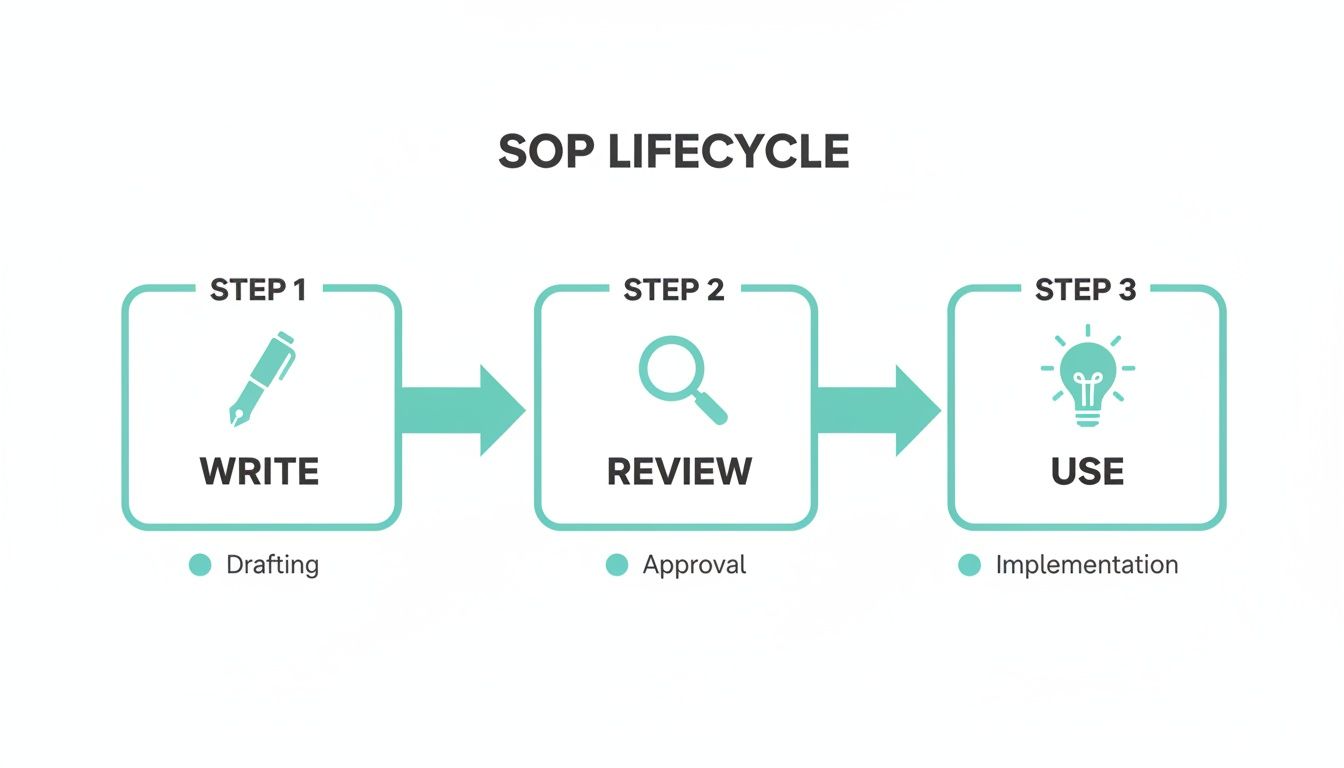
This little loop is a constant reminder that an SOP's job isn't done when you hit save.
Its real value comes from being a living, breathing part of your team's daily work.
How Long Should an SOP Be?
The honest answer? As long as it needs to be to get the job done right, but not a single word longer. There's no magic number. A simple task might be a one-pager, while a complex, multi-stage workflow could be several pages.
Your north star here is clarity, not word count. If you find yourself writing a novel, that’s a huge red flag that the process itself is probably too clunky.
When an SOP starts feeling bloated, break it down. Instead of one massive New Client Onboarding
document, split it into smaller, digestible guides like How to Run a Kickoff Call,
Setting Up Projects in Asana,
and Sending the Welcome Packet.
This makes each step easier to follow, find, and update.
How Often Should We Update Our SOPs?
Your SOPs have to be living documents, not relics you file away in a digital cabinet. A good rule of thumb is to schedule a formal review of all your critical procedures at least quarterly or semi-annually. This keeps everything fresh.
But the real secret is to make updates a real-time habit. The moment a process, tool, or policy changes, the SOP should change with it. The person who actually does the task should own the document, empowering them to make those immediate tweaks.
Your documentation is only as good as its accuracy. An outdated SOP isn't just unhelpful; it's dangerous. It creates confusion, leads to mistakes, and slowly erodes the trust your team has in your entire knowledge system.
This is why having a version control log in your template is non-negotiable. It gives you a clear history of what changed, who changed it, and why, so everyone can be confident they’re using the latest and greatest information.
What Is the Best Way to Store and Share SOPs?
You have to put your SOPs where your team actually works. Shared drives and company wikis seem like a good idea, but they often turn into documentation graveyards—places where good intentions go to die.
A much better approach is to use a system that plugs directly into your team's communication hub, like Slack.
This simple shift transforms your documentation from a static library you have to dig through into a dynamic, on-demand resource. When an AI assistant can pull the right answer from your SOPs and drop it directly into a Slack conversation, you eliminate the friction of hunting for information. Your team gets what they need, right where they are, without breaking their stride.
Who Should Be Responsible for Writing SOPs?
The person who does the job writes the SOP. Period. They're the ones who know all the little details, the potential gotchas, and the unwritten rules that make the process work. Their firsthand experience is what makes a document authentic and truly useful.
But their job isn't the only one that matters.
It’s absolutely critical that someone else—ideally a person less familiar with the process—tests the SOP by following it step-by-step. This is the ultimate stress test. They'll quickly find any confusing language, uncover missing steps, and call out assumptions the expert made. This partnership ensures the final document is both technically accurate and crystal clear for anyone who needs to use it.
Imagine a workplace where your team never has to search for information again. With SAI, you can stop answering the same questions and give your team the instant answers they need, right in Slack. It learns from your team's conversations to build a knowledge base automatically, turning every question into a reusable answer. Add SAI to a Slack channel for free.