Top 7: How an example of a knowledge base boosts your team's productivity
Imagine your team's workday, but without the endless searching. No more digging through shared drives, scrolling through old Slack channels, or bugging colleagues for that one document you can't find. Imagine a day where you never have to open another resource, search multiple places, or wait for an answer. Instead, every question gets an instant, accurate answer right where your team works: in Slack. Just ask, and the information you and your team need appears. This isn't a distant future; it's what happens when you have a single source of truth.
This guide is your shortcut to achieving that reality. We’ve curated the definitive list of top-tier knowledge base examples, from traditional platforms like Confluence and Zendesk to modern, Slack-native solutions like SAI. We'll break down exactly how each platform works, who it’s best for, and provide a clear example of a knowledge base built with it.
Forget generic overviews. For each tool, you'll get a strategic deep-dive with screenshots and actionable insights. We’ll show you not just what these platforms do, but how you can build a system where answers find your team, not the other way around. Let's find the perfect solution to eliminate shoulder taps and endless searching for good.
1. SAI
SAI represents a fundamental shift in how teams access information, making it a powerful example of a knowledge base that operates where work happens: inside Slack. Imagine a day where your team never has to switch contexts, open a new tab, or hunt through a separate platform for information again. Instead of digging through drives or wikis, you simply ask a question in a Slack channel. SAI delivers the answer instantly, turning your team's scattered knowledge into an on-demand resource you can talk to.
This approach transforms knowledge management from a chore into a seamless, real-time experience. The magic of SAI is that it works from day one without any manual setup. It learns from your existing Slack conversations and connects to your documents, building a brain for your team automatically. Every question asked and answered makes it smarter, ensuring that valuable insights are captured and reused, not lost. This system directly addresses the high cost of interruptions and repetitive questions, which can drain over two hours per employee daily.
Strategic Analysis: The Power of Conversational Knowledge
SAI’s effectiveness lies in its ability to meet users exactly where they are. By living inside Slack, it eliminates the friction that makes other knowledge bases fail. This isn't just convenient; it's a strategic advantage that makes getting answers as easy as talking to a coworker.
- Zero-Friction Access: Team members don’t need to learn a new tool. They just ask questions in Slack as they normally would.
- Organic Knowledge Capture: The system captures information from the natural flow of work. Every resolved query strengthens the knowledge base automatically.
- Context-Aware Responses: SAI understands the intent behind a question, providing relevant answers even if the phrasing isn't perfect. This is crucial for serving a diverse team with varying communication styles.
Actionable Takeaways
SAI is the ideal solution for any team on Slack that is tired of answering the same questions over and over, especially in HR, IT, Operations, and Customer Support. It’s a game-changer for remote teams where tapping someone on the shoulder
isn't possible. By providing instant, 24/7 answers, it empowers everyone with the information they need to do their jobs without waiting for a specific person to be online.
The current pricing model makes it exceptionally accessible. SAI is free for early users, offering unlimited AI responses within a single Slack channel and community support without requiring a credit card. While this free tier is limited to one channel, it provides a risk-free opportunity to see how much time your team can get back. As with any AI, it's wise to double-check mission-critical information, but for the vast majority of day-to-day queries, SAI provides a massive productivity boost.
Website: SAI
2. Atlassian Confluence
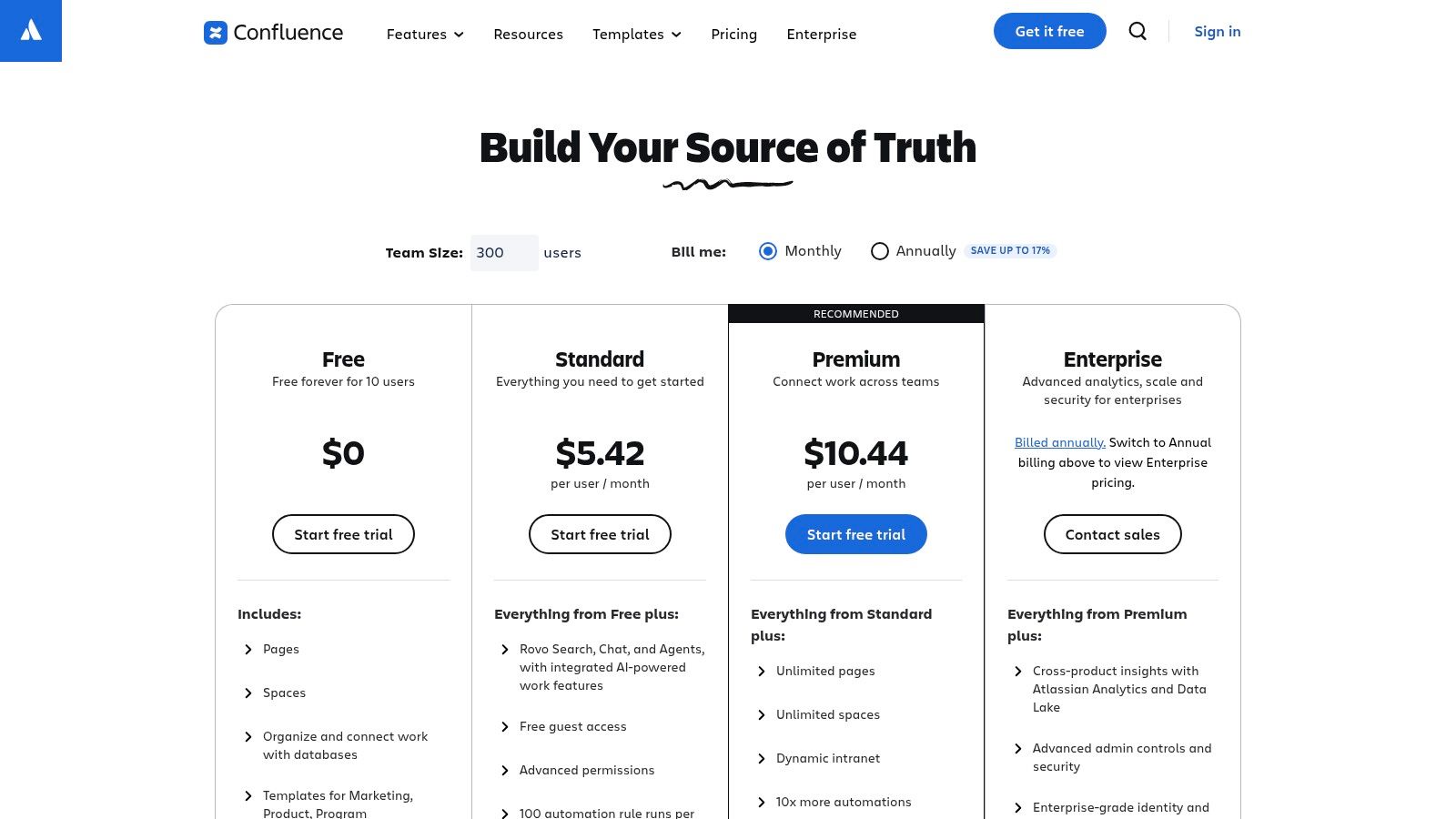
Atlassian Confluence stands as a powerful, enterprise-grade example of a knowledge base, ideal for teams that need a highly structured, permanent home for their documentation. It excels at creating a central repository for everything from technical documentation and product requirements to HR policies and marketing plans, making it a familiar choice for organizations already using Atlassian's suite. Imagine a world where your most critical, long-form content is organized, versioned, and easily searchable in one place.
Why It's a Top-Tier Example
Confluence's strength lies in its deep integration with tools like Jira and its robust hierarchical structure using Spaces
and Pages.
This allows teams to build intricate, interlinked wikis that scale as the company grows. It provides a formal system of record, ensuring that process documents and project plans are always current and auditable.
However, this structured power can also be its biggest challenge. Teams often find themselves context-switching, leaving the fast-paced flow of Slack to hunt for a specific document in a dense Confluence space. While it's a fantastic system for durable knowledge, it isn't built for the immediate, conversational needs of a Slack-first team.
Strategic Takeaway: Use Confluence as your deep-archive
system of recordfor evergreen documents, but don't force your team to live in it. The real magic happens when you connect its structured knowledge to the place your team works: Slack. With an AI tool like SAI, you can instantly surface Confluence documentation directly in a channel, answering questions without ever making someone leave their workflow to search.
Key Details & Pricing
- Best For: Engineering, IT, and product teams needing a durable, structured internal wiki.
- Unique Feature: Deep, native integration with the Atlassian suite (especially Jira).
- Pricing: Offers a Free plan for up to 10 users. Paid plans start at $6.05/user/month (Standard) and go up for Premium and Enterprise tiers. You can explore their pricing at atlassian.com.
To get the most out of a tool like Confluence, learn more about the best practices for structuring your knowledge. For additional strategies, explore these 10 knowledge management best practices for 2025.
3. Zendesk Knowledge
Zendesk Knowledge is a prime example of a knowledge base designed for external, customer-facing self-service. It's built to empower customers to find answers on their own, deflecting common tickets and freeing up support agents to handle more complex issues. Part of the broader Zendesk Suite, it excels at turning customer interactions into durable knowledge articles, creating a feedback loop that continuously strengthens your help center. Imagine a world where your support agents spend less time answering the same questions and more time solving unique customer problems.
Why It's a Top-Tier Example
Zendesk’s strength is its seamless integration into the customer support lifecycle. Its AI-powered tools can identify content gaps from support tickets and even help agents draft new articles based on their resolved conversations. This creates a powerful, efficient workflow where your team’s direct customer interactions constantly enrich your public-facing knowledge base. It's a mature, widely adopted platform that provides a single source of truth for your customers.
The downside is that this knowledge is often siloed from the internal teams who need it most. Support agents, sales teams, and product managers working in Slack still have to leave their primary workspace to search the Zendesk help center for an official answer to a customer's question. This context-switching slows down response times and creates friction in the internal workflow.
Strategic Takeaway: Use Zendesk as your definitive
system of recordfor all customer-facing documentation. But to truly maximize its value, you must bring that knowledge into your team's conversational hub. With an AI tool like SAI, your team can instantly query the Zendesk knowledge base from within Slack, pulling verified answers into any channel. This empowers everyone to respond to customer inquiries with speed and accuracy, without ever having to open another tab.
Key Details & Pricing
- Best For: Customer support teams needing a public-facing help center integrated with ticketing.
- Unique Feature: AI-assisted workflows that help turn support tickets directly into knowledge base articles.
- Pricing: The knowledge base is part of the Zendesk Suite, which starts at $55/agent/month (Suite Team). It is not sold as a standalone product. You can explore their pricing at zendesk.com.
4. Intercom (Help Center / Articles)
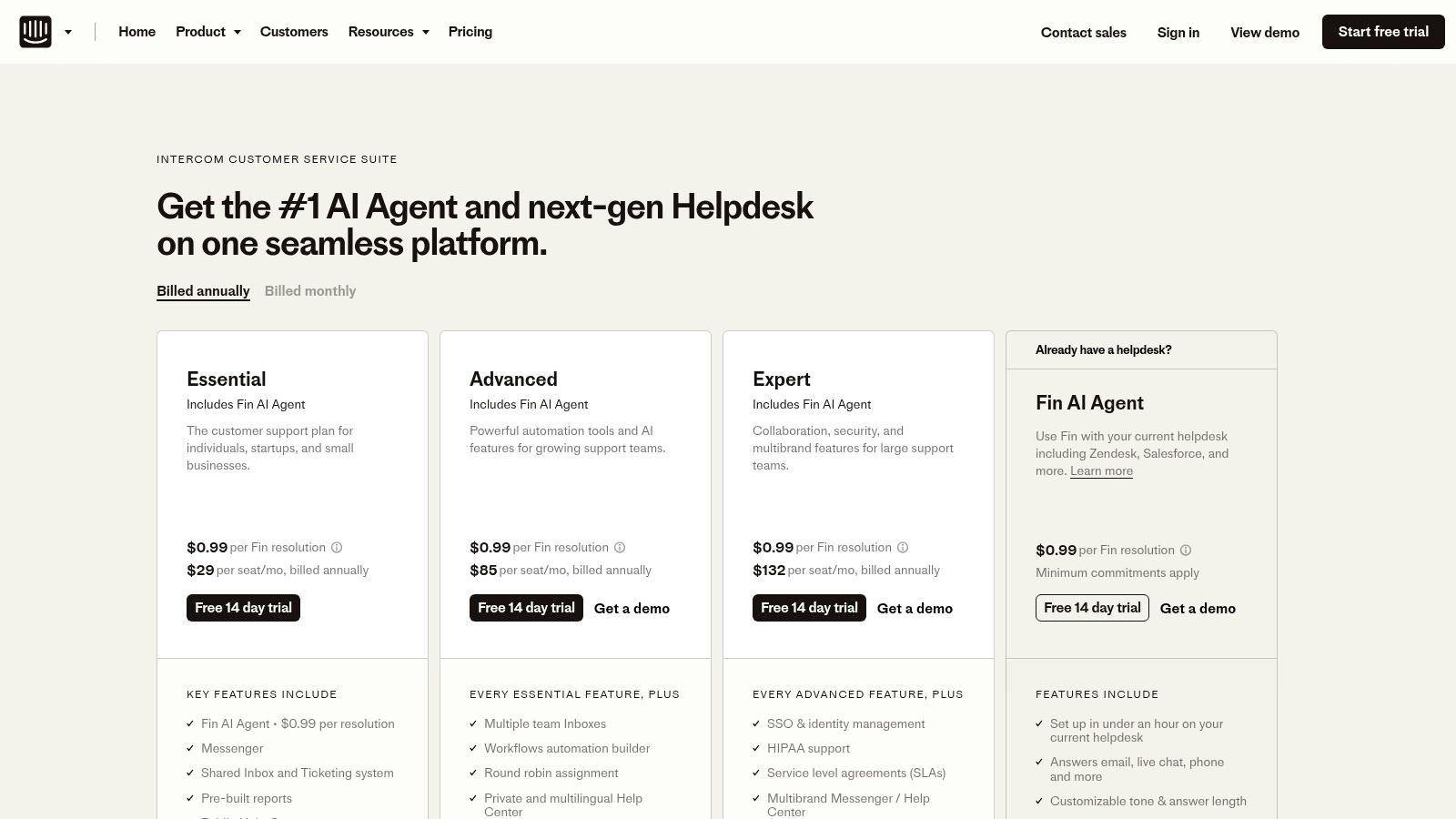
Intercom offers a customer-centric example of a knowledge base that is deeply integrated with a suite of support tools. It’s designed for product-led and SaaS teams who want a seamless, chat-first support experience where knowledge articles, AI bots, and human agents work in harmony. Imagine a customer never having to leave your website to find an answer; they can start with a chat, get an instant article suggestion, and escalate to an agent all in one continuous conversation.
Why It's a Top-Tier Example
Intercom’s strength is its unified customer experience. The platform combines a public Help Center with its powerful Messenger, Workflows, and Fin AI Agent, creating a smooth transition from self-service to assisted support. This blend is perfect for teams who want to proactively engage users and resolve issues before they become tickets, making the knowledge base an active part of the customer journey, not just a passive library.
However, this external focus means internal teams are often left out of the loop. Your support agents might live in Intercom, but your product and engineering teams live in Slack. When a customer asks a complex question, the agent has to switch contexts, search internal wikis, and then bring that information back to the customer, creating delays and internal friction.
Strategic Takeaway: Use Intercom as your powerful, customer-facing knowledge hub, but bridge the gap to your internal experts in Slack. With an AI tool like SAI, your support team can instantly pull answers from internal Confluence docs or Google Drive folders directly into a Slack thread. This empowers them to answer complex customer questions faster without ever leaving their primary workspace to search for information.
Key Details & Pricing
- Best For: Customer support and success teams in SaaS companies who need a public-facing help center integrated with live chat and AI.
- Unique Feature: The seamless blend of its Help Center articles with the Messenger, chat, and Fin AI agent for a unified support flow.
- Pricing: Starts with a plan for very small businesses at $39/seat/month. Pro and Premium plans offer more advanced features, and the Fin AI Agent is priced per resolution. You can explore their plans at intercom.com.
To fully leverage a tool like Intercom, it's crucial to connect its customer-facing knowledge with your internal systems. Discover how to create an AI in Slack knowledge base example that delivers instant answers.
5. Help Scout Docs
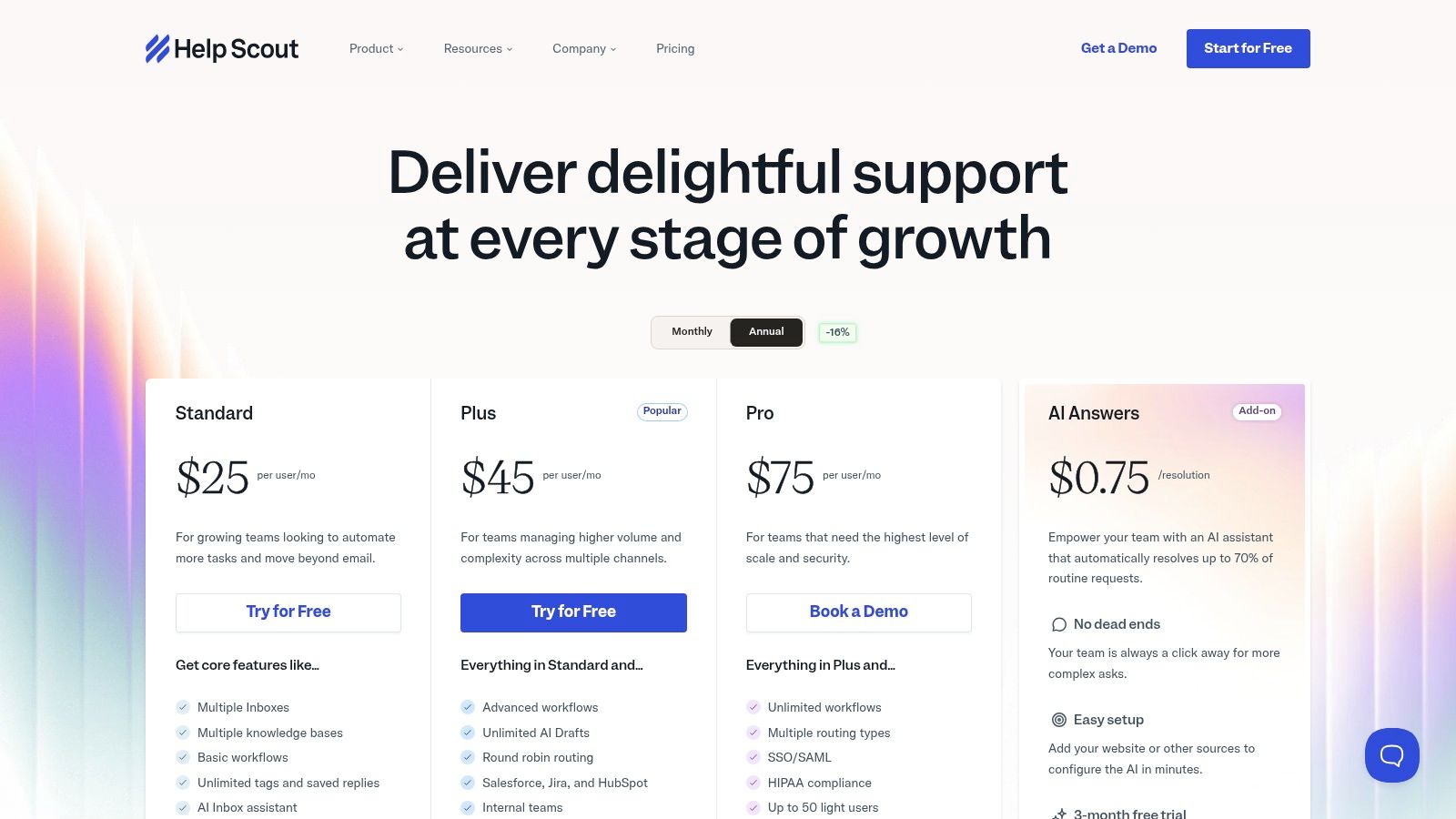
Help Scout Docs offers a clean, customer-facing example of a knowledge base designed for simplicity and speed. It's the perfect solution for small to midsize businesses that need a professional, searchable help center without the administrative burden of enterprise software. Instead of a complex internal wiki, imagine a beautifully branded, public-facing resource that lets your customers find answers on their own, seamlessly integrated with your support team's help desk.
Why It's a Top-Tier Example
Help Scout's strength is its tight integration between its help desk and its Docs feature, creating a unified ecosystem for customer support. The authoring experience is refreshingly straightforward, allowing support agents to publish and update articles quickly. This focus on ease of use means your team can build and maintain a valuable self-service portal that is both SEO-friendly and delightful for customers to navigate.
The main consideration is that Docs is not a standalone product; it's bundled with a Help Scout plan. This makes it a fantastic value for teams already needing a help desk but less suitable for those only seeking a knowledge base tool. While it excels at external documentation, it isn't designed to be a comprehensive internal knowledge management system for cross-functional teams.
Strategic Takeaway: Use Help Scout Docs to deflect common customer questions and empower self-service. Then, connect that valuable external knowledge to your internal team in Slack. With an AI tool like SAI, your support agents can instantly pull answers from your Help Scout knowledge base to resolve customer issues in Slack channels, without ever leaving their conversation or searching through your public docs.
Key Details & Pricing
- Best For: Customer support teams at SMBs who need an easy-to-manage, public-facing help center.
- Unique Feature: Seamless integration with Help Scout's help desk, creating a unified customer support platform.
- Pricing: Docs is included in all plans, which start at $20/user/month (Standard). You can view full details at helpscout.com.
6. GitBook
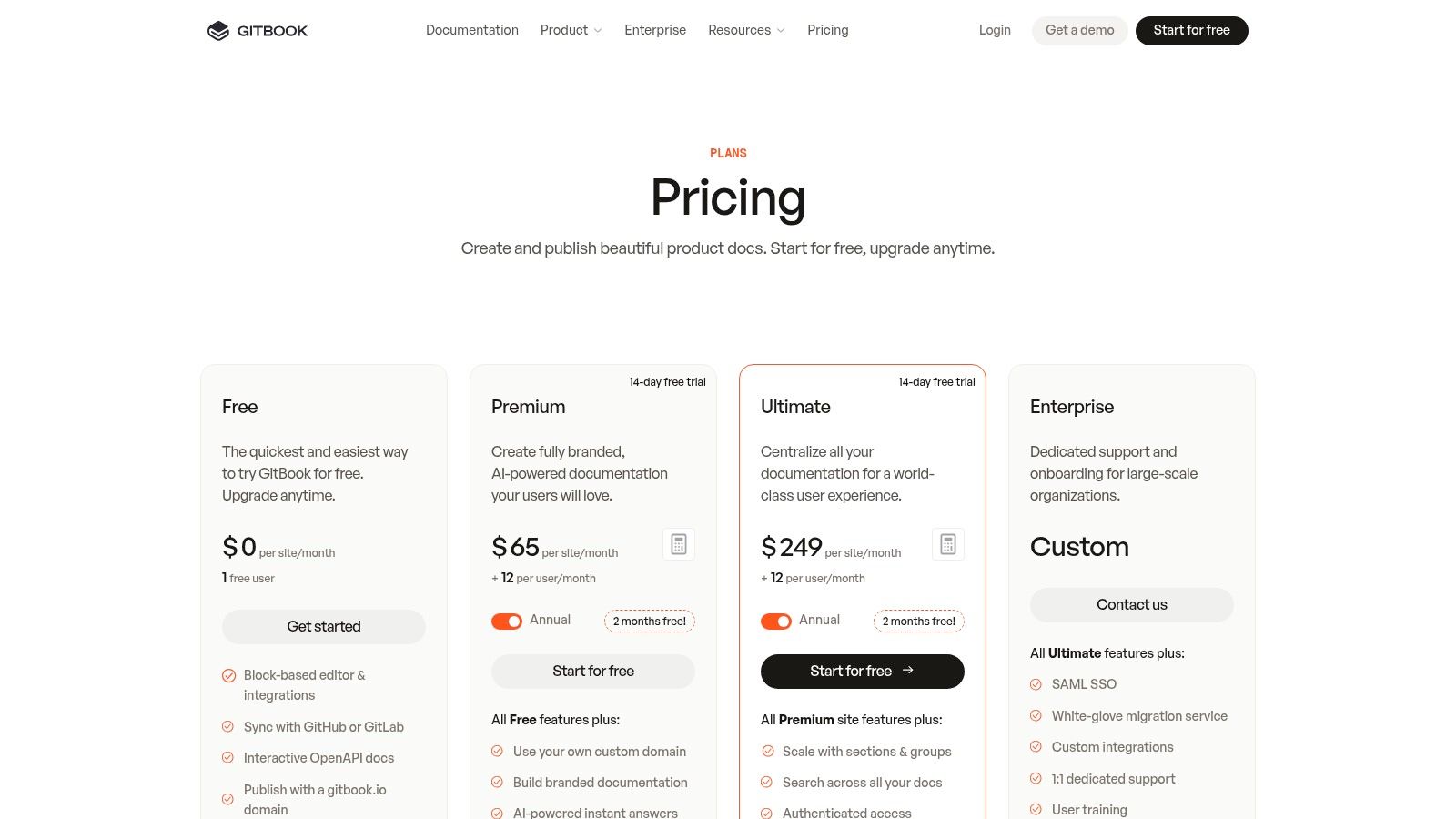
GitBook offers a modern, developer-centric example of a knowledge base designed for teams that need to publish polished, beautiful documentation. It's especially powerful for creating external product docs or internal technical handbooks, bridging the gap between code and clarity. Imagine your API documentation or engineering onboarding guides being as easy to read and navigate as a Medium article, all synced directly with your Git workflow.
Why It's a Top-Tier Example
GitBook's strength is its seamless integration with developer workflows, featuring native GitHub and GitLab sync. This docs-as-code
approach ensures your documentation is always up-to-date with your codebase. The platform excels at presenting technical information, with features like OpenAPI rendering and a clean block editor that makes writing a pleasure, not a chore.
However, its focus on public-facing or team-wide docs means it isn't optimized for the rapid, internal Q&A that dominates daily work in Slack. Engineers and other team members still have to leave their primary communication hub, navigate to the correct GitBook space, and search for the right API endpoint or process guideline, interrupting their focus.
Strategic Takeaway: Leverage GitBook for its beautiful external presentation and developer-friendly workflow. Treat it as the pristine, published version of your technical knowledge. Then, bring that knowledge to where your team lives by connecting it to Slack. With an AI tool like SAI, your team can ask
What are the rate limits for the user API?in a Slack channel and get an instant, accurate answer pulled directly from your GitBook docs, eliminating context switching entirely.
Key Details & Pricing
- Best For: Engineering teams, SaaS companies, and anyone publishing public-facing technical documentation.
- Unique Feature: Direct sync with GitHub/GitLab, allowing for a true
docs-as-code
workflow. - Pricing: Offers a Free plan for individual open-source or personal projects. Paid plans start at $8/user/month (Plus) and scale for Pro and Enterprise needs. You can review their pricing at gitbook.com.
7. Guru
Guru presents an AI-native example of a knowledge base designed to bring answers directly into your workflow, rather than forcing you to go find them. It excels at capturing, verifying, and surfacing knowledge where your team already is, such as Slack or through a browser extension. Imagine a world where your most trusted information is not just stored, but actively delivered to you the moment you need it, with clear ownership and verification status.
Why It's a Top-Tier Example
Guru’s key strength is its emphasis on verification and trust, directly addressing the is this still correct?
problem that plagues most wikis. Its verification workflows, content owners, and review cadences ensure that information stays up-to-date and reliable. The platform is built around the idea that knowledge should find you, leveraging AI to proactively suggest relevant information based on your context.
However, its power is most felt within its own ecosystem. While it integrates well, it asks your team to adopt its specific system of Cards
and verification processes. This can introduce friction for teams looking for a simpler way to access existing documents without adding a new layer of content management. It's a powerful tool, but it requires commitment to its methodology.
Strategic Takeaway: Use Guru for its verification engine and proactive content suggestions, especially for sales or support teams that need fast, trusted answers. But to create a truly seamless experience, the goal is to eliminate the need to switch contexts at all. Connect your existing knowledge sources, including Guru, to an AI tool in Slack like SAI. This allows your team to get verified answers instantly without leaving their conversation, bridging the gap between all your trusted content repositories.
Key Details & Pricing
- Best For: Sales, support, and revenue teams needing fast, verified answers within their existing workflows.
- Unique Feature: A robust knowledge verification engine that assigns owners and review cycles to keep content trustworthy.
- Pricing: Offers an AI-powered Starter plan for free up to 3 users. Paid plans start at $12/user/month (Builder), with a 10-seat minimum for self-serve plans. You can find details at getguru.com.
To better understand how to maintain trustworthy information, consider exploring these 10 knowledge management best practices for 2025.
7-Tool Knowledge Base Comparison
| Product | Implementation Complexity 🔄 | Resource Requirements ⚡ | Expected Outcomes ⭐ | Ideal Use Cases 💡 | Key Advantages 📊 |
|---|---|---|---|---|---|
| SAI | 🔄 Very low — zero configuration; installs as a Slack app | ⚡ Minimal — Slack workspace access; free single-channel early tier | ⭐⭐⭐⭐ — Immediate reduction in repetitive Q&A; measurable time savings | Slack-first teams, small ops/support groups, startups | Builds searchable knowledge from chat; instant in-channel answers; low friction |
| Atlassian Confluence | 🔄 Medium–High — requires governance, space/page structure | ⚡ Moderate — admin time, storage; cloud or self-managed options | ⭐⭐⭐⭐ — Durable, scalable internal KB suited for compliance | Engineering, product, IT, HR, ops in larger organizations | Strong hierarchy & permissions; rich editor; vast integrations |
| Zendesk Knowledge | 🔄 Medium — deployed as part of Zendesk Suite; ties to ticket workflows | ⚡ Moderate–High — agent-based pricing; Suite dependency | ⭐⭐⭐⭐ — Better customer self-service and agent deflection | Support teams needing tight ticket-to-KB flows | AI-assisted authoring/translation; federated search; deep ticket integration |
| Intercom (Help Center / Articles) | 🔄 Medium — integrates messenger, inbox, help center, AI agent | ⚡ Moderate — per-seat + optional per-resolution AI costs | ⭐⭐⭐ — Streamlined chat-first support and quicker escalations | Product-led/SaaS teams favoring chat-first support | Smooth chat+article experience; quick to start and scale |
| Help Scout Docs | 🔄 Low — quick launch within Help Scout; minimal admin | ⚡ Low — bundled in plans; predictable billing | ⭐⭐⭐ — Fast self-serve KB; low maintenance overhead | SMBs and small support teams prioritizing speed-to-live | Clean authoring, SEO-friendly output; affordable add-ons |
| GitBook | 🔄 Low–Medium — easy publish flow; Git/GitHub integration optional | ⚡ Moderate — paid tiers for SSO/custom domain, team features | ⭐⭐⭐⭐ — Polished public docs and API reference; good discoverability | Developer docs, external product docs, API teams | OpenAPI rendering; Git sync; strong reader experience |
| Guru | 🔄 Medium — setup for verification workflows and integrations | ⚡ Moderate–High — seat minimums, governance, possible AI usage limits | ⭐⭐⭐⭐ — Trustworthy internal answers with verification & governance | Slack-centric orgs needing verified, governed knowledge | Verified content review cadence; Slack-first retrieval; enterprise controls |
Your Future Without the 'Quick Question'
Imagine a workday where you are never interrupted by a quick question
again. Picture a reality where your team's most critical information isn't scattered across a dozen different apps, buried in old email threads, or lost in a sea of shared drive folders. This isn't a far-off fantasy; it's the direct result of implementing a well-structured, living knowledge base.
Throughout this guide, we've explored a variety of powerful knowledge base examples, from the structured wikis of Confluence to the customer-facing elegance of Help Scout. We analyzed how a dedicated example of a knowledge base for IT can slash ticket resolution times and how an HR knowledge base transforms a confusing onboarding process into a smooth, welcoming experience. The common thread is clear: a centralized source of truth is the foundation of operational excellence.
From Examples to Execution: Your Next Steps
Moving from inspiration to implementation is the most critical step. The examples we’ve deconstructed demonstrate that the best knowledge base isn’t just a static document repository. It’s a dynamic, evolving ecosystem that grows with your team, anticipates their needs, and delivers answers precisely when and where they are needed. Your goal is to eliminate the friction of finding information, making it easier to get an answer from the knowledge base than to ask a colleague.
To make this a reality for your team, consider these final action items:
- Identify Your Biggest Pain Point: Which department is drowning in the most repetitive questions? Is it IT support, HR onboarding, or your customer success team? Start there. Use the relevant example of a knowledge base from our list as your initial blueprint.
- Embrace the Slack-First Mentality: Your team lives in Slack. Your knowledge base should too. The key isn't just to have a knowledge base but to make it instantly accessible within the flow of work. Forcing users to leave their primary communication hub to search for information is a recipe for low adoption.
- Start Small, Win Big: Don't try to document everything at once. Begin with the top 10-15 most frequently asked questions. Create clear, concise entries for each. This initial success will build momentum and demonstrate immediate value, encouraging wider team participation.
Ultimately, the right tool is the one your team will actually use. The future of work isn't about having more tabs open; it's about consolidating intelligence into a single, conversational interface. It’s about empowering every team member to be self-sufficient, preserving your experts' focus for high-impact work, and creating a culture of seamless, uninterrupted productivity. The 'quick question' becomes a relic of a less efficient past.
Ready to eliminate repetitive questions and make your team's knowledge instantly accessible right inside Slack? SAI transforms your scattered documents and team conversations into a single, intelligent knowledge base you can query with simple questions. Stop searching and start asking. Learn how SAI can build your team’s second brain today.
