12 Best Internal Knowledge Base Software Options for 2025
Imagine a workday where you never have to ask, Who knows about X?
again. No more digging through old emails, scrolling through endless chat threads, or interrupting a colleague just to find that one crucial piece of information. This isn't about adding another complex tool to your stack; it's about eliminating the friction that drains your team's focus and energy.
The right internal knowledge base doesn't just store information, it transforms your workflow. It's the difference between context switching that costs you 23 minutes of focus and getting an instant, accurate answer right where you work, like Slack. This guide focuses on that transformation, moving beyond technical jargon to show you how the best internal knowledge base software can give your team back hours of productive time, starting today.
We've done the heavy lifting to help you find the perfect fit. Instead of just listing features, we're showing you exactly how each platform can solve your team’s most persistent information bottlenecks. You'll see real-world use cases, honest pros and cons, and clear pricing breakdowns to make your decision simple.
This article provides a comprehensive review of the top 12 solutions, including tools like SAI, Confluence, Notion, and Guru. For each option, you'll find screenshots and direct links, so you can see them in action. Our goal is to guide you to the one platform that will create a single source of truth for your team, finally ending the endless, frustrating search for answers.
1. SAI
Imagine a workday where you never open another resource. No more searching through wikis, shared drives, or past conversations. Instead, your team gets the information they need by simply asking a question in Slack. That’s the transformation SAI provides. It's not another knowledge base you have to build and maintain; it’s an AI assistant that delivers instant, accurate answers right in your team's workflow, eliminating the frustrating hunt for information.
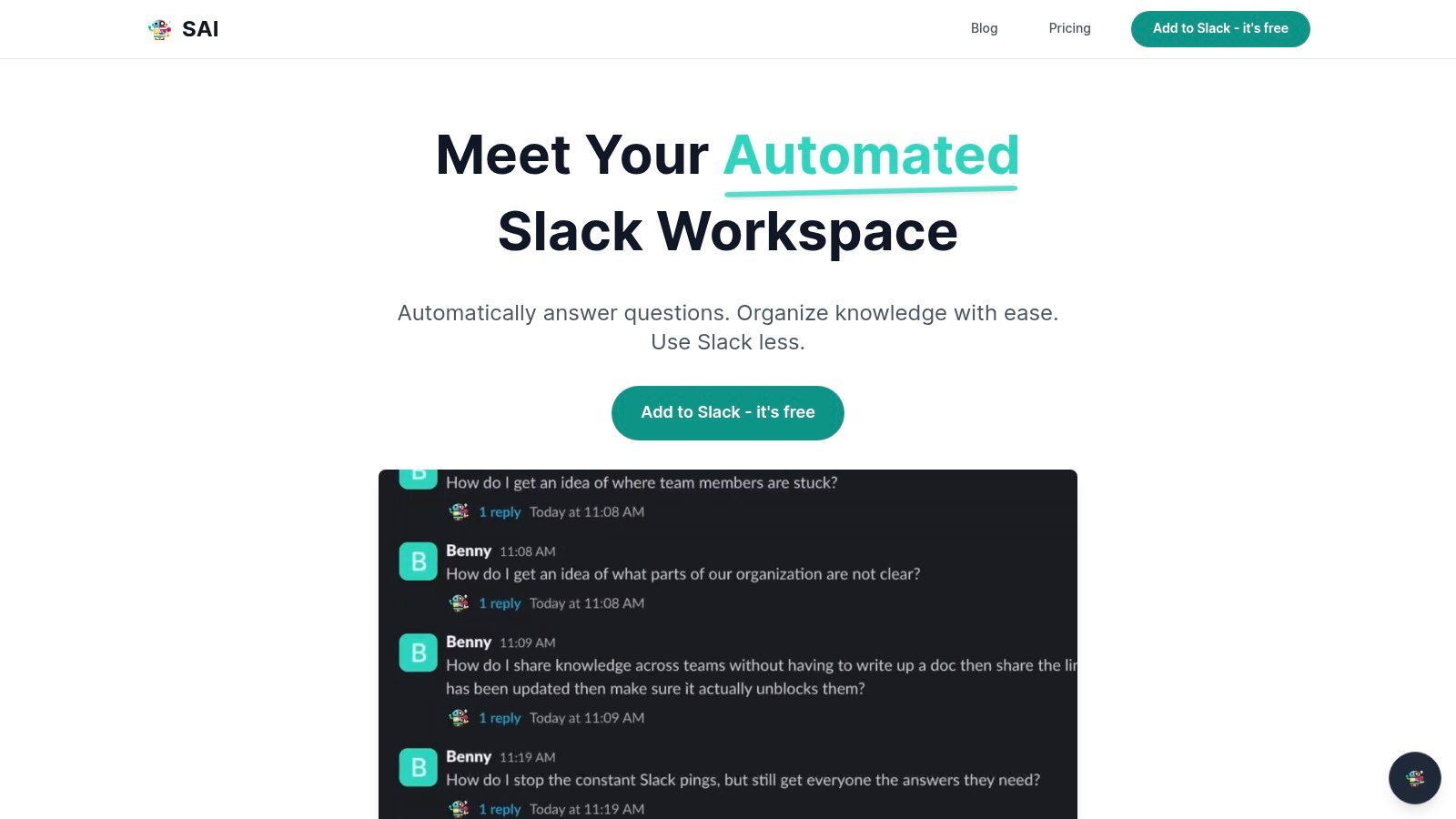
This Slack-native AI assistant stands out because it requires zero setup or data migration. It learns organically from your team’s existing conversations, automatically building a durable knowledge repository from the questions and answers already happening. This approach makes it one of the best internal knowledge base software options for teams seeking immediate relief from repetitive interruptions and costly context switching.
Key Features and Use Cases
- Instant, Automated Knowledge Capture: Add SAI to a channel (like
#ask-hror#it-support), and it begins learning. When a team member answers a question, SAI retains that information to handle similar queries in the future, 24/7. - Context-Aware AI: SAI understands intent, not just keywords. This means it can decipher the underlying need behind a question, providing more accurate and relevant answers than simple keyword-based search bots.
- Workflow Consolidation: By living entirely within Slack, SAI keeps your team focused. It reduces the need for multiple tools and eliminates the productivity drain caused by searching for information across different platforms.
Pricing and Access
SAI offers a straightforward and completely risk-free entry point.
- Early Access Plan: $0/month. This plan includes support for a single Slack channel, unlimited AI responses, and access to community support. No credit card is required to get started.
You can add SAI to your Slack workspace directly from its website to start testing its capabilities immediately.
Pros and Cons
| Pros | Cons |
|---|---|
| Zero-setup value: Starts answering questions immediately after being added to a Slack channel. | Early-access limitations: The free tier is limited to a single channel. |
| Reduces interruptions: Provides 24/7 automated support, saving senior team members significant time. | Verification needed: As with any AI, responses for highly sensitive or critical workflows may require human verification. |
| Builds knowledge automatically: Turns every answered question into a reusable asset without manual effort. | Lacks enterprise certifications: Teams with strict compliance needs should verify data security protocols. |
| Completely free to start: The Early Access Plan provides unlimited responses at no cost. |
Website: https://sai-bot.ai
2. Atlassian Confluence
Atlassian Confluence is an enterprise-grade titan in the world of internal documentation, serving as a centralized, collaborative workspace for teams of any size. It excels at creating a structured, long-form internal knowledge base that can scale alongside your organization. For businesses already embedded in the Atlassian ecosystem, particularly those relying heavily on Jira for project management, Confluence is often the default choice for building a single source of truth. Its robust architecture is built to handle complex governance and information management needs.
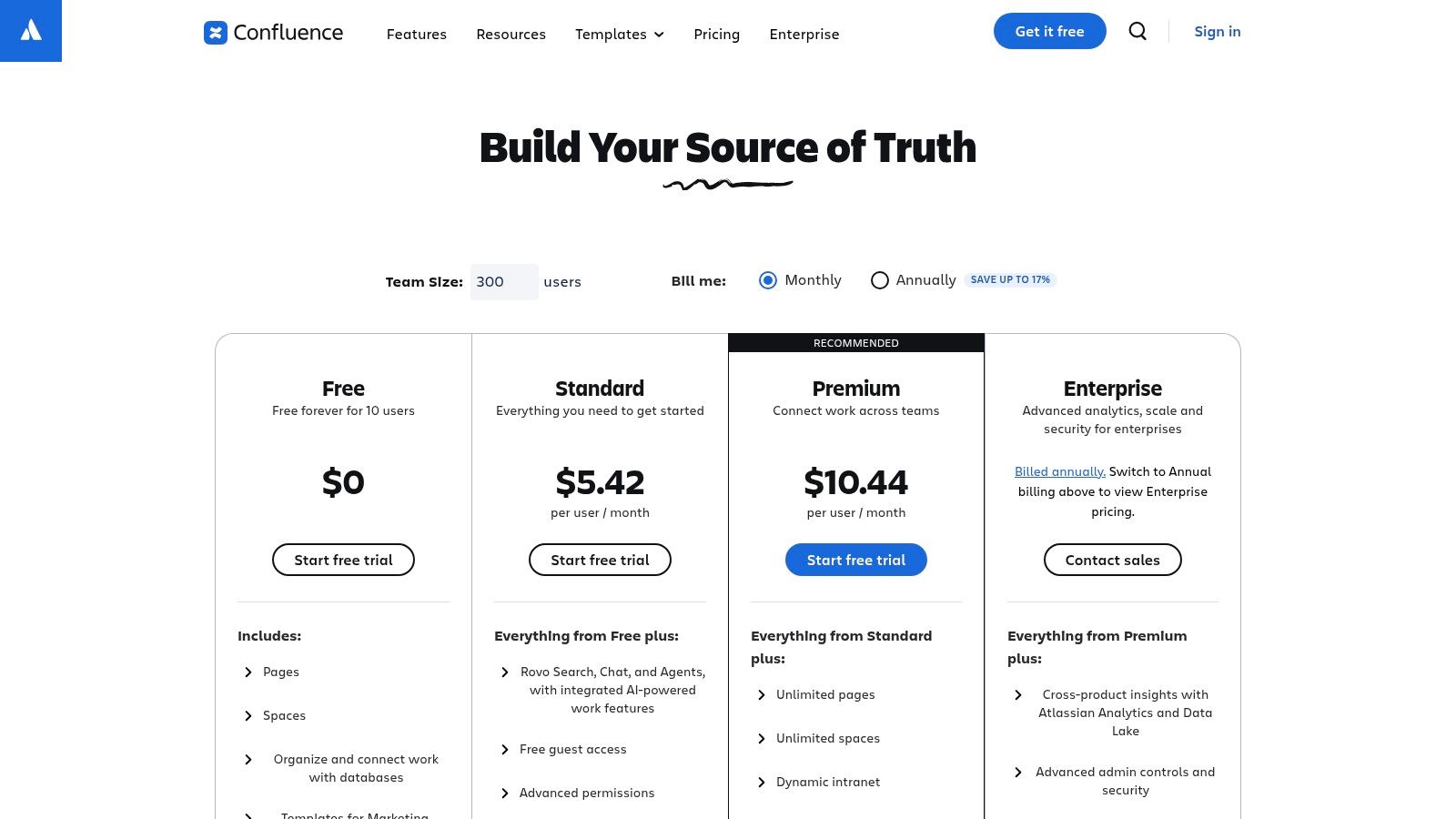
This platform stands out for its deep integration capabilities and powerful organizational features like Spaces
and Pages.
Think of a Space as a dedicated wiki for a specific team (e.g., Marketing) or project, with a nested hierarchy of pages that can be easily organized. This structure makes it one of the best internal knowledge base software options for documenting complex processes, project plans, and team policies. If you're looking for a platform that can grow from a simple team wiki to a company-wide knowledge repository, Confluence provides the necessary framework. Explore more about what a comprehensive knowledge management system like Confluence can offer.
Key Features & Pricing
- Structured Content: Create organized documentation using page trees, templates, labels, and macros.
- Advanced Permissions: Granular control over who can view, edit, and comment on specific Spaces or pages.
- Deep Integrations: A vast marketplace of apps and seamless native integration with Jira, Trello, and other Atlassian products.
- Deployment Choice: Available as a multi-tenant Cloud solution or a self-managed Data Center option for greater control.
| Plan | Price (Cloud, per user/month) | Best For |
|---|---|---|
| Free | $0 (up to 10 users) | Small teams getting started |
| Standard | $6.05 | Growing teams needing permissions |
| Premium | $11.55 | Organizations needing analytics & automation |
| Enterprise | Custom | Global enterprises with security needs |
| Pros | Cons |
|---|---|
| Proven scalability for large organizations | Can feel complex or heavyfor small teams |
| Tight integration with Jira for dev/support | Key features are often on higher-tier plans |
| Choice of Cloud or Data Center deployment | The user interface can have a steeper learning curve |
3. Notion
Notion has redefined the internal knowledge base by blending documents, wikis, and databases into a single, highly flexible workspace. It shines for teams that prioritize speed and adaptability, offering an all-in-one environment that is as easy to use as a simple text editor but as powerful as a relational database. For organizations looking to move away from rigid, legacy systems, Notion provides a refreshing, modular approach to building a source of truth. Its intuitive drag-and-drop interface and aesthetically pleasing design encourage widespread adoption with minimal training.
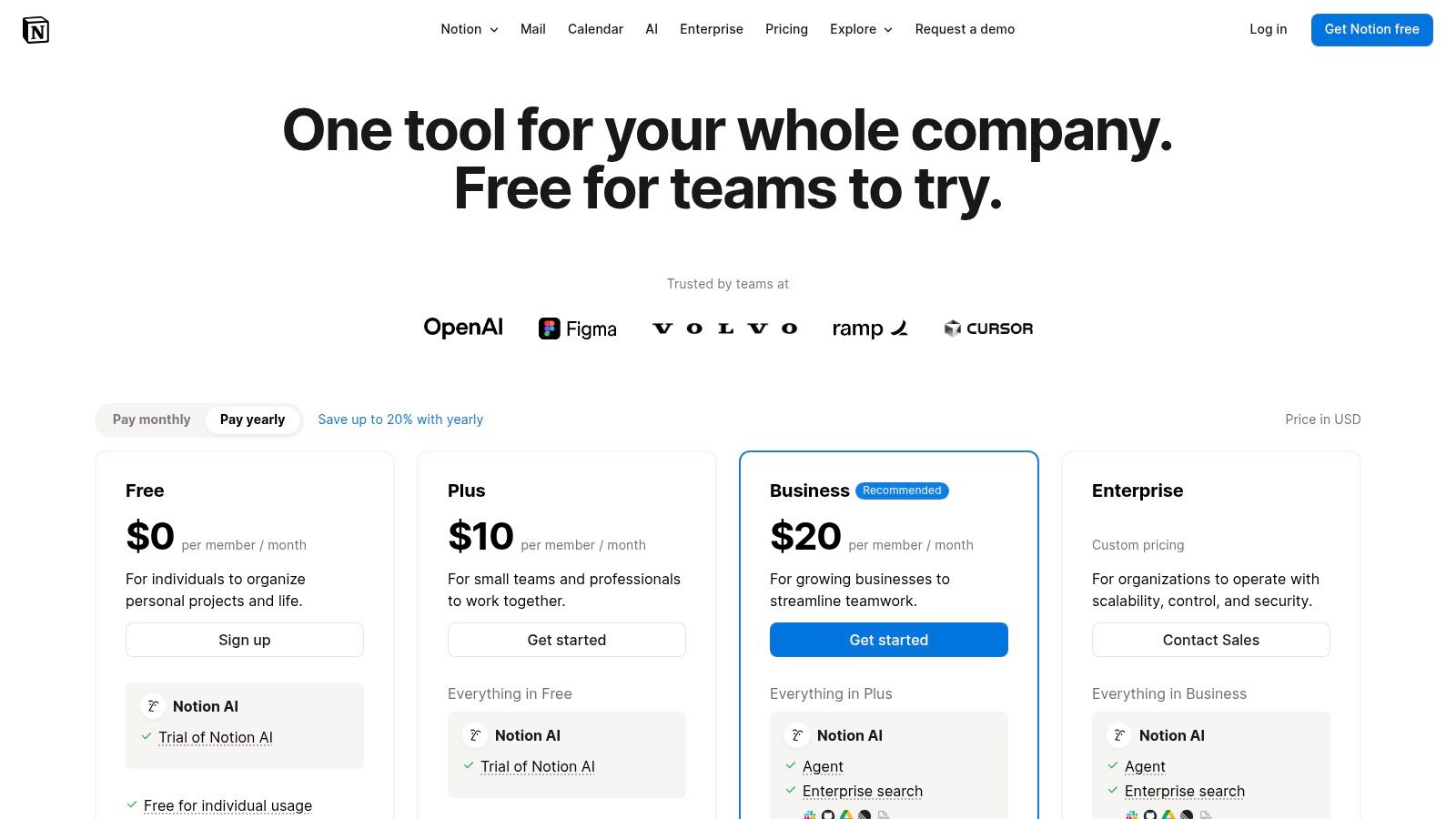
The platform's standout feature is its powerful database functionality, allowing teams to create dynamic, interconnected repositories for everything from project roadmaps to employee directories. This flexibility makes it one of the best internal knowledge base software choices for creative, engineering, and product teams who need to organize information in multiple views
like Kanban boards, calendars, or galleries. The extensive template ecosystem means you can get started instantly, building out everything from a simple team wiki to a complex company OS. Its free tier is also a generous starting point for smaller teams, which you can explore in more detail among other free knowledge base software options.
Key Features & Pricing
- Databases with Views: Create structured knowledge with powerful filters, sorts, and relations displayed as lists, boards, or galleries.
- Flexible Page Structure: Combine text, images, to-do lists, and over 50 other block types on any page.
- Teamspaces: Dedicated and customizable sections for different departments to manage their own knowledge and workflows.
- Notion AI: Optional add-on to summarize documents, draft content, and automate tasks directly within your workspace.
| Plan | Price (per user/month) | Best For |
|---|---|---|
| Free | $0 | Individuals or small teams |
| Plus | $10 | Teams needing collaboration features |
| Business | $18 | Companies wanting advanced controls |
| Enterprise | Custom | Organizations needing enterprise-grade security |
| Pros | Cons |
|---|---|
| Extremely flexible and easy to adopt | Governance at scale requires careful planning |
| Strong template ecosystem for quick setup | Advanced analytics are limited to higher plans |
| All-in-one tool reduces context switching | Can become disorganized without clear structure |
4. Guru
Guru is an AI-native internal knowledge platform designed to deliver verified, trustworthy answers directly into your team's workflow. It moves beyond the traditional wiki model by actively pushing information to employees where they already work, primarily through a powerful browser extension and deep chat integrations. The core philosophy is to reduce context switching and make knowledge accessible at the moment of need. For teams overwhelmed by outdated documentation, Guru's emphasis on content verification and freshness is a significant differentiator.
This platform stands out by combining an internal wiki, enterprise search, and AI-powered chat into a single solution. Its verification workflow, which prompts experts to regularly review and update content, builds a high level of trust in the information provided. This makes it one of the best internal knowledge base software choices for fast-moving sales, support, and marketing teams who need accurate, up-to-the-minute answers to perform their jobs effectively. If your goal is to eliminate time spent hunting for information across different apps, Guru’s in-workflow delivery system is built to solve that exact problem. You can explore their pricing and features at www.getguru.com/pricing.
Key Features & Pricing
- AI-Powered Search & Chat: Delivers instant, trusted answers and allows users to build custom, task-specific AI agents.
- Content Verification Workflow: A system of reminders and assignments ensures subject matter experts keep content fresh and accurate.
- In-Workflow Knowledge: A browser extension and integrations with Slack and Microsoft Teams surface answers without leaving your current application.
- Enterprise-Grade Security: Features SSO, SCIM provisioning, and role-based access controls to secure sensitive information.
| Plan | Price (per user/month) | Best For |
|---|---|---|
| Builder | $12 (billed annually) | Growing teams that need structured, verified knowledge |
| Enterprise | Custom | Large organizations needing advanced security and analytics |
| Pros | Cons |
|---|---|
| Designed to surface answers inside tools teams already use | Newer AI credit model may require monitoring of usage |
| Verification workflows help maintain trust in content | The Builder plan requires a 10-seat minimum |
| Strong browser extension for in-context knowledge | Can be more expensive than simpler wiki solutions |
5. Slab
Slab positions itself as a knowledge hub for the modern workplace,
delivering a focused and aesthetically pleasing platform designed purely for creating, organizing, and discovering information. It deliberately avoids the project management bloat of other tools, making it a streamlined choice for teams that want a dedicated, beautiful wiki without extra complexity. For organizations prioritizing a clean user experience and powerful search, Slab is one of the best internal knowledge base software solutions available, emphasizing speed and simplicity above all else. Its core philosophy is to be the single source of truth that your team actually enjoys using.
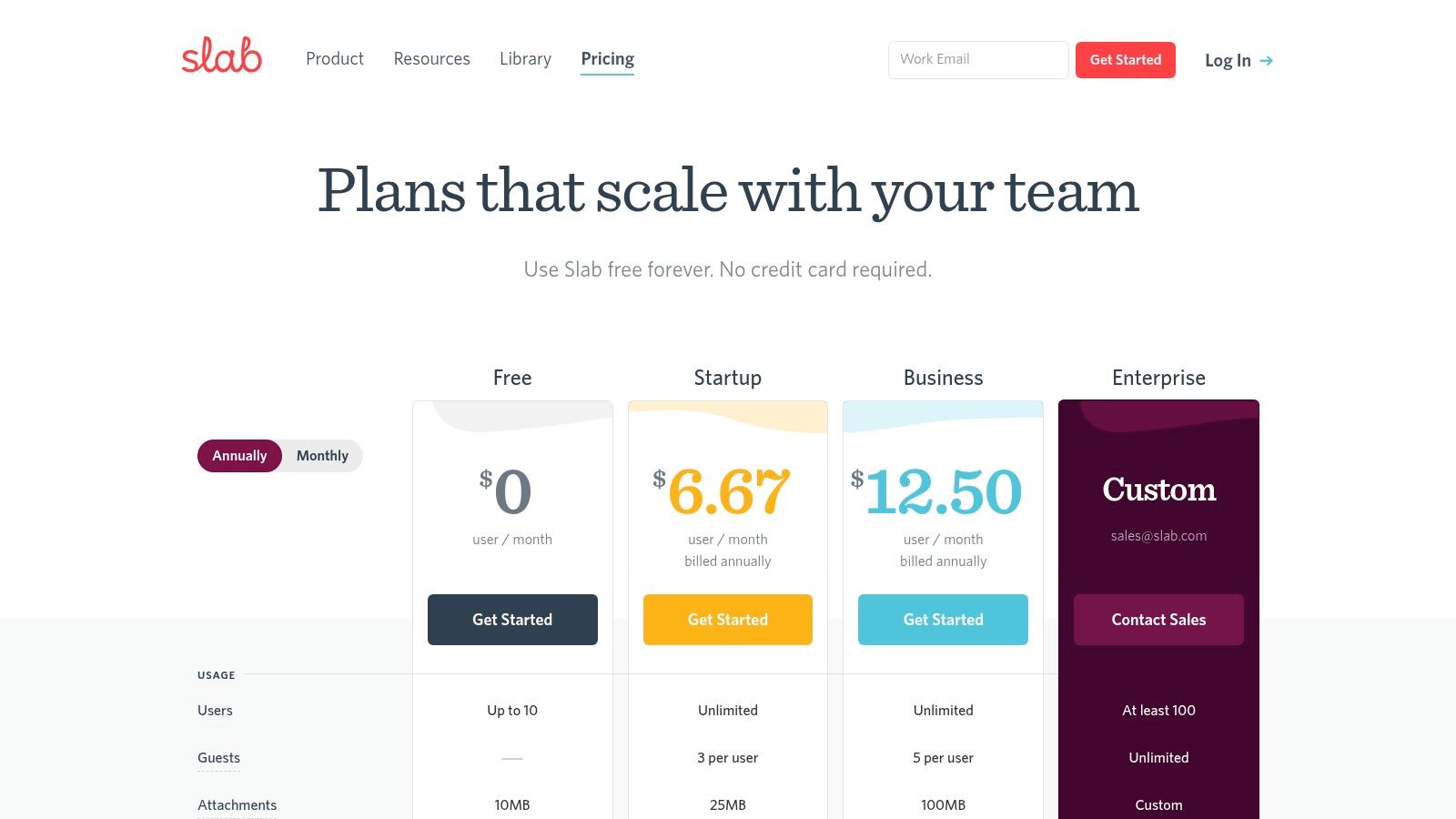
This platform excels with its organizational Topics
structure, allowing for a clear content hierarchy, and its standout feature: Unified Search. This lets you search not only within Slab but also across all your connected apps like Slack, Google Drive, and Asana right from one search bar, truly centralizing knowledge discovery. The editor is minimal yet powerful, ensuring content creation is a fast and friction-free process. Slab is ideal for teams that need a purpose-built knowledge base that integrates with their existing toolset rather than trying to replace it. For more information, visit the Slab website.
Key Features & Pricing
- Unified Search: A single search bar to find information across Slab and integrated apps like Slack, Notion, and GitHub.
- Topics & Verification: Organize content into a clear hierarchy and use content verification to ensure information stays current.
- Modern Editor: A clean, intuitive writing experience that supports real-time collaboration and rich media embeds.
- Enterprise-Ready: Offers SAML SSO, SCIM provisioning, and audit logs on higher-tier plans for enhanced security.
| Plan | Price (per user/month) | Best For |
|---|---|---|
| Free | $0 (up to 10 users) | Small teams or personal use |
| Startup | $8 | Growing teams needing more integrations |
| Business | $15 | Companies needing advanced security |
| Enterprise | Custom | Large organizations with compliance needs |
| Pros | Cons |
|---|---|
| Minimal, fast, and purpose-built for a knowledge base | Fewer work-management extras by design |
| Unified Search is a powerful differentiator | Some AI and admin features are on top-tier plans |
| Generous guest access allowances on paid tiers | Limited customization compared to more complex tools |
6. Slite
Slite strikes an elegant balance between a clean, minimalist editor and powerful, AI-driven knowledge discovery. It is designed for teams who want a straightforward documentation experience without sacrificing modern features like AI Q&A and content verification. Slite’s core philosophy is to make knowledge accessible and trustworthy, focusing on a collaborative writing environment that feels more like a modern notes app than a traditional, rigid wiki. It’s an ideal choice for companies that prioritize clarity, speed, and asynchronous communication.
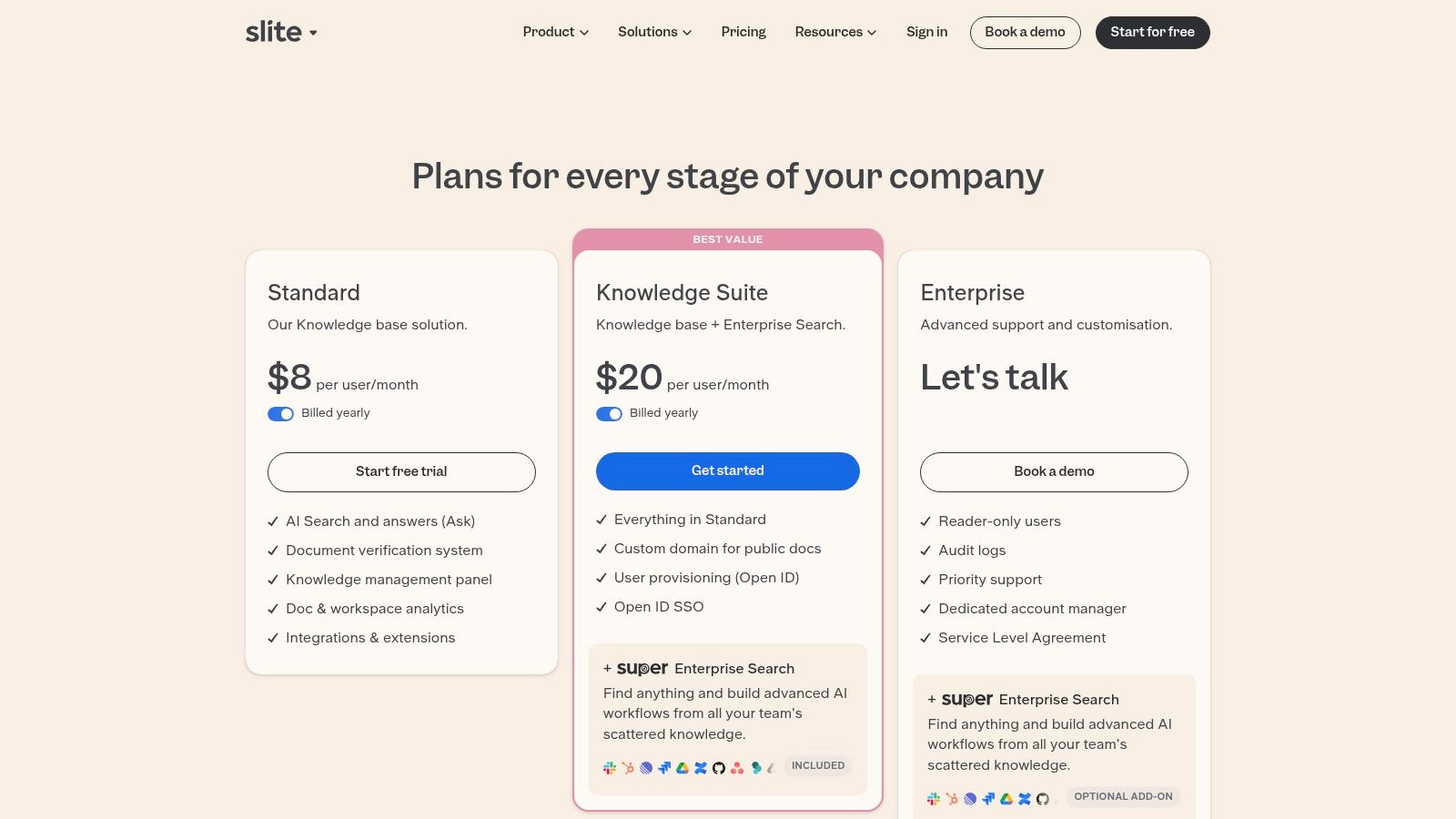
The platform’s standout feature is Ask,
an AI assistant that provides instant, synthesized answers from your company’s documents, directly within Slite or integrated into Slack. This transforms how teams find information, moving from keyword searching to conversational Q&A. This makes it one of the best internal knowledge base software options for fast-moving teams that need to reduce repetitive questions and empower employees with immediate, reliable answers. For organizations looking to adopt AI search while maintaining a simple, well-designed knowledge base, Slite provides a compelling and focused solution.
Key Features & Pricing
- Ask AI Search: Get instant, conversational answers from your knowledge base, with a native Slack integration.
- Collaborative Editor: A clean, real-time editor with rich formatting options, templates, and mentions.
- Document Verification: Assign owners and set verification cycles to ensure content stays up-to-date and trustworthy.
- Reader Insights & Analytics: Track document views and engagement to understand what knowledge is most valuable.
| Plan | Price (per user/month) | Best For |
|---|---|---|
| Free | $0 (up to 50 docs) | Small teams testing the platform |
| Standard | $10 | Growing teams needing unlimited docs & AI |
| Premium | $20 | Businesses needing analytics & advanced permissions |
| Enterprise | Custom | Large organizations with security & SSO needs |
| Pros | Cons |
|---|---|
| Strong balance of simplicity and AI features | AI quotas per user apply on lower-tier plans |
| Excellent user interface and writing experience | Workspace-level reader roles are Enterprise-only |
| Built-in document verification and analytics | Fewer deep integrations than larger platforms |
7. Tettra
Tettra is a Slack-first knowledge management system designed to eliminate repetitive questions and centralize team information directly within your chat environment. It is built for teams that live in Slack and need a simple, intuitive way to document, find, and verify knowledge without switching contexts. Tettra's core philosophy is to make knowledge accessible and trustworthy, focusing on features that encourage adoption and ensure information stays up-to-date.
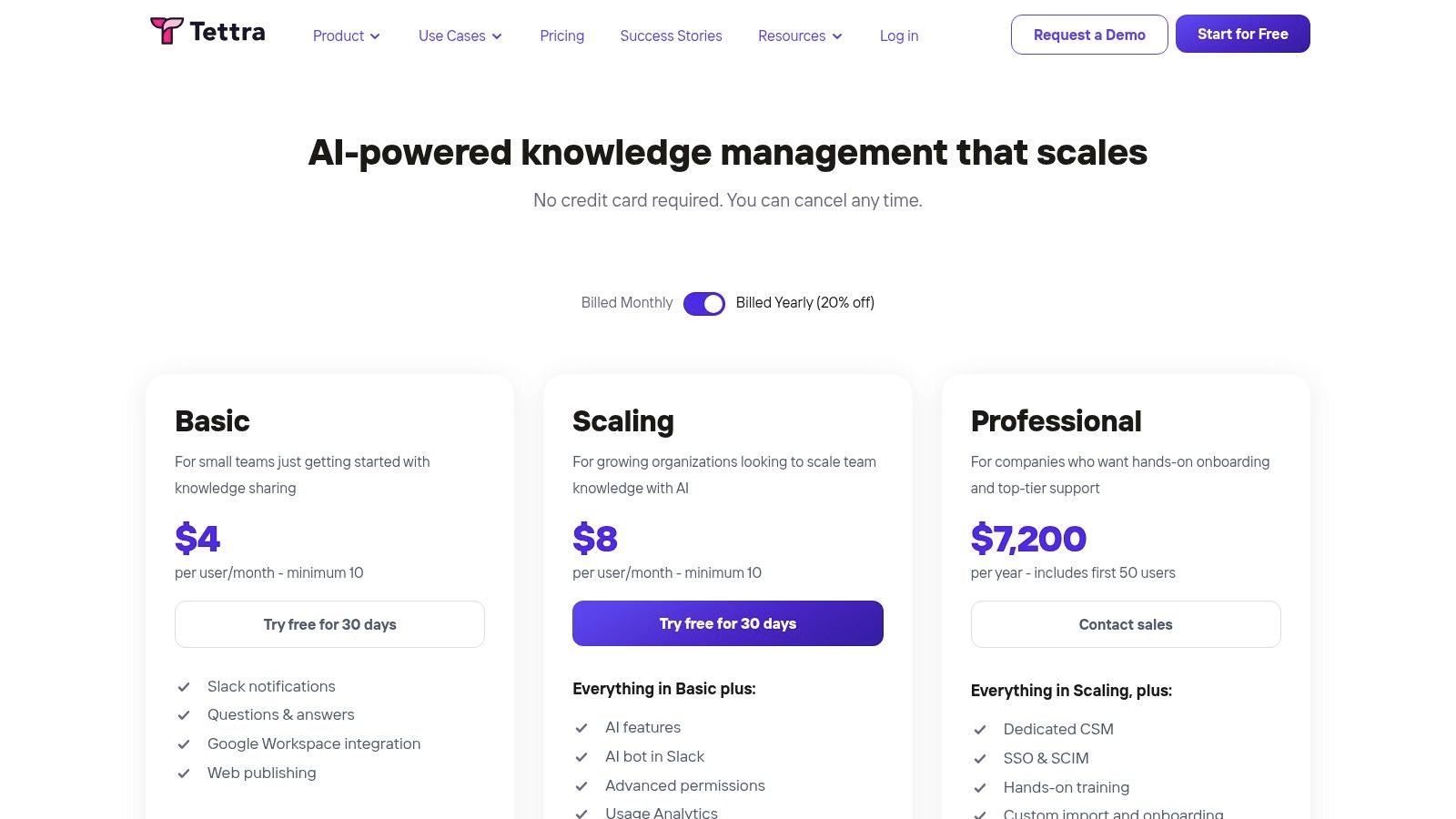
What makes Tettra one of the best internal knowledge base software choices is its seamless integration and opinionated structure. Its AI-powered chatbot, Kai, can answer questions directly in Slack or Microsoft Teams, and its content verification workflow assigns owners to pages, scheduling regular reminders to review and update them. This proactive approach tackles the common problem of stale documentation, building a reliable single source of truth that your team will actually use. Tettra is ideal for support, operations, and product teams looking for a low-friction way to manage essential knowledge.
Key Features & Pricing
- Deep Chat Integration: Capture, search, and get AI-powered answers directly within Slack and Microsoft Teams.
- Content Verification: Assign owners to content and set automated schedules for review to keep information fresh and accurate.
- Simple & Organized: An intuitive, opinionated structure makes it easy for anyone to create and find documentation.
- Usage Analytics: Gain insights into what your team is searching for, what content is most popular, and where knowledge gaps exist.
| Plan | Price (per user/month, billed annually) | Best For |
|---|---|---|
| Scaling | $10 (min 10 users) | Growing teams needing core features |
| Business | $20 (min 20 users) | Companies needing analytics & AI |
| Enterprise | Custom | Organizations with advanced security needs |
| Pros | Cons |
|---|---|
| Excellent knowledge capture and search from Slack | User minimums apply to paid plans |
| Simple, opinionated structure is easy to maintain | Advanced analytics and AI only on higher tiers |
| Content verification workflow keeps docs current | Limited customization compared to larger platforms |
8. Document360
Document360 is a powerful, feature-rich knowledge base platform designed for teams that require deep documentation governance and control. It serves a dual purpose, allowing businesses to create both private internal knowledge bases and public-facing help centers from a single hub. This makes it ideal for organizations looking to standardize their documentation process across different audiences, such as support teams and internal departments. The platform emphasizes a structured authoring environment with robust workflows and version control.
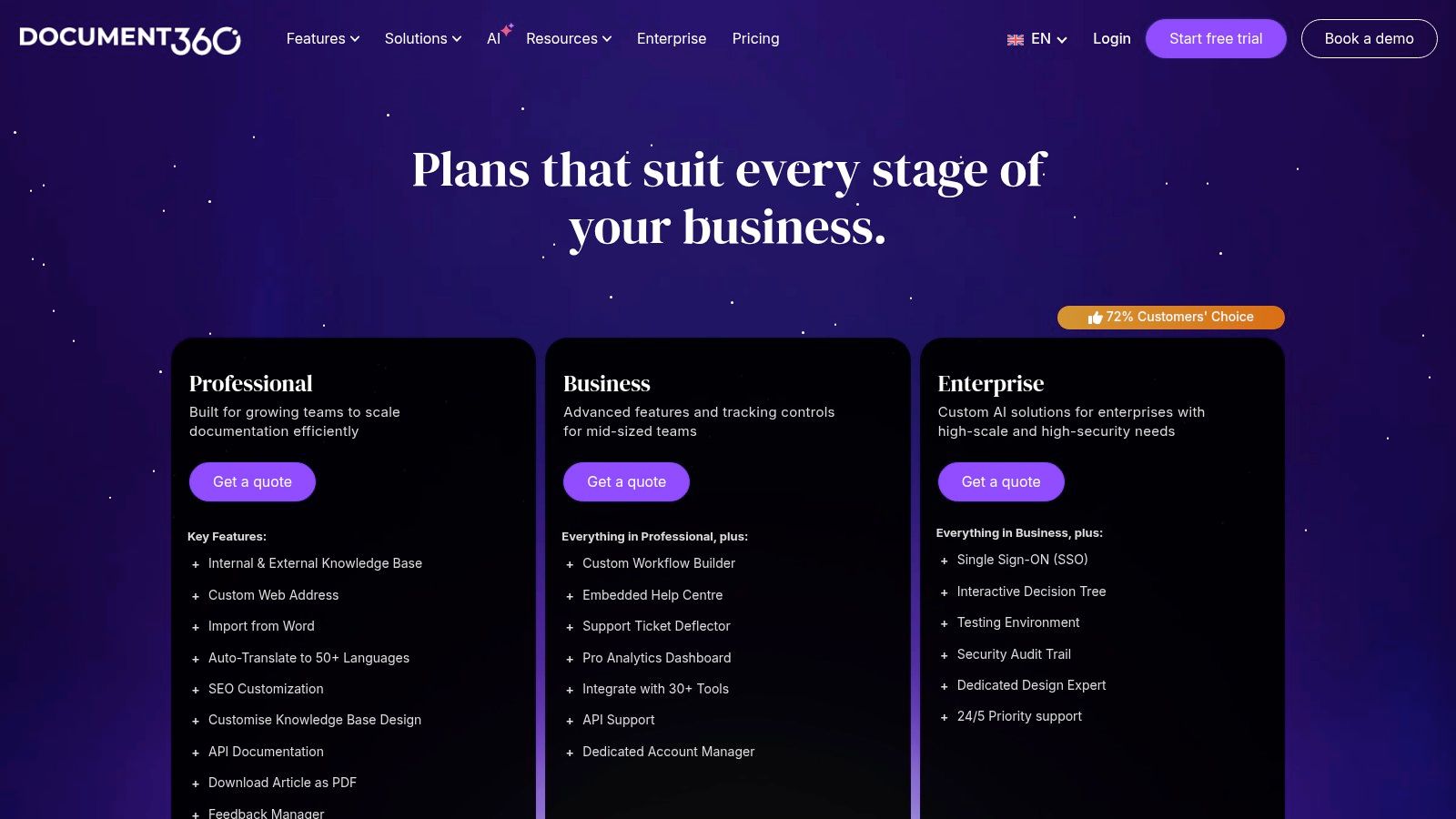
This platform stands out by separating its editor portal from the end-user site, creating a clear distinction between content creation and consumption. This is a key reason it ranks as one of the best internal knowledge base software choices for technical writing teams and enterprises that need to manage complex information lifecycles. For instance, you can use its advanced features to create detailed guides, like those needed for writing a standard operating procedure, complete with approval workflows. Its optional AI suite further enhances productivity with tools for writing, search, and tutorial generation.
Key Features & Pricing
- Dual Knowledge Bases: Manage both internal and external documentation projects from one account.
- Advanced Workflows: Set up custom review, approval, and publishing workflows for content governance.
- In-depth Analytics: Track article performance, user feedback, and search queries to improve your documentation.
- Optional AI Suite: Enhance content creation and search capabilities with an AI-powered add-on.
| Plan | Price (per project/month) | Best For |
|---|---|---|
| Standard | $149 | Startups and small businesses |
| Business | $299 | Growing teams needing advanced features |
| Enterprise | $599 | Large organizations needing full control |
| Enterprise Plus | Custom | Global enterprises with bespoke needs |
| Pros | Cons |
|---|---|
| Deep documentation features and governance | Many advanced features are on higher-tier plans |
| Separate editor portal improves clarity | Pricing can be complex for multiple projects |
| Strong version control and analytics | Can be overly complex for simple use cases |
9. Helpjuice
Helpjuice is a powerful and highly customizable knowledge base platform that focuses on delivering an exceptional authoring and search experience. It is designed for teams that need more than a generic wiki, offering deep analytics, robust permissions, and a design that can be tailored to match a company's brand perfectly. Where many tools offer a one-size-fits-all interface, Helpjuice provides vendor-assisted customization, ensuring your internal knowledge base feels like an integrated part of your company's digital workspace from day one.
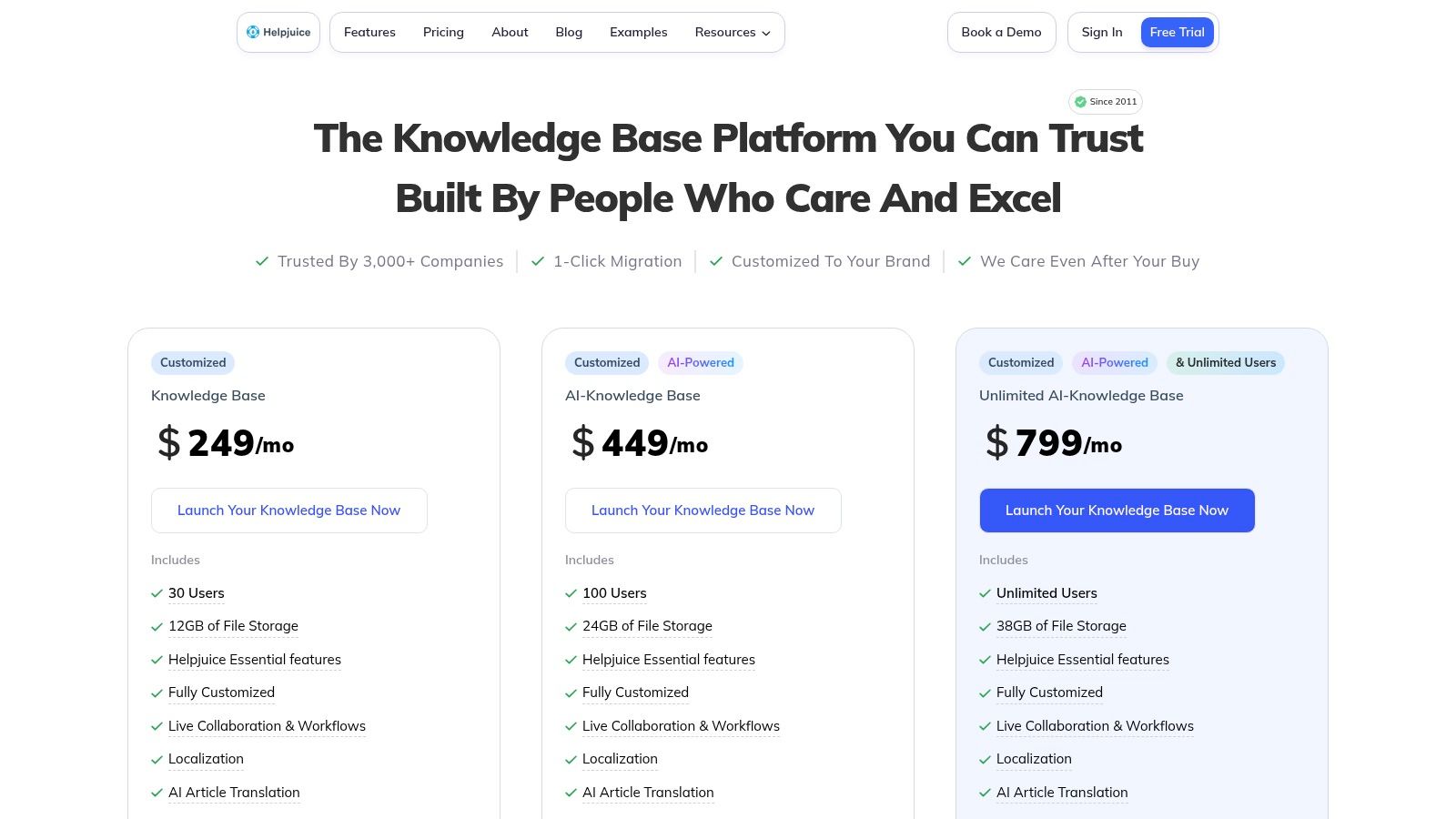
The platform’s strength lies in its intelligent search and content management capabilities, which are now enhanced with a suite of AI tools. This makes it one of the best internal knowledge base software choices for organizations that prioritize findability and want to empower employees with instant, accurate answers. Helpjuice’s live collaboration features, content workflows, and localization tools also cater to distributed or multilingual teams, helping to maintain a single source of truth across the entire organization.
Key Features & Pricing
- Fully Customizable Design: Includes vendor-assisted customization to create a branded, user-friendly interface.
- Intelligent Search: Powerful, Google-like search functionality that learns from user queries to improve results over time.
- AI-Powered Tools: Includes an AI writer for content creation, an AI-powered chatbot, and automatic translation tools.
- Advanced Analytics: In-depth reports on what users are searching for, what they can't find, and which articles are most effective.
| Plan | Price (per month) | Best For |
|---|---|---|
| Starter | $120 (up to 4 users) | Small teams needing a powerful, customized KB |
| Run-Up | $200 (up to 16 users) | Growing businesses scaling their knowledge |
| Premium | $499 (up to 60 users) | Large teams needing advanced analytics & AI |
| Enterprise | Custom (unlimited users) | Corporations requiring enterprise-grade features |
| Pros | Cons |
|---|---|
| Vendor-assisted customization speeds up branded rollouts | Higher starting price for very small teams |
| Excellent search and analytics capabilities | Some advanced AI features are on higher-tier plans |
| Fixed-price tiers cover generous numbers of users | Can be more tool than a startup needs initially |
10. Zendesk Suite (Guide/Knowledge)
Zendesk is a powerhouse in the customer service world, and its knowledge base, known as Guide, is a core component of that ecosystem. While it shines as a public-facing help center, it's also a capable tool for internal use, especially for support teams. Its strength lies in the seamless integration between the knowledge base and the ticketing system. This creates a powerful workflow where agents can easily create, link, and improve documentation directly from support conversations, turning solved tickets into reusable knowledge.
This platform stands out for businesses whose internal knowledge is heavily driven by support and IT help desk interactions. The AI-powered tools suggest relevant articles to agents as they work, reducing response times and ensuring consistency. If your primary goal is to empower your support team with a tool that combines ticketing and knowledge management, Zendesk is one of the best internal knowledge base software choices available. It’s less of a general-purpose wiki and more of a specialized, highly efficient system for support-driven documentation. You can learn more at the Zendesk website.
Key Features & Pricing
- Integrated Agent Workspace: Agents can author and access knowledge articles directly within the ticketing interface.
- AI-Powered Suggestions: Provides contextual article recommendations to agents and customers, along with generative search capabilities.
- Content Blocks: Create reusable snippets of content that can be inserted into multiple articles for easy updates.
- Multichannel Support: Part of a broader suite that includes messaging, voice, analytics, and robust automation.
| Plan | Price (per agent/month, annual) | Best For |
|---|---|---|
| Suite Team | $55 | Small support teams needing core features |
| Suite Growth | $89 | Growing businesses needing customization |
| Suite Professional | $115 | Companies needing advanced analytics & HIPAA |
| Suite Enterprise | Custom | Large-scale enterprises with complex needs |
| Pros | Cons |
|---|---|
| Unbeatable workflow for support teams | Not sold as a standalone knowledge base |
| Mature analytics and automation at higher tiers | Pricing is per agent and can be costly for wiki-only use |
| AI features are well-integrated into the workflow | Can be overly complex for non-support teams |
11. Microsoft SharePoint (Microsoft 365)
For organizations deeply embedded in the Microsoft 365 ecosystem, SharePoint serves as a foundational platform for building a comprehensive internal knowledge base and company intranet. It excels at creating structured document repositories with robust version control, enterprise-grade security, and powerful governance features. Businesses that rely on Teams, OneDrive, and Office apps will find SharePoint to be a natural extension of their existing workflows, leveraging familiar identity management and compliance tools to create a secure single source of truth.
This platform's strength lies in its ability to manage vast libraries of documents and create dedicated Team Sites
or Communication Sites
that act as hubs for departmental knowledge. Think of it as the central nervous system for your company's files, policies, and official communications. If your primary need is a highly controlled, auditable system for managing official documentation rather than a fast-paced, collaborative wiki, SharePoint provides one of the best internal knowledge base software frameworks available, particularly for compliance-heavy industries. You can learn more at the official SharePoint website.
Key Features & Pricing
- Document Libraries & Version Control: Robust management of documents with version history, check-in/check-out, and metadata.
- Enterprise Search: Powerful, indexed search that surfaces content from across the Microsoft 365 suite.
- Deep M365 Integration: Seamlessly works with Teams, OneDrive, Planner, and all Office applications for a unified experience.
- Advanced Security & Compliance: Utilizes Microsoft 365's security groups, permissions, and compliance centers for granular control.
| Plan | Price (per user/month) | Best For |
|---|---|---|
| SharePoint Plan 1 | $5.00 | Businesses needing a secure cloud storage solution |
| SharePoint Plan 2 | $10.00 | Orgs needing advanced DLP and in-place holds |
| Microsoft 365 Business | Varies | Most businesses needing Office apps included |
| Pros | Cons |
|---|---|
| Fits naturally in Microsoft-centric environments | Setup and governance can be complex |
| Strong compliance and identity management | Authoring experience is less 'wiki-like' |
| Excellent for formal document management | The user interface can feel dated or clunky |
12. Nuclino
Nuclino offers a refreshingly lightweight and minimalist approach to internal documentation, functioning as a collective brain
for modern teams. It strips away the complexity found in enterprise-grade systems, focusing instead on speed, real-time collaboration, and an intuitive user experience. For teams that find traditional wikis too rigid or slow, Nuclino provides a fast, flexible alternative that feels more like a collaborative document editor than a heavy-duty database. Its simplicity makes it one of the best internal knowledge base software choices for startups and agile teams prioritizing ease of use.
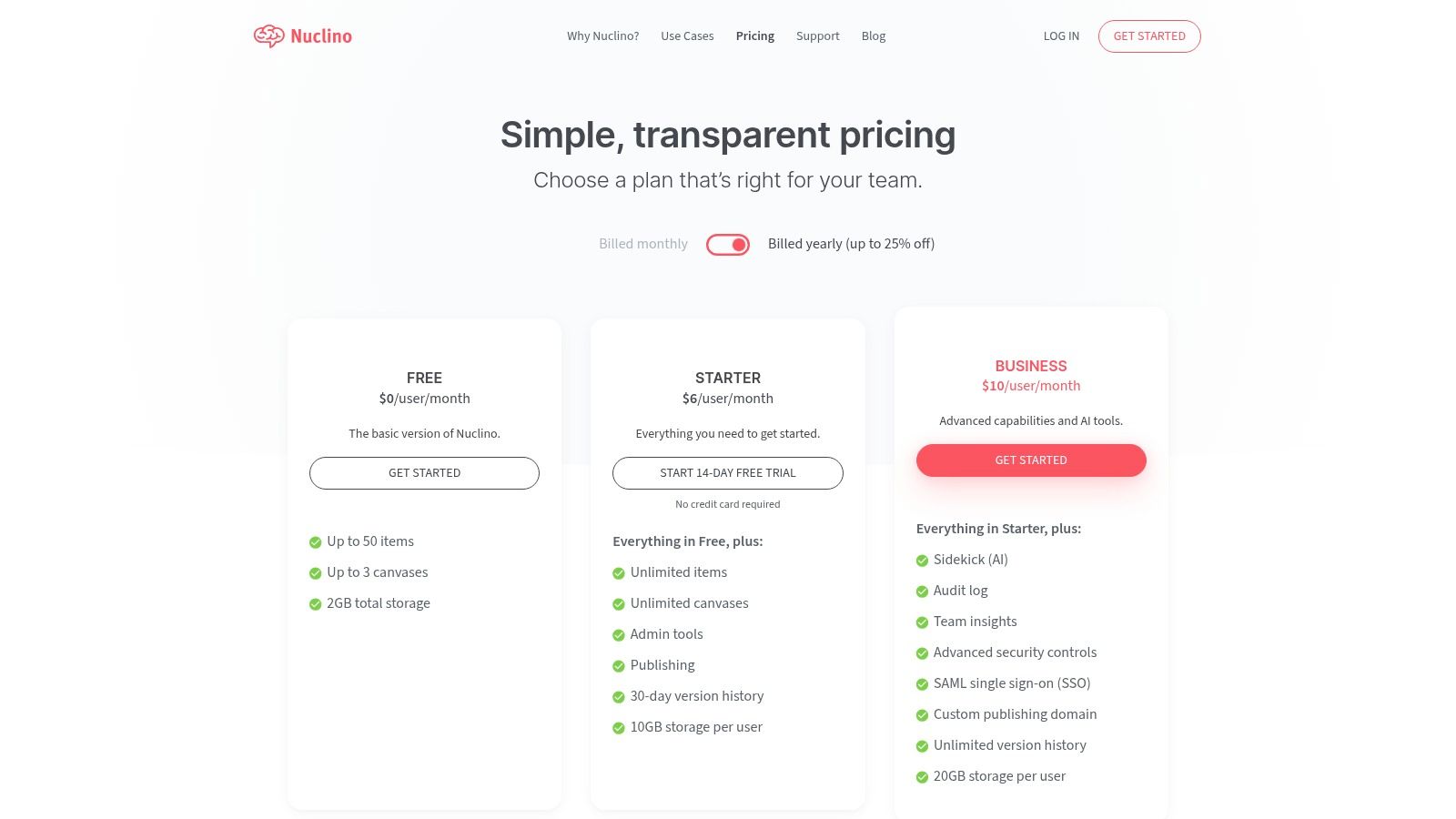
The platform’s strength lies in its unified workspace where every piece of information is an item
that can be viewed in multiple ways: as a list, a Kanban board, a table, or a mind-map-style graph. This versatility allows teams to organize everything from meeting notes and project plans to employee onboarding guides in the format that makes the most sense. Nuclino is built for speed, from its instant search to its real-time editing, ensuring that capturing and finding knowledge is a frictionless process. Learn more about Nuclino’s features.
Key Features & Pricing
- Multiple Views: Organize and visualize content as a list, board, table, or graph.
- Real-Time Collaboration: Edit documents simultaneously with colleagues, with changes reflected instantly.
- Markdown & Commands: A fast and efficient editor that supports Markdown and slash commands for quick formatting.
- AI-Powered Sidekick: An optional AI assistant to help create, summarize, and transform content within the platform.
| Plan | Price (per user/month) | Best For |
|---|---|---|
| Free | $0 | Small teams or personal projects |
| Standard | $6 | Growing teams needing more content & features |
| Premium | $12 | Businesses requiring advanced security & insights |
| Pros | Cons |
|---|---|
| Extremely fast and intuitive user interface | Fewer third-party integrations than larger platforms |
| Flexible content views (board, graph, etc.) | Free plan has strict limits on content items |
| Simple, clutter-free editing experience | May lack the complex permissions of enterprise tools |
Top 12 Internal Knowledge Base Software Comparison
| Product | Core features | UX & quality | Value & pricing | Target audience | Unique selling points |
|---|---|---|---|---|---|
| SAI 🏆 | Slack-native AI assistant; auto KB from conversations; 24/7 answers | ★★★★☆ — claims 2+ hrs/day saved | 💰 Early Access $0/mo (single channel), unlimited responses | 👥 Slack-first small teams, support & ops | ✨ Slack-first, zero-setup intent-aware answers; 🏆 Recommended |
| Atlassian Confluence | Enterprise wiki: spaces, templates, permissions, analytics | ★★★★☆ — proven at scale | 💰 Tiered (Cloud/Data Center); Premium/Enterprise for advanced features | 👥 Large orgs needing governance & Jira integration | ✨ Scalability, deep Jira & marketplace integrations |
| Notion | Docs + databases, templates, flexible layouts | ★★★★☆ — fast adoption | 💰 Free + paid team plans | 👥 Small–medium teams needing flexibility | ✨ Highly flexible DBs & templates, lightweight setup |
| Guru | AI search/chat, verification workflows, browser extension | ★★★★☆ — in-workflow surfacing | 💰 Paid tiers with AI credits; 10-seat min on some plans | 👥 Teams wanting verified answers inside existing tools | ✨ Verification workflows & in-context surfacing |
| Slab | Focused wiki with unified search, topics, SSO options | ★★★★☆ — fast & minimal | 💰 Paid tiers; Business/Enterprise for SSO/audit | 👥 Knowledge-focused teams valuing simplicity | ✨ Minimal, fast KB with unified search |
| Slite | Collaborative editor + built-in AI 'Ask', Slack integration | ★★★★☆ — balanced AI & simplicity | 💰 Paid tiers with AI quotas per user | 👥 Teams wanting lightweight KB + AI Q&A | ✨ Built-in AI Q&A and reader analytics |
| Tettra | Slack-first KB with in-chat bot, verification & analytics | ★★★★ — simple, Slack-capture strong | 💰 Paid plans with user minimums & caps | 👥 Support/ops/product teams using Slack heavily | ✨ Excellent Slack capture & opinionated structure |
| Document360 | Internal/external KB, versioning, workflows, optional AI suite | ★★★★☆ — docs & governance focused | 💰 Quote-based tiers; AI as add-on | 👥 Doc-heavy teams needing governance & tutorials | ✨ Deep documentation features and workflows |
| Helpjuice | Customizable KB design, strong search, AI writer/chat | ★★★★☆ — powerful search & customization | 💰 Fixed-price tiers; higher entry price | 👥 Teams needing branded KB and vendor support | ✨ Vendor-assisted customization & strong analytics |
| Zendesk Guide (Suite) | KB integrated with ticketing, AI suggestions, multichannel | ★★★★ — mature support workflows | 💰 Part of Zendesk Suite; per-agent pricing | 👥 Support teams using Zendesk ticketing | ✨ Seamless KB + ticketing workflow & analytics |
| Microsoft SharePoint | Sites, document libraries, versioning, enterprise search | ★★★★☆ — governance & compliance strong | 💰 Included in Microsoft 365 plans | 👥 Microsoft-centric enterprises | ✨ Compliance, M365/Teams/Office integrations |
| Nuclino | Real-time collaborative items, multiple views, canvases | ★★★★ — fast, intuitive editing | 💰 Free with limits → Business for SSO/audit | 👥 Small teams needing simple, visual KB | ✨ Real-time collaboration & visual canvases |
The Right Answer, Right Now: Choosing a Tool That Works Like You Do
Navigating the landscape of the best internal knowledge base software can feel overwhelming. We've explored twelve powerful contenders, from the sprawling ecosystems of Confluence and SharePoint to the minimalist elegance of Nuclino and the structured documentation of Document360. Each offers a unique approach to a universal problem: how do we stop institutional knowledge from evaporating?
The core takeaway from this deep dive isn't about which tool has the longest feature list. It's about which tool integrates so seamlessly into your team's existing workflow that using it feels invisible. The true measure of success for a knowledge base isn't how much information it holds, but how quickly and effortlessly that information is accessed and applied. If your team has to leave their primary communication hub, open a new tab, remember the right search terms, and sift through results, you've already lost the battle for efficiency.
The Real Cost of Searching
Think about your team's daily reality. A question arises in a Slack channel. The search begins. Someone checks the shared drive. Another person tries to remember which Notion page had that one crucial detail. A third pings a senior team member, interrupting their focus. This context switching
is the hidden productivity tax that drains your organization one small, repetitive question at a time.
The most effective solution isn't just a better wiki; it's the elimination of the search process itself. It's about transforming knowledge management from a separate, deliberate action into an instant, conversational reflex. This is where the paradigm shifts from documentation to activation.
Finding Your Single Source of Truth
Your choice ultimately hinges on your team's DNA. To guide your decision, consider these pivotal questions:
- Where does your team truly work? If your team lives and breathes in Slack, a Slack-native tool is non-negotiable. Forcing them into a different platform, no matter how powerful, will cripple adoption.
- What is the primary goal? Are you creating highly structured, public-facing documentation (like Document360), or do you need to capture and share the fluid, informal knowledge that drives internal operations (like SAI or Guru)?
- How much setup can you afford? Do you have the resources to dedicate weeks to migrating documents and building a complex hierarchy (like with Confluence), or do you need a tool that starts delivering value from day one with zero manual setup?
For teams centered around Slack, the path forward is clear. You need a solution that doesn't just integrate with Slack but is of Slack. A tool that learns from the conversations already happening and delivers answers right where questions are asked.
Imagine a workday where no one has to say, Let me find that for you.
Imagine a world where every team member, from a new hire to a seasoned veteran, can simply ask a question in Slack and get an instant, accurate answer. This isn't a futuristic ideal; it's the immediate return on investment you get when you choose a tool that works the way your team already does. You’re not just buying software; you’re buying back your team’s most valuable resource: their time and focus.
Ready to eliminate the endless search and make your team’s collective knowledge instantly accessible? SAI learns from your Slack conversations to provide instant answers right where your team works, requiring zero setup. Discover why it’s the best internal knowledge base software for modern, fast-moving teams by visiting SAI today.
