A Project Communication Plan Sample That Actually Works
Imagine a project where everyone just gets it. No more frantic Slack messages asking for the latest update, no more digging through endless email chains for a single file, and definitely no more stakeholders feeling completely out of the loop.
This isn't some project management fantasy. It’s the reality a strong project communication plan creates, turning potential chaos into a smooth, predictable workflow.
Escape Project Chaos with a Clear Communication Plan
This plan isn't just another document to create and forget. Think of it as your project's command center—the central hub that ensures the right information gets to the right people, right when they need it. It’s the single biggest difference between proactive alignment and reactive damage control.
The impact is real, and it hits your bottom line. By setting up clear channels and expectations from the get-go, you can slash rework, speed up decisions, and genuinely boost your team's morale. This one strategic move gets rid of the constant just checking in
interruptions and all the time people waste hunting for information. Your team can finally focus on meaningful work instead of rebuilding context after every ping.
The Real Cost of Unclear Communication
The numbers behind poor communication are staggering. Did you know that inadequate communication is a factor in a whopping 86% of all workplace failures? This isn't just a frustration; it's a massive financial drain, costing businesses an estimated $1.2 trillion a year globally. That’s a powerful reminder of how a simple framework can prevent very expensive misunderstandings.
Our project communication plan sample is more than just a template. It’s a proven system designed to help you:
* Align Stakeholders: Get everyone, from your core team to executive sponsors, on the exact same page about goals, progress, and expectations.
* Reduce Ambiguity: Clearly spell out who needs what information, when they get it, and how it's delivered. No more information silos.
* Increase Efficiency: Cut down on pointless meetings and redundant questions by making key information predictable and easy to find.
Think of it as creating a single source of truth for your project's story. When information flows this smoothly, your team can operate with confidence, turning what could be chaos into controlled, predictable progress.
This proactive approach is everything. It shifts the burden of finding information from each individual to the system itself, creating an environment where answers are already waiting. It’s a lot like the core idea behind a great knowledge management system—you're building a reliable way to capture and share vital information.
Now, let's look at the core pieces of this plan.
Quick View Your Project Communication Plan Sample
Here are the core pillars of an effective communication plan. This table provides a high-level look at the sample framework we'll build throughout this guide.
| Component | What It Defines | Why It's Essential |
|---|---|---|
| Stakeholder Analysis | Who needs to be informed and involved? | Ensures no one is missed and messages are tailored to the right audience. |
| Key Messages | What core information needs to be shared consistently? | Keeps everyone aligned on project goals, scope, and value. |
| Communication Matrix | Who gets what info, when, and how? | Creates a predictable rhythm for all updates, reports, and meetings. |
| Meeting Cadence | What are the recurring meetings and their purpose? | Eliminates unnecessary meetings and makes the essential ones more productive. |
| Feedback Channels | How will stakeholders provide input and ask questions? | Establishes clear pathways for feedback, preventing confusion and delays. |
By building out these components, you're creating a robust system that keeps your project moving forward with clarity and purpose.
Mapping Your Project's Key Players
Let's get one thing straight: effective communication isn't about broadcasting every single detail to everyone. That’s just noise. The real secret is getting the right information to the right people at the right time. Before you even think about drafting an update, you have to know your audience.
I've seen too many projects stumble because the team blasted the same generic message across the entire company. It’s a surefire way to get your updates ignored. The first, most critical step is a practical stakeholder mapping exercise. This isn't just about listing names on a spreadsheet; it's about deeply understanding who has influence, who has a stake in the outcome, and what they actually need to know to do their jobs well.
Identifying Your Core Audience Groups
Start by bucketing everyone involved in the project. This simple exercise immediately clarifies the information landscape and helps you see how updates should flow.
Most projects have these core groups:
- The Core Project Team: These are the folks in the trenches with you day in and day out—the developers, designers, marketers, you name it. They live and breathe the project and need frequent, nitty-gritty updates.
- Executive Leadership: Think CEO, department heads, and key sponsors. They don’t have time for the small stuff. They need the big picture: concise, high-level summaries focused on progress, budget, and the bottom line.
- Adjacent Departments: Teams like legal, finance, or customer support who aren't directly on the project but will be affected by it. They don't need the daily play-by-play, just a heads-up on key milestones that will impact their world.
- External Partners: This covers your vendors, contractors, or key clients. Their communication needs are laser-focused on their specific deliverables and timelines.
This isn't just busywork; it's strategy. Research shows that a shocking one in four change efforts fail, and a huge reason is poor communication aimed at the wrong audience. Get this right from the start, and you practically triple your odds of success.
From Categories to Actionable Insights
Let’s make this real. Imagine you're managing a major software launch.
Your lead engineer needs the granular details on bug reports and server performance. She probably wants them daily, straight into a dedicated channel on Slack. Sending her the high-level budget summary you prepared for the CFO is, at best, a distraction.
On the flip side, your CEO absolutely does not need to see every pull request. What she needs is a bi-weekly email that hits the high points: Are we on track for launch? Are there any budget risks? What's the projected business impact? Bombarding her with the engineers' daily stand-up notes is a complete waste of everyone's time.
By defining these groups and their unique information needs, you stop treating communication as a one-size-fits-all chore. Instead, you're building a system where every message has a clear purpose and lands with real impact. This is the foundation of any solid project communication plan sample—one that cuts through the chaos and keeps everyone aligned and focused on what truly matters.
Building Your Communication Matrix
Once you've mapped out your key players, it's time to get tactical. This is where we move from strategy to a concrete, actionable plan with a communication matrix. This isn't just another dusty project document; it's the living, breathing heart of your entire communication framework.
Think of it as your project's information dashboard. It completely eliminates the guesswork. No more Should I Slack this, or is it an email?
The matrix clearly defines who sends what, how often they send it, and exactly which channel to use. It’s your single source of truth for keeping everyone in the loop.
Defining Your Core Communication Types
First things first, you need to list out every single type of information that will need to be shared throughout the project. This is about more than just status reports. You're trying to create a predictable rhythm that the entire team and all stakeholders can rely on.
Here are some of the usual suspects you'll want to include:
- Weekly Status Reports: High-level progress snapshots for leadership and key stakeholders.
- Daily Stand-ups: Quick, tactical check-ins for the core project team to sync on immediate tasks and blockers.
- Immediate Risk Alerts: Urgent notifications for any issue that could derail the project timeline or budget.
- Monthly Steering Committee Reviews: Formal presentations on overall project health, ROI, and strategic alignment for your executive sponsors.
- Project Milestone Announcements: Celebratory updates shared company-wide to build momentum and recognize team achievements.
This process essentially moves you from identifying who needs to know to tailoring how you'll tell them.
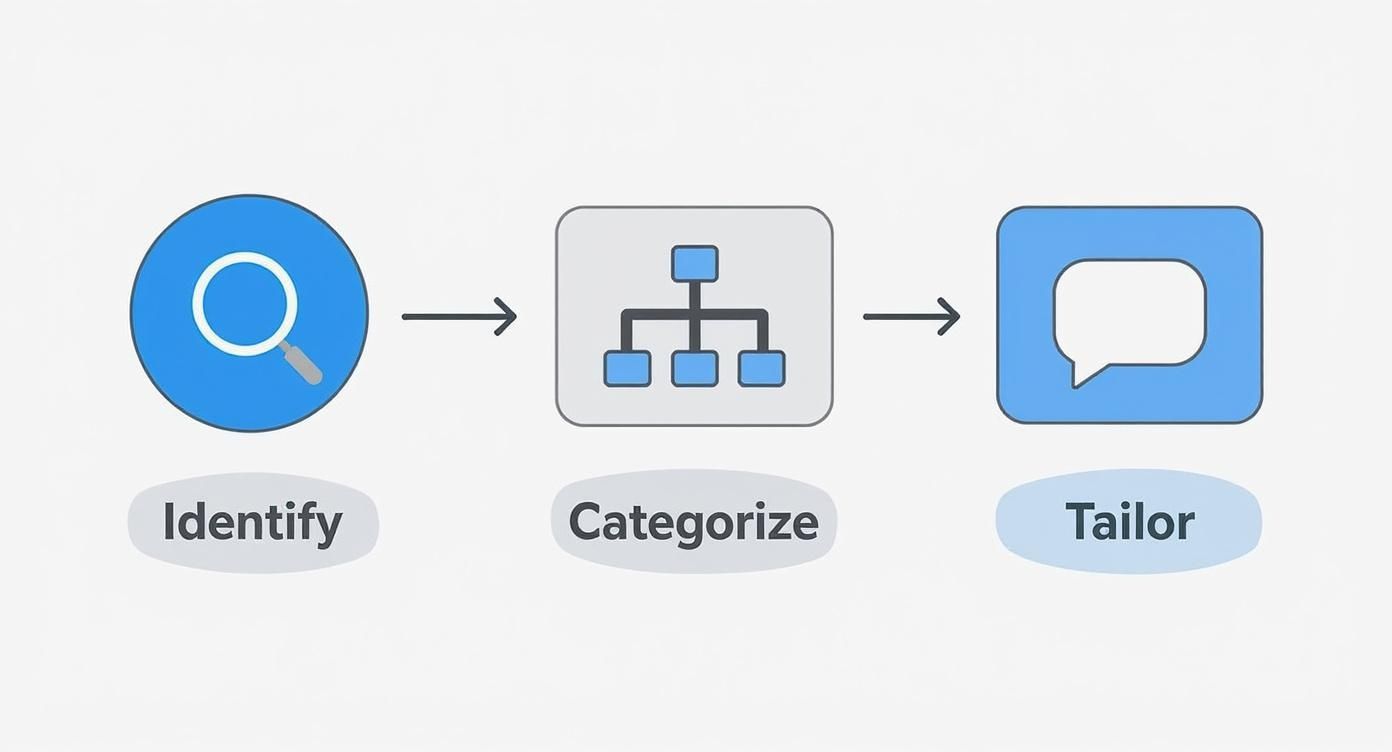
The logic here is simple but powerful: know your audience, categorize your message, and tailor the delivery. That's exactly what your matrix helps you do.
Assigning Owners and Channels
With your communication types listed, the next step is to fill in the crucial details. For every single item, you need to assign a clear owner, set a realistic frequency, and pick the right channel. This level of detail is what prevents common project pitfalls, like burying an urgent risk in a low-priority email chain.
A well-structured matrix prevents what I call
communication chaos.It’s the difference between a team that operates with calm efficiency and one that’s constantly fighting fires because the right information didn't get to the right person.
Documenting these workflows is a lot like creating a standard operating procedure—you’re building a system that can practically run itself. If you want to dive deeper into formalizing processes, our guide on how to write a standard operating procedure has some great pointers.
For example, a daily stand-up for your engineering team is owned by the tech lead. It happens daily at 9:00 AM, and the channel is a dedicated Slack channel like #project-alpha-standup. On the flip side, the monthly steering committee review is owned by the project manager, happens on the first Friday of the month, and is delivered via a formal presentation over Zoom.
Let's put this into practice with a concrete example for a software launch.
Sample Communication Matrix for a Software Launch
This table shows how you might structure communications for a typical product launch, making it crystal clear who is responsible for what.
| Communication Type | Audience | Frequency | Channel | Owner |
|---|---|---|---|---|
| Weekly Project Sync | Core Project Team | Weekly (Mondays) | Zoom Meeting | Project Manager |
| Daily Stand-up | Engineering & QA Teams | Daily | Slack (#dev-team) | Tech Lead |
| Marketing Campaign Update | Marketing & Sales Teams | Weekly (Wednesdays) | Email Summary | Marketing Manager |
| Executive Progress Report | C-Suite, VPs | Bi-weekly | Email & Dashboard | Project Manager |
| Risk/Issue Alert | Project Manager, Tech Lead | As Needed | Direct Slack/Call | Any Team Member |
| Milestone Reached | Entire Company | Per Milestone | All-Hands Email/Slack | Project Manager |
This simple grid turns a complex web of interactions into an easy-to-follow plan. By building out a comprehensive communication matrix, you provide your team with a reliable roadmap for all project interactions, stopping confusion before it ever has a chance to start.
Bringing Your Communication Plan to Life in Your Daily Workflow
Let's be honest—a brilliant communication plan is completely useless if it's just a document collecting digital dust in a forgotten folder. For this strategy to actually work, it needs to become part of the very fabric of your team's day-to-day. The goal is to weave it so seamlessly into the tools you already use that great communication becomes a reflex, not another box to check.
This is where the plan moves from a static document to a living, breathing part of your project. We're talking about embedding these practices directly into platforms like Slack, Asana, or Microsoft Teams, making it the single source of truth for everyone involved.

From Document to Actionable Hub
Today's projects move way too fast for us to be manually chasing down updates. A recent look at 2025 trends shows that communication isn't a side task anymore; it’s now deeply integrated into the project management tools where we spend our time. Platforms like Microsoft Teams, for example, have become command central for countless projects, drastically cutting down the email noise we used to tolerate. You can see more about how project management is evolving on theprojectgroup.com.
To really activate your plan, you have to meet your team where they are. If everyone lives and breathes Slack, then that’s where your communication plan needs to come alive.
Here’s how to do it in the real world:
- Set Up Dedicated Channels: Don't dump everything into one channel. Create specific spaces like
#project-x-mainfor general updates,#project-x-design-feedback, and#project-x-dev-blockersto keep conversations focused and relevant. - Pin Your Key Docs: Take your communication matrix and stakeholder map and pin them right to the top of the main project channel. This gives everyone one-click access and ends the constant digging through shared drives.
- Embrace Threads: This is non-negotiable for sanity. Make it a team rule to use threads for all replies and follow-up discussions. It keeps the main channel clean and ensures conversations stay connected to their original context.
A well-integrated plan completely eliminates the
Hey, where can I find...?question. When the answers are built directly into the workflow, your team gets back hours of precious focus time that would have been wasted on searching and switching gears.
Put Your Communication Cadence on Autopilot
Now for the magic. The real power move is to automate the communication rhythm you so carefully defined in your matrix. By using the built-in features of your tools, you can make your communication cadence happen like clockwork, without you having to manually nudge everyone.
Here are a few ways to set this up:
- Schedule Recurring Reminders: Use your tool's native reminder function to prompt the team for updates. For instance, set a bot to post in your
#project-updateschannel every Friday at 2 PM: “@here Time for our weekly recap! Please share your wins and blockers in a thread below.” - Use Simple Workflow Builders: Tools like Slack have surprisingly powerful (and easy) workflow builders. You could create a simple workflow that triggers a form every morning at 9 AM for daily stand-up notes, then neatly organizes all the responses in a single, easy-to-scan thread.
Automating these touchpoints does more than just ensure consistency; it reduces the mental load for the entire team. To see which platforms excel at this, take a look at our roundup of the best internal communication tools for modern teams.
By embedding your project communication plan sample directly into your everyday tools, you make clarity and alignment the path of least resistance.
How to Know if Your Communication Plan is Actually Working
So, you've built a beautiful communication plan. Now what? How can you be sure it’s actually making a difference? A plan is only as good as its results, and you need to move beyond just having a document to defining what success looks like in the real world. This isn't about tracking fluffy metrics; it's about seeing a real shift in your team's efficiency and clarity.
You'll know it's working when you feel the impact. Are your meetings suddenly shorter and more decisive? Is your team spending noticeably less time hunting down information or asking for clarification on basic tasks? When key stakeholders consistently feel in the loop and confident, that’s your first sign of success.
Look for Outcomes, Not Just Metrics
Forget about counting how many messages were sent. Instead, zoom in on the qualitative results that truly move the needle. The real goal is to create a frictionless environment where communication feels easy and effective.
A great way to gauge this is by simply observing how your team operates:
* Fewer repeat questions. Is the same question popping up over and over in different channels? A successful plan means people know exactly where to find answers, which kills the repetitive back-and-forth.
* Faster decisions. When the right people have the right information at the right time, approvals and key decisions happen much quicker. Delays because someone was out of the loop
should become a thing of the past.
* More proactive updates. You'll notice team members start sharing relevant information without being prompted, simply because the channels and expectations are crystal clear.
A communication plan isn't a
set it and forget itdocument. Think of it as a living guide. The moment it becomes static, it starts losing its value and people will ignore it.
To keep your plan alive and well, you absolutely must build in a feedback loop. This doesn’t have to be some complicated, formal process. A quick check-in during a team meeting or a simple two-question poll can give you a goldmine of feedback. Ask direct questions like, On a scale of 1-5, how clear are our project updates?
or What's one thing we could do better in our weekly sync?
Make Smart Adjustments as You Go
Getting feedback is only half the job. The real magic happens when you use that feedback to make smart, small adjustments along the way. Your plan needs to stay in sync with the project's reality, from the kickoff all the way to the finish line.
Set a recurring reminder for yourself—maybe at the end of each project phase or just once a month—to pull up your communication matrix. Get the team involved and ask some pointed questions:
* Are any of our scheduled meetings starting to feel pointless or redundant?
* Is a particular Slack channel getting too noisy and losing its purpose?
* Have new stakeholders joined who we need to loop into the plan?
This continuous cycle of review and refinement is what separates a decent project communication plan sample from a truly great one. By regularly tuning your approach, you ensure the plan remains a powerful tool that actively cuts down on confusion, rather than becoming a rigid set of rules that everyone ignores. This is how you keep your communication sharp, relevant, and effective from start to finish.
FAQs: Navigating the Real-World Bumps in Your Communication Plan
Even with the best template in hand, you're going to hit some snags. That’s just the reality of managing projects with real people. The strongest plans aren't the ones that are perfect on paper; they're the ones built to handle the messy, unpredictable parts of working together.
Let’s tackle a few of the most common questions that pop up once a communication plan meets the real world. Think of this as your field guide to keeping things on track.
What If Stakeholders Just Ignore the Plan?
Ah, the classic. You've built a beautiful, streamlined process, but a key stakeholder keeps dropping urgent
requests in random Slack DMs or firing off one-off emails. It's frustrating, but don't take it personally. See it as feedback—it often just means their old habit is easier than your new process.
The key is gentle, consistent redirection.
When that email lands in your inbox asking for an update you've already scheduled, try responding with something like: Great question! I just posted the latest status report in our pinned `#project-updates` channel, right on schedule. You'll find all future updates there, so you always know where to look.
You're not scolding; you're just reinforcing the new, better way.
How Much Communication Is *Too* Much?
There's a razor-thin line between keeping people informed and completely overwhelming them. If you notice your team's eyes glazing over when you send a message, it’s a red flag that you've crossed it. You're creating noise, not clarity.
The fix? Relevance.
A developer probably doesn’t need a play-by-play of the marketing team's creative brainstorm. The CEO definitely doesn’t need daily bug reports. Go back to your communication matrix and ask a brutally honest question for every single item: Does this person *need* this to do their job, or is it just 'nice to know'?
If it's the latter, cut it back. Maybe it becomes a weekly digest or gets moved to an optional, FYI-only channel.
A successful plan isn’t measured by the volume of messages sent, but by the clarity and action it creates. If your communication isn't driving progress or alignment, it's just noise.
How Do We Adapt the Plan When Everything Changes?
Let's be real: no project survives first contact with reality. A key stakeholder leaves, the scope creeps, or a new risk pops up out of nowhere. Your communication plan needs to be a living, breathing document, not a stone tablet.
Build in checkpoints. Schedule a quick 15-minute review at major project milestones or, at a minimum, once a month. This is your chance to ask a few simple questions:
- Who's new? Did a new team lead join? Do they need to be added to the weekly leadership sync?
- What's different? Has the timeline been compressed? Maybe that means leadership updates need to become more frequent.
- What's not working? Are people consistently skipping that one standing meeting? It might be time to kill it or change the format.
Being able to adapt on the fly is what separates good project managers from great ones, and it all starts with a solid communication framework you can easily tweak.
Imagine a workday where you never have to search for information again. No more digging through Google Drive, no more asking the same questions in Slack, no more context switching. With SAI, you simply ask your question in Slack and get an instant, accurate answer. It’s like having your entire company’s knowledge base available in a single conversation. Stop the endless hunt for information and give your team the gift of uninterrupted focus. Add SAI to your Slack workspace for free and transform your workday.
