Help Desk Software Comparison The Definitive Guide for Teams in Slack
When you're comparing help desk software, the biggest difference isn't the feature list—it's the workflow. Traditional tools pull your team out of their rhythm, forcing them into separate apps and ticket queues. Modern, AI-powered solutions, on the other hand, bring the answers directly into Slack. This small change eliminates costly context switching and completely redefines how your team gets work done.
Beyond the Ticket Queue: Why Modern Support Lives in Slack

Think about the last time you needed a quick answer from another department. The process is probably all too familiar. You stop what you're doing, open a new tab, and navigate to some clunky help portal or a sprawling knowledge base. You spend minutes just trying to guess the right keywords to find a relevant article.
If that doesn't work, you’re stuck submitting a formal ticket, filling out a bunch of fields, and then just… waiting. This constant context switching is more than just an annoyance. It's a genuine productivity killer that drains focus and momentum from your entire organization. Every time you're forced to disengage, it takes real mental effort to get back on track.
The True Cost of Siloed Information
The old support model was built on a flawed idea: that information should live somewhere else, separate from where work actually happens. This approach creates information silos that make everyone less effective. Your team’s collective knowledge—all the answers shared in past conversations and documents—is locked away, completely out of reach in the moments you need it most.
This inefficiency is exactly why the help desk software market has seen such explosive growth. Valued at $11.24 billion in 2024, it's projected to hit $23.58 billion by 2035, growing at a steady 6.97% CAGR. This boom isn't just about new tech; it highlights how urgently businesses are searching for a better way to handle rising support demands.
But the solution isn't just a better ticketing system. It's getting rid of the system entirely.
Imagine a workflow where you never have to leave Slack to get an answer. Instead of digging through multiple platforms or interrupting a colleague, you simply ask a question in a channel and get an instant, accurate response.
This is the power of conversational AI. It meets your team right where they already work, turning your daily collaboration hub into an intelligent, self-service support layer. Support stops being a separate, disruptive process and becomes a seamless part of the workflow. By keeping everyone in one place, your team reclaims its focus, gets answers immediately, and keeps moving forward.
To see how you can make this a reality, check out our guide on 10 transformative help desk best practices for Slack-based teams in 2025.
How to Evaluate Modern Help Desk Software
It’s easy to get lost in the weeds when you start comparing help desk software. Every vendor’s website throws a similar list of features at you: ticket management, reporting, integrations. But focusing on these traditional metrics misses the most important question: does this software actually cut down on interruptions, or does it just create new ones?
The old way of thinking was all about how efficiently an agent could process a ticket. But today, the real win is getting a question answered instantly without pulling anyone away from deep work. A truly modern help desk shouldn't just be a tool for organizing chaos—it should prevent that chaos from ever starting.
From Ticket Management to Workflow Enhancement
Here’s the fundamental flaw with most old-school evaluations: they treat support as a separate, isolated task. The moment you force your team to open another app, log into a portal, or hunt through a siloed knowledge base, you’re encouraging the exact kind of context-switching that kills productivity. The goal isn't just closing tickets faster; it’s making them obsolete.
This demands a whole new set of benchmarks—ones that measure real business outcomes, not just software features. Instead of tracking ticket volume, we should be counting how many times a team member gets an instant answer without ever having to leave Slack.
Introducing Modern Evaluation Criteria
Let's reframe the help desk software comparison around what actually moves the needle for today’s fast-paced, collaborative teams. These criteria are all about enhancing the workflows you already have, not forcing new ones on you.
Resolution Speed (Inside Slack): This isn't your grandfather's
time to first response.
This is about the time elapsed from when a question is asked in a Slack channel to when a correct answer is delivered right there. A great score here means your team stays in flow, with zero context switching.Effortless Knowledge Creation: Imagine your team never needing to search for information in multiple places again. Instead of manually writing wiki articles, the best systems capture expertise organically. When an expert answers a question in Slack, that knowledge becomes instantly reusable for the next person, transforming conversations into an always-on resource.
Reduced Expert Interruptions: Here’s a critical success metric: how often are your senior engineers and subject matter experts shielded from answering the same questions over and over? The software should be the first line of defense, handling the common stuff so your experts can focus on high-value problems.
The ultimate test of any help desk software is simple: Does it make your team’s knowledge more accessible, or does it lock it away behind another login screen? The right tool makes expertise flow effortlessly.
When you use these benchmarks, your evaluation stops being a technical checklist and becomes a strategic assessment of your team's productivity. You start asking questions that uncover a tool's real value. For a deeper look at this new approach, explore our guide to help desk automation software and see how it can reshape your team’s dynamics.
This modern perspective changes the entire conversation. The help desk software comparison is no longer a simple feature-for-feature battle. It's a serious discussion about your company's culture. Are you building a culture of interruption and waiting, or one of instant empowerment and shared knowledge? The right software doesn't just manage support—it actively helps you build a smarter, more efficient organization.
Help Desk Software Evaluation Scorecard
To put this into perspective, let's look at how different types of help desk solutions stack up against these modern criteria. This scorecard gives you a high-level view before we dive deeper into specific tools.
| Evaluation Criterion | Traditional Help Desk Suite (e.g., Zendesk) | Niche Ticketing Tool (e.g., Jira Service Management) | Conversational AI Assistant (SAI) |
|---|---|---|---|
| Resolution Speed (Inside Slack) | Poor. Requires leaving Slack to create/view tickets. Slows down resolution. | Fair. Integrations exist but still center around a ticket, not the conversation. | Excellent. Designed to answer questions instantly and directly within Slack. |
| Effortless Knowledge Creation | Poor. Requires manual creation of knowledge base articles, a separate task. | Fair. Can link to Confluence, but knowledge capture is still a manual process. | Excellent. Automatically learns from conversations and expert answers in real-time. |
| Reduced Expert Interruptions | Fair. Can deflect some issues with a knowledge base, but many still become tickets. | Fair. Good for structured IT/dev requests but less effective for ad-hoc questions. | Excellent. Acts as the first line of defense, answering 70% of questions instantly. |
| Productivity Impact | Negative. Pulls users out of their primary workspace (e.g., Slack), causing context switching. | Neutral. Keeps technical teams in their ecosystem but can be clunky for other departments. | Positive. Keeps everyone in their workflow, providing answers without disruption. |
As you can see, the model you choose has a massive impact on whether you're building a culture of interruption or a culture of flow. The traditional tools were built for a different era of work. Now, let’s look at how this plays out with specific platforms.
A Head-to-Head Analysis: Putting Help Desk Software to the Test
Forget the sterile feature checklists for a moment. To really understand how these tools work, we need to see them in action. Let’s walk through a scenario that happens every day in countless businesses and see how each type of help desk handles it. This simple test reveals the deep-seated differences between tools that force you into new workflows and those that just make your existing ones work better.
Here’s the scene: Sarah, a new marketing specialist, just joined the team. She's ready to jump into a project but hits a common roadblock—she needs the company’s brand assets. It’s a simple question your team has answered a hundred times. How each platform handles this request tells you everything.
The Traditional Suite: The Portal Detour
Sarah is in Slack, her team’s central hub. She posts in the #marketing-team channel: Hey, where can I find the latest brand logos and assets?
With a traditional help desk suite like Zendesk plugged in, the response isn't an answer. It's a roadblock. A bot pipes up with something like, Please submit a ticket through our IT support portal for asset requests.
Just like that, Sarah's momentum is gone.
Her new workflow is a mess of context switching:
* Stop everything: She has to drop what she was doing.
* Leave her workspace: She clicks out of Slack, opens a new browser tab, and hunts for a portal she’s probably never seen before.
* File a formal ticket: She’s forced to fill out a clunky form, duplicating the simple question she already asked into fields like 'Category,' 'Priority,' and 'Subject.'
* Wait in line: Her request gets dumped into a queue, where it sits until an IT agent finally sees it, finds the link, and pastes it back into the ticket.
Hours later, an email notification arrives. She clicks back into the portal and, at long last, gets the link. What should have been a 10-second exchange became a multi-step, delayed process. This isn't just frustrating for Sarah; it’s a productivity killer that keeps your expert teams bogged down answering the same simple questions over and over.
The Specialized System: The Structured Request
Okay, let's try that again, this time with a more specialized tool like Jira Service Management. These systems are beasts for managing structured, project-based tasks, particularly in IT and development.
When Sarah asks her question in Slack, the Jira integration is a bit smoother. It might pop up a form allowing her to Create a Request
right there in the channel. She stays in Slack a little longer, which is a small win.
But the core issue is still there. She’s being forced to package a simple question into a formal ticket. The entire system is built around cataloging work for the support team’s backlog, not empowering Sarah with an instant answer. The focus is on the agent’s process, not the employee's need for information now.
Even though it’s better integrated, this approach still wraps a simple question-and-answer in red tape. It turns a quick chat into a formal task that has to be processed, tracked, and closed out.
The old way of thinking is all about managing requests. The goal today should be to eliminate them. Traditional tools are built to manage tickets; conversational AI is built to make team knowledge instantly available.
The Conversational AI Assistant: The Instant Answer
Now, let's see how this plays out with a conversational AI assistant like SAI living right inside your Slack workspace. The entire game changes.
Sarah asks the exact same question in the #marketing-team channel: Hey, where can I find the latest brand logos and assets?
Imagine a world where that question never interrupts another human being. A few weeks ago, a senior designer answered the same question for someone else. SAI saw that exchange and instantly learned. It wasn’t a separate task; it just happened as part of the normal workflow.
Within seconds, SAI pops into the thread with a direct answer: Here is the link to our Brand Assets folder: [link]. You'll find all the latest logos, fonts, and guidelines there!
Let's unpack the transformation:
* Zero context switching: Sarah never left Slack. She asked, got an answer, and kept working. No friction.
* Instant resolution: The answer arrived in seconds, not hours. The bottleneck vanished.
* No manual work: The team’s knowledge base built itself. No one had to open a separate tool to create an article.
* Experts stay focused: The IT team and senior designers were never pulled away from their deep work to handle a question they’d already answered.
This isn’t just about closing tickets faster; it’s a complete shift in how a team operates. The focus moves from managing a queue of problems to building a self-service ecosystem of knowledge. To see how this comes to life, check out our ultimate guide to internal help desk software.
This kind of immediate, in-workflow support is becoming a must-have. Small and medium enterprises (SMEs), which made up the largest market segment in 2023, are driving this change. The help desk market is projected to explode from $11.85 billion in 2023 to $29.40 billion by 2033. For these agile companies that live in Slack, wiping out the high cost of task-switching is the key to scaling without burning out their teams. You can read more about this trend in the full help desk software market findings.
Ultimately, this help desk software comparison boils down to a clear choice. You can stick with a system that forces your team into a rigid, slow process of ticketing and waiting. Or, you can embrace a tool that works within the collaborative flow you already have, making your entire team smarter and more productive with every conversation.
Picking the Right Tool for the Job
Choosing the right help desk software isn't about finding the one with the most bells and whistles. It’s about finding the tool that solves the real-world problems bogging your team down every single day. The best solution should feel less like a new system to master and more like a natural fit for how you already operate.
Let's walk through three common business scenarios. See which one sounds most like your current situation—it's the fastest way to pinpoint the type of tool that will make the biggest difference for your team right away.
Scenario 1: You're Drowning in Customer Questions from Every Direction
Picture this: customer questions are flooding in from email, live chat, social media, maybe even phone calls. Your team's biggest headache isn't just answering the questions; it's the constant struggle to keep everything organized and make sure nothing gets lost in the shuffle. The real enemy here is the chaos of scattered conversations.
If that hits close to home, a traditional help desk suite like Zendesk is probably your best bet. These platforms are purpose-built to act as a central command center for all your external communications. Their superpower is pulling every single customer interaction into one unified ticket queue.
This approach brings immediate order to the chaos by:
* Creating a single source of truth: No more digging through different inboxes to piece together a customer's history. It's all in one place.
* Ensuring clear ownership: Every single inquiry gets assigned to someone, so you know a follow-up is guaranteed.
* Giving you powerful reporting: You can finally track metrics like ticket volume, response times, and customer satisfaction across every channel.
When your main goal is to tame the beast of external customer support, the rigid structure of a traditional help desk is a lifesaver. It’s designed specifically to manage high volumes of diverse inquiries with methodical precision.
Scenario 2: Your Internal Experts are Stuck on Repeat
Now, let's look at a different kind of problem. Your IT, HR, and Operations teams are incredibly talented, but they're trapped in Slack, answering the same simple questions over and over. What's the Wi-Fi password?
How do I request a new monitor?
Where's the expense report template?
The issue isn't about managing external customers; it's about liberating your internal experts from the death-by-a-thousand-cuts of repetitive, low-impact work. Every minute they spend re-typing an answer is a minute they aren't spending on the high-stakes projects that actually move the needle.
The real win isn’t better ticket management—it's getting rid of the ticket entirely. The goal is to give your team back their time and focus.
This is exactly where a conversational AI assistant like SAI shines. Instead of forcing employees to navigate a clunky ticketing portal, SAI lives right inside Slack and delivers instant answers. It learns from past conversations, so when an expert answers a question just once, that knowledge is captured and automated for good.
The result is a fundamentally different workflow. Your experts are shielded from constant interruptions, and the rest of the team gets what they need without having to wait. No portal, no queue—just immediate answers right where they're already working.
Scenario 3: Your Team is Growing Fast and Knowledge is Slipping Away
Finally, think about a company in hyper-growth. New people are starting every week, but all the crucial tribal knowledge
is stuck in the heads of a few senior employees. Your biggest fear is that as you scale, this invaluable expertise gets watered down or lost completely. The thought of building and maintaining a traditional knowledge base feels like a daunting, full-time job you just don't have time for.
What you need is a way to create a culture of shared knowledge that builds itself organically, without adding more work to anyone's plate. You need a system that gets smarter with every conversation your team has.
This, again, is a perfect use case for conversational AI like SAI. Its ability to learn from everyday Slack chats creates a self-building knowledge base with zero extra effort. When a senior engineer explains a complex process in a public channel, that explanation instantly becomes a searchable, reusable asset for the entire company.
This transforms your company's knowledge from a static document that's quickly outdated into a living, breathing part of your daily workflow. It ensures that as your team grows, its collective intelligence grows right along with it—accessible to everyone, anytime.
Making the Right Choice for Your Team
After breaking down all the features and specs, the decision boils down to one simple question: where is your team hurting the most? The best tool isn't the one with the longest feature list. It's the one that directly solves the daily friction that’s slowing you down. You’re not just choosing a product; you’re committing to a new workflow.
Think about it. Is your team drowning in the same repetitive questions over and over again inside Slack? Or is the bigger nightmare trying to manage a flood of customer tickets coming in from email, chat, and phone calls? Your answer points you to the right solution.
Charting Your Path to Better Support
The path forward becomes clear once you identify your biggest bottleneck. Are you focused on external customer support, streamlining internal operations, or building a culture where knowledge is shared, not siloed? This flowchart can help you visualize the decision based on what your team needs right now.
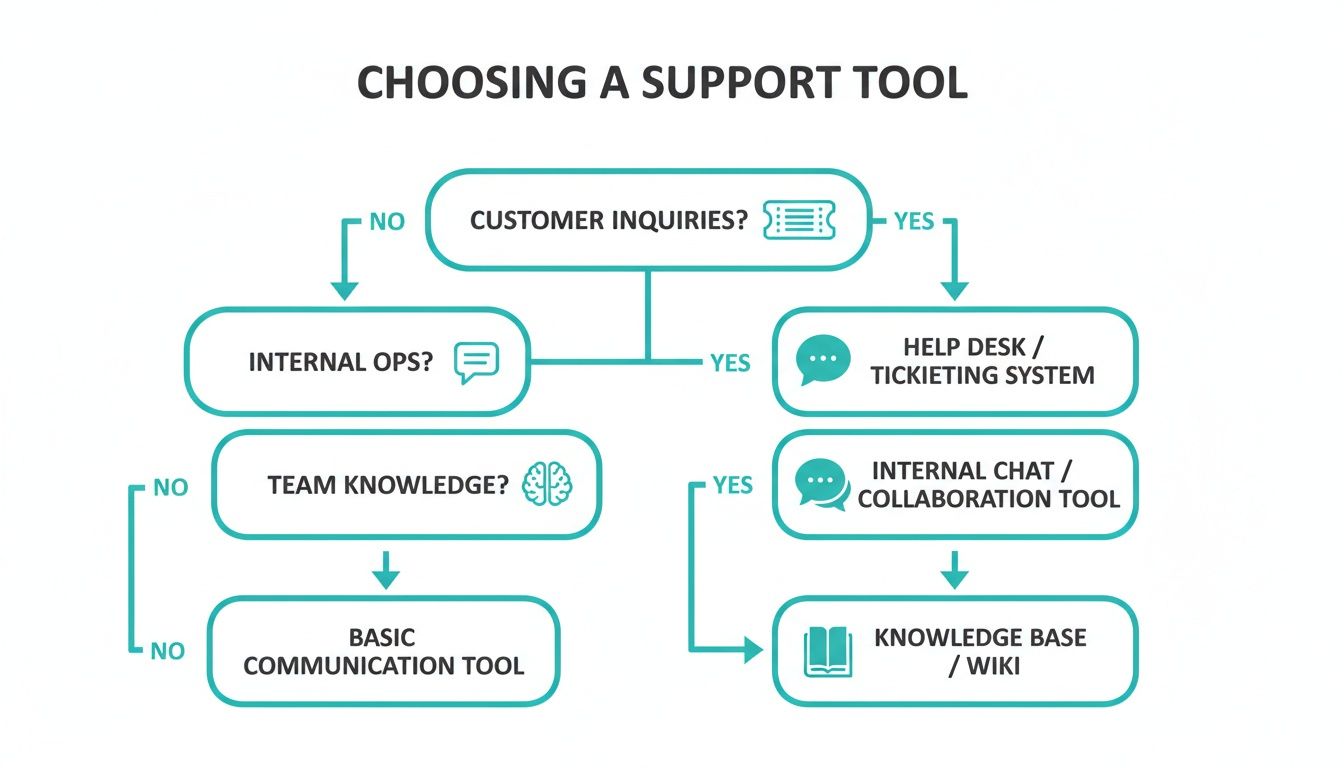
As you can see, the workflows are distinct. Traditional help desks excel at consolidating external tickets from many sources. Modern, in-workflow tools are built for creating internal knowledge and operational speed right inside platforms like Slack.
For teams whose days are constantly derailed by shoulder taps and repeat questions in chat, the choice is obvious. The goal isn't just to manage interruptions—it's to stop them from happening in the first place. This is how you move from a purely reactive support model to a proactive one where knowledge is instantly available to everyone.
The Shift to Proactive, In-Workflow Support
There’s no doubt that cloud-based help desk software is the standard, projected to command 61.3% of revenue share by 2025. And while large enterprises make up a 58.7% share of that market, the real innovation is happening with smaller, more agile teams who need efficiency above all else. For them, tools like SAI—which live directly inside Slack channels—cut through the noise of traditional help desks. They deliver immediate, context-aware answers without forcing anyone to switch apps. You can dig into more of these market trends and their impact on support teams.
The ultimate transformation isn't finding a better way to log tickets. It's creating a culture where your team never has to search for information in multiple places again—they just ask and get an instant answer.
If your main objective is to build a culture of shared knowledge and drastically cut down on interruptions inside Slack, SAI is the clear winner. It was built for one thing: to make your team’s collective intelligence instantly accessible, right where the work gets done.
Imagine a day where your experts aren't pulled away to answer the same question for the fifth time. Picture new hires getting up to speed in record time because every bit of tribal knowledge is right at their fingertips. This isn't just about saving a few minutes here and there; it’s about empowering your entire team to stay focused and productive.
You can see this change for yourself. There’s no risk and no complicated setup. Add SAI to a single Slack channel for free and watch it start turning your team's conversations into an effortless, self-building knowledge base.
Got Questions About Help Desk Software? We've Got Answers.
When you're comparing help desk software, a lot of questions pop up. It's not just about features; it's about how a new tool will genuinely impact your team's daily grind. Let's get straight to the point and answer the big ones.
Can Conversational AI Really Replace My Help Desk?
Honestly, it depends on what you're using your help desk for. If you're managing a flood of external customer tickets from email, phone, and social media, a traditional system is still your best bet. Those tools are built for that exact purpose.
But if your biggest headache is the never-ending stream of internal questions inside Slack, then a conversational AI like SAI can absolutely take over. Think about it: your IT, HR, and Ops teams are probably stuck answering the same questions over and over. Instead of forcing someone to log into a clunky portal for a simple password reset question, they just ask in Slack and get an answer instantly.
This isn't about replacing complex ticket management. It's about making a huge chunk of those repetitive internal tickets disappear entirely. For a lot of companies, that means they can ditch their internal help desk altogether.
How Long Does It Take to Get an AI Assistant Running?
This is where things get interesting. We've all been through the pain of traditional software rollouts—weeks of configuration, painful data migration, and endless training sessions. A modern, Slack-native AI assistant flips that script completely.
The change is immediate. Seriously. Because tools like SAI learn directly from your team’s existing conversations, there's basically no setup. You just add it to a Slack channel, and it starts working. It learns from the very next question an expert on your team answers.
You don't have to spend a weekend building a knowledge base from scratch. Your team’s everyday work is the knowledge base, and it gets smarter with every single interaction. You'll see the value in minutes, not months.
Is It Secure to Let an AI Into Our Slack Workspace?
Security is non-negotiable, and any modern AI tool worth its salt is built with enterprise-grade standards from day one. You should always look for solutions designed to meet top-tier security protocols, so you know your data is locked down.
Here’s what you should expect as a baseline:
* Data Encryption: All your information should be encrypted, both when it's moving and when it's stored. No exceptions.
* Access Controls: The AI should only have access to the public channels you explicitly authorize. It shouldn't be wandering around your private conversations.
* Compliance Certifications: Look for vendors with certifications like SOC 2. It’s a clear sign they take secure data management seriously.
The whole point is to bring smart automation into your workflow without opening up security holes. You should feel confident that your team's conversations and data are safe. Any decent help desk software comparison will put security front and center, letting you innovate without taking on unnecessary risk.
Ready to see how shared knowledge transforms your team? Add SAI to a Slack channel and get instant answers to your team’s repetitive questions today. It’s free to start. Get started at https://sai-bot.ai.
