How to Build a Knowledge Base That Actually Gets Used
An effective knowledge base isn't a library of documents you have to hunt through. It’s the end of hunting for information, forever. It's about getting instant, reliable answers right where your team works—Slack. This isn't about building another dusty wiki; it's about creating a single source of truth that finally ends the constant interruptions and frees everyone to do the work that matters.
Imagine a Workday Without Constant Interruptions

Think about your ideal workday. Imagine never having to open another tab, dig through Google Drive, or ask a colleague where to find something. Imagine just asking a question in Slack and getting the right answer, instantly.
For most teams, that's a dream. The reality is a chaotic hunt for information—a daily grind of searching old Slack channels, sifting through shared drives, and navigating confusing wikis. It’s a silent killer of productivity and a massive drain on morale.
This guide is about making that dream your new reality. We’re not just covering the technical steps. We're showing you how to build a system that works the way your team does, delivering instant answers inside Slack. Imagine a world where your team's collective knowledge is always at their fingertips.
The True Cost of Just a Quick Question
Every time someone taps you on the shoulder (physically or digitally) with a quick question,
it carries a hidden tax. That 30-second interruption isn't just 30 seconds. It completely shatters your concentration, forcing a mental context switch that's incredibly expensive.
In fact, research shows it can take over 23 minutes to fully get back on track after just one interruption. Multiply that by dozens of questions a day across your whole team, and you’re looking at a staggering amount of lost time.
This constant context-switching snowballs into bigger problems:
* Deep work becomes impossible: How can anyone tackle complex problems when their attention is fragmented all day?
* Frustration builds: Team members get blocked waiting for answers, while your experts feel like they're running a non-stop help desk.
* Knowledge gets siloed: Critical information ends up trapped in DMs and private channels, completely lost to everyone else who will inevitably have the same question later.
This cycle of interruption and information hunting isn’t just inefficient—it’s a genuine barrier to growth. Your team's most valuable asset, their collective knowledge, is scattered and inaccessible. It forces them to solve the same problems over and over again.
The Shift to Effortless Knowledge Flow
Now, picture the alternative. A new hire has a question about the expense policy. Instead of pinging the finance manager and waiting, they ask SAI in Slack and get an immediate, accurate answer. A developer needs an API key for the staging environment. They don't have to interrupt a senior engineer; they just ask in Slack and get it instantly.
That's the future of work a properly integrated knowledge base delivers. It fundamentally changes your team's dynamic from reactive and interrupted to proactive and empowered. For a closer look at making this happen, check out our step-by-step guide to ending repetitive Slack questions.
Ultimately, the goal is to create a calm, focused environment where knowledge flows freely, allowing everyone to do their best work without all the noise.
Your Blueprint for a Living Knowledge Base
Building a team knowledge base doesn't have to be a massive, soul-crushing project. The old way of thinking—trying to document every single process before you even launch—is a recipe for failure. The secret is to start small, get some quick, high-impact wins, and build momentum from there.
Think about what happens right now. Your team spends hours hunting for answers, derailing their focus and pulling you into constant interruptions. This isn't just an annoyance; it’s a serious financial drain. In fact, wasted time searching for information can cost companies up to 25% of their annual revenue. For a Fortune 500 company, that number can balloon to a staggering $2.4 billion.
Flipping that script is where the magic happens. When you get knowledge management right, a full 80% of employees report they can make better, sharper decisions.
The goal isn't to build a rigid, static library that’s outdated the moment it goes live. We’re creating a living, breathing resource that grows with your team—a system that makes finding information feel instant, not like an archeological dig.
Find Your High-Impact Starting Point
The fastest way to get your knowledge base off the ground is to solve a real, painful problem first. Don't try to boil the ocean. Instead, apply the 80/20 rule: find the 20% of questions that are causing 80% of the interruptions.
So, where are these hotspots? They're usually hiding in plain sight in your Slack channels:
- Your Onboarding Channel: New hires are a goldmine of common questions. What are they all asking in their first 30 days? That's your Day One onboarding playbook, just waiting to be built.
- The IT Support Channel: Think about the classics: password resets, software access requests, VPN setup guides. These are perfect candidates for instant, automated answers.
- Team-Specific Help Channels: Is the marketing team constantly asking where to find the latest brand assets? Does the sales team need constant clarification on pricing tiers? Start right there.
By homing in on one specific team or workflow, you prove the value of this system immediately. That quick win makes it infinitely easier to get buy-in from everyone else when you're ready to expand.
The most effective knowledge base isn’t the one with the most articles; it’s the one that solves the most frequent problems. Start where the pain is most acute, and you'll create advocates from day one.
Before we dive deeper, let's visualize the transformation we're aiming for. It's a fundamental shift from chaos to clarity.
Before and After A Slack-Native Knowledge Base
| Challenge | The Old Way (Scattered Information) | The New Way (With an Integrated Knowledge Base) |
|---|---|---|
| Finding Answers | Team members hunt through Slack channels, DMs, and shared drives. | Answers are instantly available in Slack. Just ask SAI and get what you need. |
| Repetitive Questions | Experts answer the same questions over and over, losing hours of productive time. | Common questions are answered automatically, freeing up experts for high-impact work. |
| Onboarding | New hires feel lost, constantly pinging mentors for basic information. | A structured knowledge base guides new hires, giving them confidence from day one. |
| Decision-Making | Decisions are delayed while people search for the right data or context. | Information is accessible on-demand, leading to faster, more informed decisions. |
| Knowledge Silos | Critical information is trapped in individual DMs or private channels, lost forever. | Knowledge is captured from conversations and made accessible to the entire organization. |
This table isn't just about efficiency; it's about building a smarter, more self-sufficient culture. That's the real power of an integrated system.
Design for Speed and Simplicity
Once you've picked your starting point, the next step is designing a simple structure. Complexity is the enemy of adoption. If people need a map to navigate your knowledge base, they just won't use it. To really get this right, you can explore the core principles of what a knowledge management system is and how its design impacts usability.
Skip the Complicated Folders
First things first: forget trying to build a perfect, multi-layered folder system. In a Slack-first world, search is king. People aren't going to click through a labyrinth of nested folders; they're going to ask a question. Your architecture should support that natural behavior with simple, intuitive tags or categories like HR Policies,
IT Guides,
or Marketing Templates.
Create Minimalist Templates
Your content templates need to be incredibly easy to fill out and even easier to read. A heavy, bureaucratic template just creates friction and actively discourages people from contributing.
Think about a dead-simple template with just three key sections:
- The Question: What specific problem does this solve? (e.g.,
How do I request PTO?
) - The Answer: A short, direct solution. Use bullet points or a numbered list to make steps crystal clear.
- Key Details: Who owns this process? When was it last updated? Is there a link to a more detailed document somewhere else?
This minimalist approach ensures your knowledge base is built for speed and clarity from the very beginning. Your team can add new information in minutes, and anyone can find what they need in seconds. That creates a virtuous cycle of use and contribution that helps the system grow all by itself.
Capture Knowledge Without Adding More Work
Want to know the number one reason knowledge bases wither and die? It’s surprisingly simple: they feel like a chore.
Asking your busiest experts to stop what they're doing, open yet another tab, and write down something they just explained in Slack is a fundamentally broken process. That friction is precisely why most internal wikis end up as digital ghost towns.
But what if your knowledge base could build itself from the conversations you’re already having? Imagine a world where you never have to ask someone to please document that.
This isn't some far-off idea; it's about fundamentally changing how we think about managing knowledge. It’s about capturing team wisdom right at the source, automatically.
This is a massive shift. The global knowledge management market is on track to explode to over $3.5 trillion by 2034, and it's because teams are drowning. Fragmentation is the silent killer—a recent study found 36% of companies are juggling three or more knowledge tools, and a staggering 31% don't even know how many they have. This chaos just leads to duplicated work and frustrated people. In contrast, the companies that get this right see 39% better business execution and 35% gains in productivity. You can dive into more of these knowledge management trends and statistics to get the full picture.
Let Your Experts Do What They Do Best
Think about a scene that plays out dozens of times a day in your company. A junior developer gets stuck on a tricky deployment and asks for help in the #dev-team Slack channel. A senior engineer, in between meetings, fires off a brilliant, detailed answer that unblocks not just the one person, but a few others who were watching.
In the old model, that priceless insight just evaporates. It gets buried under a mountain of new messages in hours, lost forever. The next time someone has that exact same question, the whole cycle of interruption starts all over again.
Now, picture a different outcome. As soon as that senior engineer posts their solution, an AI assistant like SAI instantly recognizes it as valuable knowledge. With a simple emoji reaction or a single click, that entire exchange—the question, the surrounding context, and the expert answer—is captured, verified, and added to your knowledge base.
The next person who asks a similar question gets that same expert answer, instantly, without ever interrupting anyone. The senior engineer never had to leave Slack, open a different tool, or do any manual data entry. They just did their job, and the knowledge base grew smarter because of it.
This approach transforms knowledge capture from a burdensome task into a natural byproduct of just talking to each other.
This is the core idea behind building a knowledge base that actually works. You start with the real needs of your team and build from there.
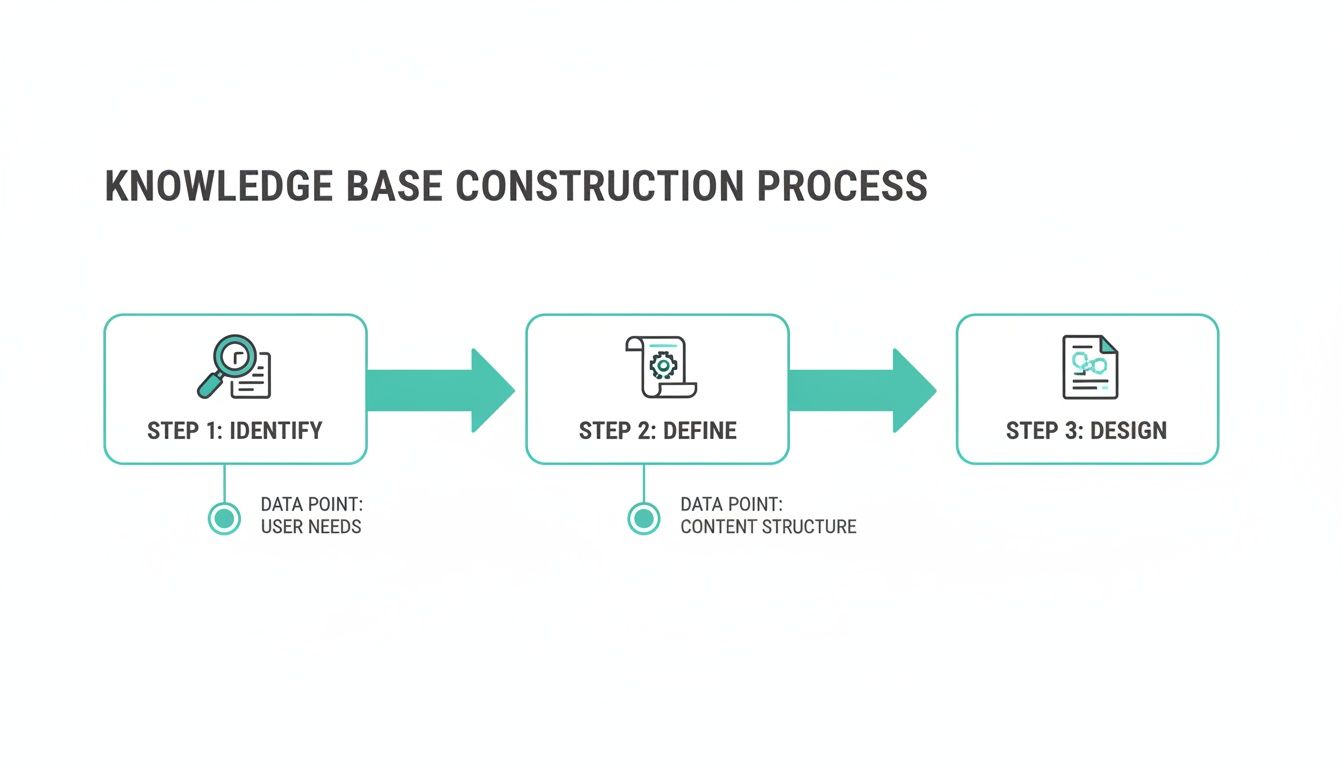
The key takeaway is that a great knowledge base always starts with a deep understanding of what your users actually need, which then directly informs a logical content structure and a user-friendly design.
Start Building from Day One with Zero Setup
This zero-setup
philosophy is absolutely crucial for getting people on board. The goal is to start building a rich repository of team wisdom from the moment you turn the system on, without any complex configurations or tedious manual work. The best tools simply learn from the natural flow of conversation, identifying patterns and surfacing potential knowledge base entries all on their own.
This approach has a few powerful benefits:
- It’s effortless: Nobody on your team has to change how they work. They just keep collaborating in Slack like they always have.
- The content is relevant: The knowledge being captured is based on the real questions your team is actually asking, which guarantees its value.
- It’s immediate: You don't have to wait for some massive, months-long documentation project to finish before you see results. Your knowledge base starts providing real value within days.
Of course, most teams already have existing documentation scattered across Google Drive, Confluence, or Notion. A modern system doesn't force you to abandon those resources. Instead, you can seamlessly integrate them to seed
the knowledge base, giving your team a valuable, searchable resource from the get-go. The AI can then pull answers from both your Slack conversations and these connected documents, creating a single, unified source of truth.
Make Information Instantly Discoverable in Slack
Let's be real. The most beautiful, comprehensive knowledge base on the planet is completely useless if your team can't find what they need in seconds. If finding an answer involves opening another tab, digging through a clunky wiki, or sifting through a maze of Google Drive folders, people just won't do it. They'll ping a coworker instead. Every time.
The goal isn't just to store information; it's to deliver answers right where the work happens—inside Slack. The moment someone has a question, the answer should be right there. No context switching, no searching, no waiting.
Why Simple Keyword Search Is Broken
We’ve all been there. You type PTO policy
into the search bar and get a dozen irrelevant results from two years ago. Traditional search fails because it's literal. It relies on you guessing the exact keywords used in a document title. If you search for tax form
but the official doc is called W-2 Retrieval Process,
you get nothing.
That friction is the enemy. It's what drives people to give up and default to the path of least resistance: interrupting someone else.
But what if your knowledge base could understand what you mean, not just what you type? Modern AI-powered systems do exactly that. They don't just match keywords; they understand intent.
A team member can ask in their own words, just like they'd talk to a colleague:
* How do I get my W2?
* Where's my tax form?
* I need my end of year pay stuff.
An intelligent system recognizes these are all the same question and delivers the one correct answer, instantly. This shift from keyword-matching to intent-based search is the single most important factor in getting your team to actually use the knowledge base.
Forget about rigid folder structures that nobody clicks through. The future of knowledge management is a powerful, intuitive search that feels less like a database and more like asking your smartest teammate a question.
Design for Discovery, Not Just Storage
Since search is how people will find information 99% of the time, your entire organization strategy should support it. Stop wasting weeks designing a perfect, multi-level folder hierarchy. It’ll be outdated in a month anyway.
Instead, build a more fluid system designed for the fast-paced flow of Slack.
- Embrace Smart Tagging: Use simple, intuitive tags to create broad categories. Think
#hr-policy,#it-guide, or#marketing-assets. This lets you group content without locking it into a single, restrictive folder. - Let AI Surface Answers Proactively: The best systems don't even wait for a search. An AI assistant like SAI can monitor channels for common questions and proactively suggest answers from the knowledge base, often resolving an issue before a human even has to respond.
- Create Semantic Connections: Modern tools can automatically link related articles. Someone looking at the PTO policy might also see suggestions for the company holiday calendar or sick leave guidelines, giving them the full picture without extra work.
This approach makes knowledge find your team, not the other way around. To see what this looks like in practice, check out these real-world examples of how an AI in a Slack knowledge base delivers instant answers.
Keep Your Knowledge Fresh and Trustworthy
The final piece of the puzzle is trust. If your team gets an outdated answer just once, they'll lose faith in the system and go right back to their old habits. We all know that manual content reviews, while well-intentioned, rarely happen on schedule.
This is where automated governance is a total game-changer. A smart system can practically maintain itself.
For example, it can:
1. Flag Unanswered Questions: If the AI can't find an answer, it doesn't just give up. It flags the question and routes it to a designated subject matter expert to create the missing knowledge.
2. Prompt Expert Reviews: The system can automatically detect content that hasn't been updated in a while and send a friendly nudge to the owner directly in Slack, asking for a quick refresh.
3. Learn from Feedback: Simple was this helpful?
buttons are incredibly powerful. This feedback loop helps the AI learn over time, ensuring the best, most relevant answers always rise to the top.
This kind of automated upkeep ensures your knowledge base is a living, breathing resource people can actually rely on. And the impact is massive. McKinsey research shows that a searchable, well-managed knowledge system can cut information search time by 35% and boost overall productivity by 20-25%. It’s not just a convenience; it’s a serious competitive advantage.
Launch and Drive Adoption with Your Team
You've done the hard work. You’ve planned the architecture, captured the knowledge, and plugged it all into Slack. But let's be honest: the best tool in the world is just shelfware if nobody uses it. A successful rollout isn't about sending a memo and hoping for the best. It's a strategic campaign to change habits and prove the value of your new system from day one.
Think about the before and after.
Before, your team was drowning in shoulder taps, context switching, and endless searches across ten different apps. After, they just ask a question in Slack and get an instant, reliable answer. You aren't just launching a tool; you're introducing a calmer, more focused way to work.
Your goal is to frame this not as another thing to learn, but as the solution to the universal pain of hunting for information.
Crafting Your Launch Communication
First impressions matter. Your launch announcement needs to cut through the noise and speak directly to the frustrations everyone feels. Ditch the corporate jargon and focus on solving real, everyday problems.
A great launch message immediately answers the question, What's in it for me?
Here’s a simple, effective Slack announcement you can adapt for your own rollout:
Heads up, team! 👋 We're rolling out a new way to get instant answers right here in Slack.
We've all felt the pain of digging through old channels or interrupting someone just to find a piece of info. Starting today, you can ask questions directly to SAI, our new AI assistant.
Why you'll love this:
* No more waiting: Get immediate answers to common questions about HR policies, IT setup, project specs, and more.
* Fewer interruptions: Find what you need without breaking your flow (or anyone else's).
* One source of truth: All our critical team knowledge, in one searchable spot, right inside Slack.Give it a try! Just @mention SAI in the
#ask-anythingchannel with your first question.
This message is direct, benefit-focused, and gives people a single, clear action to take.
Onboard Champions, Not Just Users
To make this new workflow stick, you need evangelists. Find a handful of respected, tech-savvy people from different departments and make them your champions. Give them early access, a little extra training, and make them feel like insiders.
These champions become your on-the-ground support system. They will:
* Showcase quick wins: When a champion gets a fast, helpful answer, they can share that wow
moment in their team channels.
* Gently redirect questions: Instead of just answering a colleague's question, they can say, Great question! Try asking SAI in Slack—it knows the answer instantly.
* Provide priceless feedback: As your first power users, they’ll be the first to spot knowledge gaps or suggest ways to make the system even better.
Getting this small group on board creates a ripple effect that pulls the rest of the organization along.
Weave It into Your Core Team Rituals
For your knowledge base to become truly essential, it has to be part of your company's DNA. Don't let it be an optional add-on; integrate it into your most important processes.
The most critical place to start is new hire onboarding. Train new team members from their very first day to use the knowledge base as their go-to source for information. This not only gives them a far better onboarding experience but also instills the right habits from the beginning.
Knowledge bottlenecks aren't just an annoyance; they're a massive operational risk. Recent data shows the average time to recover from a business disruption has jumped 65%, often because critical expertise is siloed or lost. Some organizations, like hospitals, report losing over 65 hours per worker annually just searching for information. This is the exact problem a well-adopted knowledge base solves. You can dig into more insights on how knowledge management prevents operational bottlenecks.
Measure What Really Matters
Finally, a successful launch is a measurable one. But skip the vanity metrics like how many articles you've written. Instead, track the outcomes that actually move the needle for your business.
- Fewer repetitive questions: Are your experts getting fewer DMs about the same old topics? Keep an eye on the volume of questions in your key support channels.
- Faster issue resolution: When answers are instant, resolution times should plummet. Monitor how quickly common problems get solved.
- Happier new hires: After their first 30 days, survey new team members. Ask them directly how easy it was to find the information they needed to get up to speed.
Watching these numbers improve is the ultimate proof that you're not just building a repository of documents—you're building a smarter, faster, and more empowered team.
Frequently Asked Questions
Building a knowledge base that truly works for a Slack-first team always brings up a few common questions. Let's tackle them head-on, focusing on how to build a system your team will actually want to use.
How Do We Get Our Team to Actually Contribute Information?
The secret is to make contributing feel completely invisible. Forget adding update the wiki
to anyone's to-do list. The goal is to capture knowledge from the conversations that are already happening, right inside Slack.
When an expert drops a great answer in a public channel, that’s a knowledge-building moment. The right tool learns from that interaction on the spot. This way, your knowledge base grows organically, day by day, without anyone having to break their stride or learn a new process.
As for your existing docs, don't boil the ocean with a massive migration. Instead, use a pull
model. Only bring a document into the new system when someone asks a question that it answers. This guarantees you're only seeding the knowledge base with information people are actively looking for.
What's the Best Way to Start If We Have No Documentation?
Honestly, starting from scratch is a huge advantage. You have no outdated information to sift through, no bad habits to break.
The smartest move is to pick the one Slack channel where the most repetitive questions pop up. For many companies, this is #it-support, #hr-questions, or maybe a team-specific help channel like #ask-engineering.
Focus your efforts there. Install an AI tool in just that channel and let it learn from the natural Q&A that’s already happening. Within a week, you'll have a small but incredibly relevant set of answers for that one function. This quick win is powerful—it proves the value immediately and builds the momentum you need to expand.
Starting small in a high-pain area proves the concept instantly. Your team sees fewer interruptions and gets faster answers, turning skeptics into advocates without a lengthy, top-down implementation project.
How Do We Stop Our Knowledge Base from Becoming Outdated?
Let's face it, traditional wikis go stale because maintaining them is a manual, thankless chore that always gets pushed to the bottom of the list. A modern, AI-powered knowledge base flips this script with active, automated governance.
First off, knowledge captured directly from recent Slack conversations is current by its very nature. Beyond that, the system can automatically flag information that hasn't been referenced or verified in a while. It then sends a gentle nudge to the original expert, asking for a quick yes, this is still good
or a simple update.
This proactive approach is where AI really shines; in fact, 38% of knowledge management teams are already using it for content recommendations. This is critical when you consider that inefficient searches can cost over 65 hours per worker annually in some industries. You can learn more about the impact of AI on knowledge management trends.
By making maintenance a series of small, automated nudges instead of a massive annual project, you ensure the information stays trustworthy.
Our Information Is Spread Across Google Drive and Confluence. Where Do We Start?
The single biggest mistake you can make is trying to migrate everything at once. That's a one-way ticket to a long, frustrating project that’s likely to fail.
Instead, think of your new Slack-native knowledge base as the central ask
layer that sits on top of everything else. Don't move your files; connect to them.
Link your Google Drive and Confluence spaces to the new tool. When someone asks a question in Slack, the AI should first check the knowledge it has learned from past conversations. If it can't find an answer there, then it searches your connected drives and wikis, surfacing the right answer or a direct link to the document. This gives your team a unified search experience from day one, without the headache of a massive migration. Over time, your reliance on those older, siloed documents will naturally shrink as the Slack-native knowledge grows.
Ready to stop the endless searching and repetitive questions for good? With SAI, you can build a knowledge base that learns directly from your team's Slack conversations, delivering instant answers where you already work. No setup, no migrations, no extra work required.
