How to Improve Workplace Efficiency Without Just Working Harder
Look, the secret to a high-performing team isn't about working longer hours. It's about building a system where people can find what they need instantly and get back to doing what they do best. The goal is to kill the endless scavenger hunt for information that splinters the workday and tanks everyone's momentum.
Stop Chasing Answers and Start Driving Growth
Think about it. What could your team accomplish if they could stay in a state of deep, focused work? Imagine a new hire being fully productive in days, not weeks, because every single question they have is answered on the spot, right inside Slack.
This isn't some far-off dream. It’s what happens when you eliminate the biggest silent killer of productivity: scattered information.
Every time someone has to stop, search for a document, ping a colleague for the fifth time, or scroll through a year's worth of channels, the cost is massive. It’s not just about the lost minutes; it’s a full-blown mental reset. That constant stop-and-start is exhausting, frustrating, and a surefire way to burn out your best people.
The Real Cost of a Disengaged Team
This isn't just about feelings; it hits the bottom line, hard. Globally, a shocking 21% of employees are actually engaged at work. That lack of engagement cost companies an estimated $438 billion in lost productivity just last year.
For team leads, you see this firsthand. Your senior engineers are pulled off critical projects to answer the same onboarding questions again and again. This isn't just a project delay—it’s a cycle that actively breeds disengagement. Want to see more? We've compiled some eye-opening workplace statistics that really put this problem into perspective.
The true measure of an efficient workplace isn't how many hours people clock in. It's how much of that time is spent on the right work. When your team's energy is spent searching instead of solving, growth simply grinds to a halt.
Let's break down what this really looks like day-to-day. The small, seemingly harmless interruptions are often the most damaging.
The Hidden Costs of Inefficiency
| Inefficiency Type | What It Looks Like | The Real Business Cost |
|---|---|---|
| Repetitive Questions | A new hire asking, Where's the brand guidelines doc?for the tenth time this week. |
Senior team members lose focus, project timelines slip, and new hires feel like a burden. |
| Information Silos | The marketing team has crucial campaign data in a Google Doc that sales can't find or access. | Missed opportunities, duplicated work, and decisions made with incomplete information. |
| Context Switching | A developer has to stop coding to answer a quick questionin Slack, losing their train of thought. |
It can take over 20 minutes to regain focus, leading to massive productivity losses and buggy code. |
| Tribal Knowledge | Only one person knows how to reset the staging server, and they're on vacation. | Critical processes halt, creating a single point of failure and project bottlenecks. |
These aren't just minor annoyances; they are cracks in your operational foundation that grow wider over time, costing you more than you realize.
From Fragmented Knowledge to a Single Source
So, what's the fix? It’s not another dusty wiki that no one updates or a clunky new platform that adds to the noise. The real solution is to meet your team where they already are and build intelligence directly into their daily workflow.
Think about all the expertise locked away in your Slack history, Google Docs, and support tickets. That's your company’s living, breathing playbook—it’s just scattered everywhere. Pulling it all together is the first step. You can learn more about this approach by reading our guide on what a knowledge management system is and why it's so important.
The idea is simple: create an environment where information flows freely, but interruptions don't.
But before you can build that smarter workflow, you have to get honest about where your team's time and energy are really going. The next step is to pinpoint the exact friction points and measure their impact, turning vague complaints into a solid plan. This is how you set the stage for real change that doesn't just improve efficiency—it re-energizes your entire team.
Pinpoint Your Team's Productivity Drains
Before you can fix the leaks drowning your team's focus, you have to find them. Improving workplace efficiency isn't about bringing in expensive consultants; it's about taking an honest look at your current reality to see where the friction really is. This starts with a simple, clear-eyed audit of your team's daily rhythm.
Think about it. Is your new hire onboarding a smooth ramp-up, or is it a week-long series of repetitive questions that constantly pull senior staff off critical projects? How much of your customer support team's day is spent hunting down answers to questions they know have been solved a dozen times before?
These aren't just minor annoyances. They are systemic drains silently killing momentum, one interruption at a time. Every quick question
spirals into a much larger business cost than most people realize.
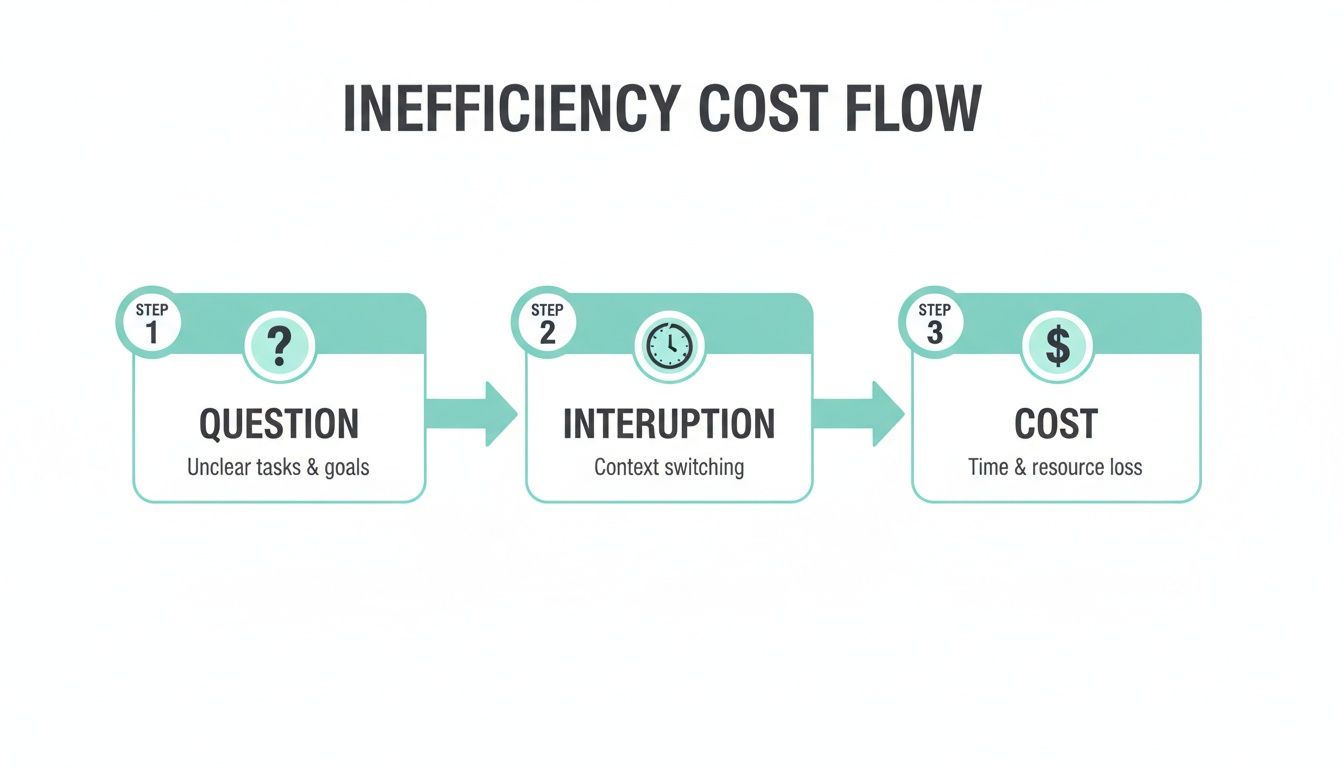
Each interruption isn't just a brief distraction. It's a compounding loss of time, focus, and resources that should be driving growth.
Map Your High-Traffic Workflows
You don't need a complex diagramming tool for this. Just grab a whiteboard or open a fresh document and trace the real path of a common process. A customer support escalation is a perfect example.
What actually happens when a Tier 1 agent can't solve an issue? Do they have to ping a senior engineer in a public channel, shattering their deep work? Is the solution then buried forever in a direct message thread? Mapping this out makes the hidden roadblocks and information silos painfully obvious.
Your goal here is simple: find the points where work grinds to a halt because someone is waiting on information. Those are your biggest opportunities for improvement.
Start a Simple Question Log
One of the most powerful diagnostic tools I've ever used is also the simplest: a question log. No, this isn't about creating more admin work. It's about gathering cold, hard data on what’s repeatedly pulling people away from their core tasks.
Set up a dedicated Slack channel or a shared Google Doc.
For one week, ask your team to log any question they get asked that they've answered before. They should note the question, who asked, and where the answer lives (if it lives anywhere at all).
By the end of the week, you won't have a list of vague frustrations. You'll have a concrete, data-backed inventory of your team's biggest knowledge gaps. This turns
I feel like I'm always answering the same thingsintoWe answered the question 'Where is the latest sales deck?' **17 times** this month.
This simple exercise transforms abstract problems into a specific, actionable list. It’s the raw material you need to build a smarter workflow.
Find the Patterns in the Noise
Once you have a week's worth of data, it’s time to play detective. You'll quickly see patterns emerge. Certain topics will appear over and over, revealing the knowledge your team desperately needs but can't easily find. These recurring questions are your low-hanging fruit.
Look for themes like these:
- Onboarding Queries: A flood of questions about setting up dev environments or finding HR policies? That’s a blaring signal that your onboarding docs are either hard to find, incomplete, or out of date.
- Cross-Functional Gaps: Is the sales team constantly bugging marketing for the latest case studies? This points to a classic silo where one team’s output isn't easily accessible to the people who depend on it.
- Process Ambiguity: Are people repeatedly asking,
Who needs to approve this?
orWhat's the next step?
This highlights major gaps or confusion in your documented processes.
Pinpointing these recurring drains is the crucial first step. It gives you the clarity to stop patching holes and start building a system where answers are instant and accessible, finally letting your team reclaim their focus.
Build a Single Source of Truth in Slack
Okay, so you've found the cracks where your team's time and energy are leaking out. The knee-jerk reaction is often to throw a new app at the problem, but let's be honest, that usually just adds another layer of complexity. The real win comes from simplifying, not complicating.
It's time to build a single, reliable hub for knowledge right where your team lives and breathes every day: inside Slack.
Imagine this: a new hire needs to know the expense policy. Instead of bugging someone in finance or getting lost in a shared drive, they just ask a question in a channel. A moment later, they have the correct, up-to-date answer. No waiting, no context switching, no guesswork. This is what it feels like when information comes to you instead of you having to hunt for it.
This simple shift is profound. It moves your team from a state of constant information hunting to one of effortless information finding, and that changes everything about how work gets done.
The End of the Digital Scavenger Hunt
Take a hard look at your team's day. How much of it is spent on what's basically a digital scavenger hunt? They’re scrolling through endless Slack threads, digging through shared drives, and navigating a maze of Confluence pages, just hoping the information they find isn't three years out of date.
Each one of those searches feels small, but they add up, killing momentum and draining focus.
The true cost of this fractured knowledge is staggering. Research has shown that employees are often productive for only 60% of their workday. Constant multitasking and context switching can slash efficiency by a shocking 40%, costing businesses a fortune. But there's a clear way out. Industries that embrace AI are seeing productivity gains five times higher than those that don't. With 75% of knowledge workers using AI tools, the proof is in the results: 90% report saving time, and 85% find they can concentrate better on what really matters. You can dig into more insights on how AI impacts worker productivity in recent studies.
Imagine never having to open another tab to find an answer. Picture your team simply asking a question in Slack and getting an immediate, accurate response. That’s the experience of a true single source of truth—it feels less like a system and more like a superpower.
This isn’t about adding another tool. It's about transforming your existing Slack workspace from a chat app into an intelligent, self-organizing brain for your entire company.
How a Living Knowledge Base Works
Imagine a world where your company’s collective brain is always accessible, right inside Slack. An AI assistant like SAI taps into the expertise already flowing through your team's daily conversations to make this a reality.
Every time a senior engineer answers a technical question or an HR manager clarifies a policy, that’s priceless knowledge. Normally, it gets buried and lost forever. With an AI assistant, however, that exchange is instantly captured. The next time someone asks a similar question, the proven answer is delivered on the spot. Your team gets smarter with every conversation.
This creates an incredibly powerful feedback loop:
* The more your team talks, the smarter your company gets. SAI learns your unique lingo, processes, and culture.
* Knowledge is always current. When a process changes and gets discussed in Slack, SAI learns the new way, stopping old information in its tracks.
* Answers are delivered in context. You won't just get a link to a 50-page document. You'll get the exact snippet you need, right there in the conversation.
A Real-World Support Team Transformation
Let’s make this concrete. Picture a customer support team drowning in repetitive tickets. New agents are constantly pinging senior reps in a dedicated Slack channel with the same questions about product features, refund processes, and common troubleshooting steps. The senior reps end up spending a third of their day just re-typing answers instead of handling the complex escalations that actually need their expertise.
Here’s how that changes:
Before: A junior agent gets a tricky billing ticket. They can’t find the answer in the wiki. They ping a senior agent, who has to drop their work on a critical customer issue to help out. The total response time for the customer stretches to over an hour, and two employees were pulled off task.
After: The same junior agent asks the question in their team's Slack channel. SAI, having learned from hundreds of previous, similar conversations, instantly provides the exact step-by-step process for that specific billing issue. The customer gets a correct answer in under five minutes, the junior agent learns on the job, and the senior agent remains completely focused on their high-priority work.
In this scenario, efficiency isn't just a buzzword on a slide deck; it's a tangible outcome. Response times are slashed, customer satisfaction climbs, and your most experienced people are freed up to solve the problems they were hired to solve. This is how you stop chasing answers and start building a workplace that is truly efficient by design.
Automate Interruptions to Reclaim Team Focus
What's the single biggest drag on your team's productivity? It’s not a clunky new software or some complicated project management philosophy. It's the constant, low-level interruptions that chip away at your team's focus, all day long. Every time a developer, designer, or support specialist has to stop what they're doing to answer a question they know is documented somewhere, their momentum evaporates.
Imagine a world where your team can actually get into a state of deep, uninterrupted work. A new hire asks, Where's the latest brand guide?
in a public channel. Instead of a manager having to drop a high-level task to go hunting for a link, an intelligent assistant instantly serves up the right file. This isn't about pushing people to work harder; it's about building a protective bubble around their most valuable asset: their attention.

This is a fundamental shift from a reactive, interruption-driven culture to a proactive, focused one. You'll see it happen when your team stops spending their time searching for information and starts using that time to solve real problems.
Your New 24/7 Team Member
Think of an AI assistant like SAI as a new team member, not just another tool. It’s the one with a perfect memory who is always online and dedicated to one thing: handling all the repetitive questions that distract everyone else. It never needs a coffee break, never gets tired of answering the same thing, and lets your human experts stay locked in on the work that actually drives growth.
Best of all, this kind of automation feels less like code and more like a simple conversation. Your team doesn't have to learn a new interface or log into yet another system. They just keep working in Slack, asking questions the way they always have. The only difference is that the answers are now instantaneous.
Imagine never again having to stop what you're doing to answer a question that’s already been answered a dozen times in another channel. That reclaimed time isn’t just a few minutes back in your day; it’s the restoration of focus and momentum for your entire team.
This automated first line of defense is how you protect your most valuable employees from becoming glorified help desks.
Start Small, See Immediate Results
You don’t need a massive, company-wide rollout to feel the impact. The smartest way to get started is by picking just one high-traffic Slack channel where the same questions pop up over and over again. This could be your #it-support, #ask-hr, or #dev-help channel.
By focusing your initial efforts there, you're running a concentrated experiment. Within days, you’ll see a measurable drop in how often your senior team members get pulled away from their core responsibilities. This small win builds incredible momentum and proves the value of automating interruptions before you go any further.
The data backs this up. Recent studies show that while workdays have shortened, productivity is rising. But that progress is being held back by operational chaos. A staggering 50% of businesses are juggling 17 or more disconnected worktech stacks, creating an environment where information is constantly lost. It's so bad that 37% of companies need more than 11 full-time employees just to manage their data operations—a massive drain on resources. You can see more on how workplace trends are shifting at eptura.com.
An AI assistant that learns natively inside Slack bypasses this entire problem.
The Transformation in Action
Let’s look at a classic scenario for a growing startup. The #general channel is a firehose of questions from new hires and people across different departments.
- Before SAI: The marketing lead asks,
What's the official hex code for our primary brand color?
The question just sits there for 20 minutes. Finally, a senior designer, deep in the middle of a critical product launch, sees the ping. She has to stop her work, open the brand guide, copy the code, and paste it into Slack. Her creative flow is completely shattered. - After SAI: The marketing lead asks the same question. Within two seconds, SAI—having learned the answer from a conversation a month ago—responds with the correct hex code. The designer never even sees the question. Her focus stays unbroken, and the marketing lead is unblocked instantly.
This isn't some minor tweak. It's a fundamental change in how your team works together. When you automate the flow of existing knowledge, you empower everyone to be more self-sufficient and keep things moving. You can learn more about how this all works by checking out our guide on what is workflow automation and how it can transform your work.
Ultimately, reclaiming your team's focus is about creating an environment where your best people can do their best work—without the constant tax of trivial interruptions.
Measure Real Impact and Drive Continuous Improvement
You’ve started to tackle interruptions and build a single source of truth for your team. That’s a great first step. But how do you actually know if it’s working? The goal isn't just to feel more productive; it’s to see a real, measurable impact on the outcomes that matter.
Forget vanity metrics like messages sent
or tasks checked off.
True efficiency shows up in results you can confidently take to leadership. It’s about drawing a direct line from the changes you made to bottom-line improvements in your team's performance.
This is where you stop hoping for a better workflow and start proving its value with hard data.
Focus on Outcomes, Not Just Activity
To really gauge your impact, you need to track the metrics that show a fundamental shift in how work gets done. Instead of counting how many questions your AI assistant answers, measure the decrease in repeat questions your senior engineers have to field. That’s the real win.
Picture this: your new hire onboarding time is cut in half. A new team member is fully ramped and contributing within their first week because they can get instant, accurate answers without bugging a mentor. That’s not just a small efficiency gain; it’s a massive advantage.
We dive much deeper into this philosophy in our guide on how to measure team productivity without micromanaging.
A Simple Before-and-After Snapshot
You don’t need a complex analytics dashboard to get started. A simple before-and-after
comparison can be incredibly powerful. Pick a key process you already flagged as a bottleneck—say, customer support responses in Slack—and track a key metric for 30 days.
Then, introduce a tool like SAI into that Slack channel and track the exact same metric for the next 30 days. The difference will speak for itself.
You’re not just plugging in a new tool; you're running a targeted experiment to eliminate friction. When you can show leadership that the time-to-first-response for customer queries dropped by 40%, you’ve moved beyond theory and into undeniable business impact.
This data-backed approach turns your efficiency initiative from a nice-to-have
into a core operational strategy.
From Inefficiency to Impact A Measurement Framework
Here’s a practical guide to tracking the metrics that truly reflect improvements in workplace efficiency. This isn't about creating more work; it’s about choosing a few high-impact metrics that tell a clear story of transformation.
| Area of Improvement | Metric to Track (Before) | Metric to Track (After) | Tool for Measurement |
|---|---|---|---|
| New Hire Onboarding | Average time for a new hire to resolve their first 10 independent tasks. | Reduction in the average time to resolve the first 10 tasks. | Project Management Tool (e.g., Asana, Jira) |
| Customer Support | Time-to-first-response for support tickets raised in Slack. | Decrease in average response time for support tickets. | Slack Analytics or Ticket Timestamps |
| Internal IT Support | Number of repetitive IT questions asked in public channels per week. | Sharp decline in repetitive IT questions asked to the team. | Manual count or Slack search filters. |
| Sales Enablement | How often sales reps ask for the latest product info or case studies. | Reduction in manual requests for sales collateral. | Slack Channel Question Log |
By focusing on these kinds of metrics, you connect your efforts directly to business value, making it easy for anyone to see the win.
Create a Continuous Improvement Loop
Measuring your progress isn't a one-and-done task; it's the engine that powers continuous improvement. Once you prove the value of automating interruptions in one area, you'll start seeing opportunities everywhere.
The data you gather creates a powerful feedback loop. You spot a bottleneck, implement a solution, measure the positive impact, and then use those wins to justify expanding your efforts.
This is how workplace efficiency stops being a project with a start and end date and becomes an ongoing part of your company culture. It’s a cycle where each small win builds on the last, creating compounding returns in focus, productivity, and team morale. You stop chasing efficiency and start building it into the DNA of how you work.
Answering Your Questions About Workplace Efficiency
When you're looking to improve how your team works, it's smart to ask tough questions. You need to be sure any change you make will actually deliver results, not just pile on more complexity for your team. We get it. Here are some of the most common questions we hear from leaders who are ready to stop chasing down answers and reclaim their team's focus.
How Long Does It Take to See Real Improvement?
With a tool like SAI, the change is almost immediate. Because it learns directly from your existing Slack history, it starts answering repetitive questions within minutes of being added to a channel. You're not starting from scratch.
Think about it this way: on Monday, your senior developers are constantly interrupted with the same old onboarding questions. On Tuesday, after you’ve added SAI, those questions get answered instantly by the AI. You'll be able to measure a drop in repeat questions and see faster response times within the very first week—all without any manual setup or training.
Will My Team Have to Learn Another Complicated Tool?
Absolutely not, and this is a big deal. The whole idea is to meet your team right where they already work: in Slack. There's no new interface to learn, no separate login to remember, and no new app to keep open in another browser tab.
People just ask questions naturally in their usual Slack channels, and SAI chimes in with an answer just like a helpful colleague would. This seamless approach gets rid of the friction and learning curve that kills most new software rollouts. You'll see high adoption from day one because you're not actually asking anyone to change how they work.
The goal is to make your team feel like they've gained a superpower, not another chore. They simply stop having to dig for information and start getting instant answers, all without leaving the one platform they use all day long.
Is This Just for Technical or Support Teams?
While it’s a game-changer for support, IT, and ops teams, any team that relies on Slack will feel the impact. The core problem it solves—repetitive questions and scattered knowledge—is something every department struggles with.
Just imagine how this could help other departments:
- HR Teams: Stop manually answering the same questions about benefits, company policies, and time-off requests.
- Sales Teams: Get immediate access to the latest product specs, pricing sheets, and case studies without having to bother the product team.
- Marketing Teams: Instantly pull up the latest brand assets, campaign messaging, and performance data right inside Slack.
If a department is slowed down by information bottlenecks, they'll see a serious boost in efficiency.
What Happens When Our Team Knowledge Changes All the Time?
That's the beauty of a system that learns from real conversations. SAI continuously updates its knowledge as your team communicates. It's a living system, not a static wiki that's out of date the second you hit publish.
When a process changes and someone shares the new, correct answer in a Slack channel, SAI learns that new information on the spot. It stays current without anyone needing to go in and manually update a separate database. This ensures the answers it gives are always relevant and accurate, building a workplace that gets smarter with every single conversation.
Ready to stop the endless searching and give your team the gift of focus? SAI is an AI assistant for Slack that learns from your team's conversations to answer repetitive questions instantly. Add SAI to one channel for free and watch the interruptions disappear. Get started at sai-bot.ai.
