What Is Workflow Automation and How It Can Transform Your Work
Let’s be honest, what does your average workday really look like? Is it spent hunting through a maze of shared folders for the latest version of a sales deck? Or maybe it's that constant, dizzying shuffle between apps—jumping from your email to the CRM, then over to Slack to ping a colleague, and finally logging everything in your project management tool.
This is the silent productivity killer in most companies. It’s not the big, headline-grabbing projects that drain your team's energy. It's the death by a thousand paper cuts—the tiny, repetitive tasks that pile up, hour after hour, day after day.
This relentless search for information isn't just a time-waster; it’s a bottleneck that grinds your entire operation to a halt. Every time someone has to ask for a status update or track down a standard operating procedure, you lose momentum. But what if there was a better way?
What is Workflow Automation, Really?
At its core, workflow automation is about making your technology do the grunt work for you. It’s about creating a system where the apps you already use can handle sequences of tasks on their own, based on rules you set. Think of it as teaching your software to take care of the repetitive data entry, follow-ups, and approvals that clog up your team's day.
From Manual Mayhem to Automated Flow
Instead of that chaotic scramble, imagine a workday where information finds you. A day where your business has a central nervous system connecting your people, tools, and data, letting answers flow exactly where they need to be, right when they're needed. That’s the real promise of workflow automation. It’s not about adding yet another tool; it’s about making your existing tools finally work together as a cohesive team.
Imagine this: instead of opening a dozen browser tabs or interrupting a coworker to find an answer, you just ask a simple question in Slack. Instantly, an answer is delivered, pulled from your company’s entire collective knowledge—every document, conversation, and support ticket. No more searching. No more waiting. The endless hunt for information is just... over.
Workflow automation is about redesigning how you work to eliminate friction. It shifts your team's focus from being reactive administrators of tedious tasks to becoming proactive thinkers who drive creative, high-value work.
A Quick Look at Your Work Before and After Automation
The difference isn't just theoretical. Here's a quick comparison of what your team's daily reality looks like with and without automation.
| Manual Process (Before) | Automated Workflow (After) |
|---|---|
| Employee manually creates and assigns a ticket after a customer email. | A new customer email automatically creates and assigns a support ticket. |
| Sales rep manually enters new lead data into the CRM. | A new lead from a web form is automatically added to the CRM and assigned. |
| HR team manually sends onboarding documents to new hires. | New hire in the HR system triggers a workflow that sends all onboarding docs. |
| A manager has to chase team members for weekly status updates. | A bot automatically pings each team member in Slack for updates and compiles a report. |
The After
column isn't a futuristic dream; it's what's happening right now in forward-thinking companies.
This shift is already happening on a massive scale. By 2024, an estimated 66% of businesses had already automated key processes, and that number is expected to climb to 85% by 2029. The reason is simple: automation unleashes a team’s true potential. Many companies are already getting a head start by connecting some of the 12 essential apps for small business to transform workflow.
By handing over the predictable, rules-based tasks to technology, you free up your people to do what they do best: think critically, solve tough problems, and innovate. You get to create a workplace where busywork is the exception, not the rule.
How Automation Works Without the Technical Jargon
So, how does workflow automation actually turn all that manual chaos into a smooth, predictable process? Let's skip the code and APIs for a moment. Instead, picture a digital assembly line built just for your business. Every time a new task shows up, this assembly line knows exactly what to do, step-by-step, with zero human oversight.
It's a lot simpler than it sounds. The whole system really just comes down to three core ideas working together. Once you get these three parts, you'll see exactly how to build a system that takes all that repetitive work off your plate for good.
The Starting Signal: Triggers
Every automated workflow needs a starting pistol to kick things off. In automation, we call this the trigger. A trigger is just a specific event that tells the system, Okay, go!
It’s the if this happens...
part of the whole equation.
A trigger could be almost anything, like:
* A potential customer submits a Contact Us
form on your website.
* An email with the subject Urgent Support Request
hits your inbox.
* A new hire's status is changed to Hired
in your HR software.
This one event is the first domino, setting off a chain reaction you’ve already planned out—no more manually watching for things to happen.
The Work Crew: Actions
As soon as that trigger fires, it's time for the actions to get to work. These are the individual tasks that need doing. Think of them as the specialized crew on your digital assembly line, where each worker performs one specific job perfectly before passing it down the line.
Following our new employee trigger, the chain of actions might look like this:
* Send a personalized Welcome aboard!
email with initial onboarding documents.
* Automatically create their user accounts in your company's core software.
* Ping the IT department with a ticket to set up their new laptop.
* Add a First-Day Welcome
meeting to their manager's calendar.
Each action happens instantly and in the right sequence, making sure nothing ever falls through the cracks.
This diagram shows how this simple process turns common business headaches into tangible, valuable results.
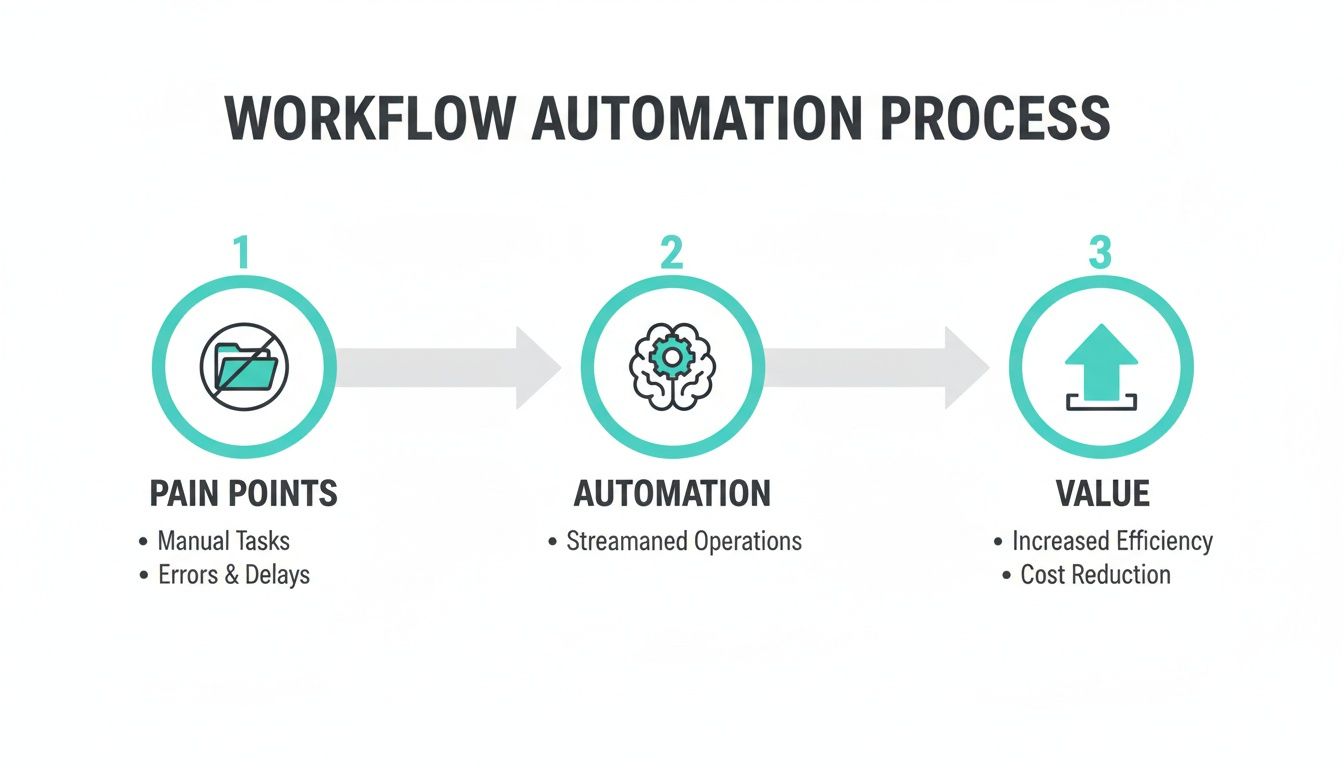
As you can see, automation isn't just about doing things faster; it's the engine that directly converts operational friction into real business value.
The Quality Control Manager: Logic
But what about when things aren't so straightforward? That's where logic steps in. Logic is like the sharp-eyed quality control manager on your assembly line, making smart decisions based on the information at hand. It uses simple if/then
rules to steer the workflow down different paths depending on the situation.
Logic is what gives your automation its brains. It allows a workflow to adapt on the fly, making sure the right actions happen for the right scenarios without you having to step in.
For example, your onboarding workflow could have a simple piece of logic built in: "If the new hire is joining the sales team, then add them to the company CRM and invite them to the #sales-team Slack channel. Otherwise, just send the standard welcome kit."
This ability to make decisions is what elevates your processes from just being automated to being intelligent. By weaving together triggers, actions, and logic, you can build a powerful, self-managing system that handles even your most complex processes from start to finish. And that frees you up to focus on the work that actually moves the needle.
The Real-World Benefits That Go Beyond Efficiency
Efficiency
is one of those words that gets tossed around so much it starts to lose its meaning. But what does it actually feel like when your business becomes truly efficient? Workflow automation is so much more than a tool for getting things done faster—it fundamentally changes how your team operates, creating tangible results that ripple across the entire company.
This isn't just about small, incremental improvements. It's about taking back your team's most valuable resources, delivering perfect work every single time, and finally getting a clear, unfiltered view of your operations. Let's break down the three pillars of this change.
Reclaim Your Team's Most Valuable Asset: Time
Think about all the little, repetitive tasks that chip away at your team's day. It’s the constant hunt for approvals, the mind-numbing copy-and-paste between spreadsheets, and the manual updates to your CRM. Each one is a tiny thief, stealing minutes that quickly bleed into hours, then entire workdays.
Workflow automation is your time-reclaiming engine. It takes over these predictable, rules-based chores, freeing your people from the daily grind. Imagine your sales team spending less time on data entry and more time actually talking to high-value clients. Or your HR department focusing on employee growth instead of chasing down onboarding paperwork.
This isn't just about saving a few hours. It’s about reallocating your team's collective brainpower from low-impact tasks to the strategic, creative, and problem-solving work that actually drives your business forward.
This shift has a real, measurable impact. The global workflow automation market is exploding, projected to hit a staggering USD 80.57 billion by 2035. Businesses that get on board early are already seeing the rewards, reporting up to 30% in cost savings. It’s no surprise that 75% of executives now see automation as a genuine competitive advantage. You can explore the full research on the workflow automation market to get a better sense of how these trends are reshaping modern business.
Achieve Flawless Consistency
Let's be honest, people make mistakes. It's natural. But in business, those mistakes can be expensive. A simple typo on an invoice, a missed step in a client onboarding process, or a support ticket sent to the wrong department can lead to lost revenue, frustrated customers, and a serious dent in your reputation. No matter how sharp your team is, errors are inevitable when everything is done by hand.
Workflow automation practically eliminates this risk by making sure your processes are executed perfectly, every single time. Think of it as a digital checklist that never gets tired, distracted, or forgets a step.
- Standardized Output: Every task, from sending a welcome email to processing a refund, follows the exact same pre-defined path. The result is consistent, high-quality work.
- Enhanced Reliability: Your customers get the same excellent experience with every single interaction, which is the foundation for building real trust and loyalty.
- Improved Compliance: For companies in regulated industries, automation ensures that every compliance and approval step is followed without fail, drastically reducing legal and financial risks.
When you remove the variable of human error, you build a system that's fundamentally more reliable—for your team and your customers.
Gain Unprecedented Visibility
How well do you really know what’s happening inside your business? Manual workflows are often black boxes. Work goes in, results eventually come out, but trying to spot the bottlenecks, delays, or hang-ups in between is nearly impossible. You’re left managing by gut feeling and secondhand stories.
Automated workflows throw the doors wide open, making every single step visible and measurable. Because the system is tracking every action, you get a crystal-clear map of how work is flowing. This insight is powerful, allowing you to instantly see where things are getting stuck. With this data in hand, you can ask the right questions and get real answers. For instance, imagine asking in Slack, What's our average time to resolve a support ticket?
and getting an instant, data-backed answer instead of needing a manual report. This visibility means a knowledge management system could streamline your internal communications not just by storing information, but by serving it up proactively.
Suddenly, you can see that one specific approval stage consistently takes three days longer than every other step. Armed with that fact, you can fix the root cause, optimize the process, and unlock a whole new level of performance. This data-driven approach turns you from a reactive manager into a proactive leader who is constantly fine-tuning the engine of your business.
See Workflow Automation in Action Across Your Business
It’s one thing to talk about workflow automation in theory, but the real aha!
moment comes when you see it solving the genuine, day-to-day problems that are slowing your business down. This isn't about some far-off concept; it’s about making a real difference where your team actually gets work done.
Think about all the little points of friction in a typical workday—chasing down updates, copying and pasting data between apps, sending reminders. Now, imagine if those processes just… ran themselves.
Let’s dig into what that actually looks like for the core teams that keep your business humming.
Get Your Sales Team Selling, Not Administering
Your sales team is at its best when they’re building relationships and closing deals. They’re not at their best when they’re bogged down with administrative work. Every minute spent manually updating a CRM or logging an activity is a minute they could have been on a call. Automation completely flips that script.
Here’s a common scenario: a hot lead fills out the demo request form on your website. Before your rep even has a chance to see the notification, a series of actions kick off instantly:
- A new channel pops up in Slack, complete with the lead's name, company info, and what they’re interested in.
- The right account executive is automatically assigned based on territory or workload and gets tagged in that channel immediately.
- A new lead record is created in your CRM—like Salesforce or HubSpot—with all the form data perfectly populated. No typos, no missed details.
The result? Follow-up is immediate, and every lead gets the white-glove treatment it deserves. Your team can finally stop managing data and get back to what they were hired to do: sell.
Bring Order to Your Marketing Operations
Marketing teams are the ultimate jugglers, balancing dozens of campaigns, deadlines, and creative approvals at once. Without a solid system, this can quickly turn into a chaotic mess of email chains and missed feedback. Automation brings much-needed structure to this creative chaos, ensuring every project moves from idea to launch without a hitch.
Take your content approval process, for example. Instead of relying on manual hand-offs and did you see my email?
follow-ups, automation creates a clear, accountable system.
When a writer finishes a draft in Google Docs, they just change the status to
Ready for Review.That one click triggers a workflow that pings the editor in a #content-review Slack channel, complete with a direct link to the doc. Once the editor gives it the green light, the workflow automatically notifies the design team to start on the visuals.
It’s not just about moving faster; it's about giving everyone total clarity. No one has to ask, Hey, what's the status of that blog post?
ever again. For teams looking to build these kinds of systems, finding the right documentation automation tools can be a game-changer.
This kind of operational efficiency is a huge driver of growth, not just for individual companies but for the entire industry. The workflow automation sector now employs over 117,500 people worldwide and added 14,500 new jobs in the last year alone, fueled by over 800 startups.
Modernize Your HR and People Operations
If there's one department buried under a mountain of repetitive tasks, it's HR. From onboarding new hires to processing time-off requests, the administrative load can be crushing. Workflow automation helps HR evolve from a reactive paperwork hub into a proactive, strategic partner for the business.
Let's look at a simple, universal task: vacation requests. The old way involves a flurry of emails, messy spreadsheets, and manual calendar invites. The automated way is so much cleaner and can happen right inside Slack.
An employee uses a simple slash command like /request-pto, fills in their dates, and hits submit. That single action triggers a workflow that:
- Sends an approval request straight to their manager.
- Updates the shared company PTO calendar the moment it's approved.
- Calculates and updates the employee’s remaining time-off balance in your HR system automatically.
This one elegant process eliminates confusion, prevents double-bookings, and gives everyone the visibility they need. Your HR team is now free to focus on the things that truly matter, like building a great culture and supporting your people.
Your Simple Guide to Getting Started
Diving into workflow automation can feel like a massive undertaking, but it really doesn't have to be. The secret isn't to try and automate everything at once—that's a recipe for burnout. Instead, think of it as scoring a series of small, strategic wins that build on one another.
We're aiming for progress here, not perfection. By following a clear, step-by-step approach, you can start winning back your team's time and focus without getting bogged down. Let's walk through the four phases that will get you started on the right foot.
Phase 1: Identify Your Biggest Time Sinks
Before you automate anything, you have to know where your team's time is actually going. This first step is all about observation. Your mission is to find the most repetitive, low-impact tasks that are quietly eating away at productivity every single day.
Start by asking your team some direct questions: What's the most annoying task you have to do every week?
or If you could snap your fingers and make one administrative chore disappear, what would it be?
You'll be amazed at what you uncover.
Listen for patterns like:
* Manual Data Entry: The classic copy-paste routine—pulling info from an email and plugging it into a spreadsheet or CRM.
* Repetitive Nudges: Manually pinging people for status updates or reminding them about deadlines.
* Routine Approvals: Chasing down signatures or verbal go-aheads for standard things like time-off requests or small expense reports.
These are your golden opportunities. They're predictable, follow simple rules, and offer a huge return for a relatively small effort.
Phase 2: Start Small to Build Momentum
Once you have a list of potential tasks, fight the urge to go after the biggest, most complicated one. Your very first automation project should be a quick, undeniable win. Pick one simple process and automate it from start to finish.
Why start small? Because success breeds confidence. When your team sees a clunky, manual task suddenly running by itself, the value of automation becomes real. It's no longer just a buzzword; it's a genuine fix for a daily headache.
A great first project could be something as simple as automatically posting new website leads into a dedicated Slack channel. It's a straightforward workflow that delivers immediate value by helping the team respond faster. That initial success story becomes your internal proof-of-concept, making it much easier to get buy-in for bigger projects later on.
Phase 3: Choose the Right Tools for Your Team
The best tool is the one your team will actually use. Period. The good news is that modern automation platforms are incredibly user-friendly and built for people who aren't developers. You shouldn't need a coding background to build a simple workflow.
The most important feature to look for is integration. Your chosen platform must connect easily with the software your team already uses every day, like Slack, Google Workspace, or your CRM. The goal is to make existing work better, not to force everyone into a whole new system.
When you're looking at different tools, prioritize simplicity and strong integrations over a long list of fancy features you'll probably never touch. A tool that fits into your team's existing habits is far more valuable than a more powerful one that disrupts them.
This focus on the user experience is the key to getting everyone on board and ensuring automation becomes a helpful ally, not another technical hurdle.
Phase 4: Measure, Learn, and Expand
Congratulations—your first automated workflow is live! But your work isn't done. Now it's time to gather feedback, measure the impact, and figure out what's next. Chat with the team members who use the new process. Is it saving them time? Is their work genuinely easier?
Use their feedback and your initial success to build a case for doing more. Show other departments the before and after
of what you accomplished. When the sales team sees how marketing automated its content approvals, they’ll start thinking about how to fix their own clunky lead management process.
This cycle of identifying a pain point, automating a solution, and sharing the results is how you build a culture of continuous improvement. Each small win provides the fuel—and the blueprint—for the next one, transforming how your business operates one smart workflow at a time.
Got Questions About Automation? Let's Clear Things Up.
As you start thinking about what workflow automation could mean for your business, it’s only natural for questions to pop up. This isn't just about plugging in a new piece of software; it's about shifting how your team approaches its work, day in and day out.
To help you get a clearer picture, we’ve put together answers to the most common questions we hear from leaders and their teams when they first start exploring this. Our goal is to cut through the noise and show you just how practical—and powerful—this change can be.
Is Workflow Automation Just for Big Companies?
Not at all. While giant corporations absolutely rely on automation for their massive, complex operations, today’s tools have brought this power to everyone. In fact, you could argue that small and medium-sized businesses stand to gain the most.
You don't need a huge budget or an army of IT specialists anymore. Modern, user-friendly platforms mean a team of five can automate their most important tasks just as effectively as a company of five thousand. It’s a genuine game-changer, letting smaller outfits punch well above their weight and operate with an efficiency that was once reserved for their largest competitors.
The real magic of workflow automation is how it scales. It can solve one nagging little problem for a single department, or it can streamline processes across the entire organization. Its value isn't tied to company size, but to the simple desire to work smarter and empower your people.
Whether you're automating client follow-ups, scheduling social media posts, or just simplifying internal IT requests, automation hands your small business its most valuable resource back: time.
Will This Replace People on My Team?
This is easily the biggest myth about automation, and the answer is a firm no. The goal of workflow automation is to augment your team, not replace it. It’s about taking over the tedious, robotic tasks that, frankly, people shouldn’t be spending their brainpower on anyway.
Think of automation as the ultimate assistant—the one who handles all the monotonous administrative work. This frees up your brilliant team members to focus on the work that actually requires a human touch.
- It takes on the grunt work: Automation is perfect for things like data entry, firing off routine email reminders, or pulling together standard weekly reports.
- It elevates human skills: With the busywork gone, your team can pour their energy into creative problem-solving, building real relationships with customers, and dreaming up your next big strategy.
When you take the frustrating, low-impact tasks off their plates, you actually boost job satisfaction and open up new paths for growth. Your team gets to be more strategic, more innovative, and more engaged in what they do.
How Technical Do I Have to Be to Set This Up?
You don’t need to be a programmer. You don’t need to write a single line of code. The best modern automation platforms were built from the ground up for non-technical people—that’s why you’ll hear terms like no-code
and low-code
thrown around.
If you can sketch out a process on a whiteboard or map out a simple flowchart, you already have all the technical skill you need to build a surprisingly powerful workflow. These tools use intuitive, drag-and-drop interfaces where you visually connect the apps your team already knows and loves.
The focus is on understanding your own process—what happens first, what comes next, and what decisions need to be made. The technology just handles the rest, making automation a realistic strategy for any team lead who simply wants to find a smarter way to work.
Ready to stop repetitive questions from derailing your team's focus? SAI learns from your Slack conversations to provide instant answers, turning every question into a permanent knowledge asset. See how you can eliminate busywork and give your team back their time. Add SAI to Slack for free.