How to Reduce Employee Burnout for High-Performing Slack Teams
If you want to reduce employee burnout, a great place to start is by tackling the digital noise and constant interruptions that plague your team’s day. Automating answers to those common, repetitive questions and building systems that actually protect focus time? That's how you attack the root causes of exhaustion and give people the breathing room they need to do their best work.
The True Cost of Burnout in Your Slack Channels
Before we get into the how,
let's be real about the problem. Employee burnout isn't just a buzzword. It's a silent tax on your team's innovation, productivity, and morale. It’s that invisible drag that slows down projects, fuels mistakes, and quietly pushes your best talent right out the door.
For teams that practically live in Slack, this tax is collected one notification at a time. The endless pings, the frantic search for that one document, and the mental whiplash from constant context switching aren't just minor annoyances. They're a direct line to cognitive overload.
The Hidden Price of Being Always On
Every @channel for a question that’s been asked a dozen times before does more than just break someone's concentration. It chips away at their focus and emotional reserves. This isn't just a hunch; the data backs it up.
The 2023 Fidelity Global Employer Survey laid it all out. It found that 43% of employers saw a rise in employee burnout, which directly fueled turnover rates as high as 36% annually. At the same time, 34% of these companies watched performance take a nosedive, drawing a clear line from team exhaustion to the bottom line. You can read the full report here.
This reality forces a tough question: Is your main communication hub accidentally becoming the epicenter of your team's fatigue?
The real cost of burnout isn't just in the work that doesn't get done. It's in the lost creativity of a drained mind and the departure of a star performer who simply ran out of steam.
From Collaboration Hub to Burnout Hotspot
Slack was built to bring people together. But without clear guardrails, it can quickly foster a culture where everyone feels pressured to be perpetually online and available. And that's a recipe for disaster.
Just think about the daily grind for a second:
* Repetitive Questions: An engineer is deep in a complex coding problem, only to get pulled out to explain where to find the API docs... again.
* Information Scavenger Hunts: A new hire spends their first week digging through old channels for onboarding materials instead of actually learning their role.
* Constant Context Switching: A project manager juggles three different conversations, losing critical details and momentum with every jump.
Each of these scenarios creates a tiny bit of mental friction. Day after day, that friction grinds down even your most resilient people, leading to disengagement and cynicism. You can find more strategies for improving efficiency when you measure team productivity without micromanaging.
The key to fixing this is realizing the problem isn't Slack itself—it's the chaotic workflows happening inside Slack. By addressing these broken processes, we can turn it back into what it was always meant to be: a platform for connection, not a catalyst for exhaustion.
Reading the Digital Tea Leaves: Early Burnout Warnings on Slack
Burnout doesn't just show up one day, unannounced. It’s more of a slow fade, a gradual erosion of energy and engagement that leaves subtle clues in its wake. And in today's workplace, those clues are often hiding in plain sight—right inside your Slack channels.
Learning to spot these digital breadcrumbs is a game-changer for any manager. It’s the difference between reacting to a crisis and proactively supporting your team. You’re essentially learning to read your team's digital body language, allowing you to step in with support long before a good employee starts polishing their resume.
This isn’t about becoming a digital detective or micromanaging every message. It's about developing an awareness—a gut feeling, even—that helps you distinguish between someone having a tough week and someone who is genuinely starting to disengage.
The Shift from Proactive to Passive
One of the first and most obvious signs of trouble is a shift in someone's communication rhythm. Think about your most reliable people—the ones who are always quick with an answer, jumping in to help solve problems, and generally keeping the momentum going. When burnout takes hold, that spark starts to dim.
You’ll start to see a few things pop up:
- Slowing Down: The person who used to reply in minutes now takes hours, sometimes even a full day. The sense of urgency is gone.
- Getting Terse: Thoughtful, detailed responses get replaced with one-word answers.
Noted.
Ok.
Done.
The conversation becomes purely transactional. - Pulling Back: They stop volunteering ideas in brainstorming sessions or flagging potential problems in project channels. They're still there, but they’ve switched from
drive
toneutral.
These aren't signs of laziness. They're indicators that someone's cognitive and emotional reserves are running on empty. They’re just trying to get through the day, and there’s simply no energy left for anything beyond the absolute essentials.
When Optimism Gives Way to Cynicism
Another huge tell is a change in tone. A positive, engaged employee doesn't just wake up one morning a cynic. Burnout is an accelerant for negativity, and it seeps into their language, their reactions, and even their emoji choices.
Keep an ear out for a pattern of sarcasm or passive-aggressive comments that feel out of character. The enthusiastic Let's do this!
you used to hear might turn into a weary Sure, add it to the pile.
Even their emoji use can be a quiet signal for help—a sudden spike in the 🫠 (melting face) or 🙃 (upside-down face) emoji in response to new work is often more telling than words.
Burnout often poisons the well of positive communication first. When you notice a consistent shift from a
can-doto acan't-dealattitude, it’s a clear sign you need to pay closer attention.
How to Spot Burnout in Slack Behaviors
Beyond what people are saying, how they use Slack can also provide clues. These behaviors often paint a picture of someone struggling to keep their head above water, feeling completely overwhelmed by a workload that feels impossible to manage.
It's all about recognizing the patterns. What does healthy, sustainable engagement look like versus the behaviors of someone running on fumes?
Digital Cues of Burnout on Slack
Here's a quick comparison of healthy engagement versus potential burnout indicators seen in daily Slack usage.
| Behavior | Healthy Engagement Signal | Potential Burnout Warning Sign |
|---|---|---|
| Status Updates | Uses statuses to communicate availability (In a meeting, Focus time, Grabbing lunch). |
Always online, with a green dot glowing late at night or on weekends, hinting at no downtime. |
| Channel Activity | Actively participates in relevant channels, shares updates, and asks clarifying questions. | Mutes nearly all channels, goes radio silent, or only pops up when directly tagged. |
| Asking for Help | Feels comfortable asking for help or a second opinion when they're stuck. | Tries to power through every problem alone, leading to missed deadlines or subpar work. |
| Emoji Use | Uses a variety of emojis to add tone and personality to conversations (👍, 🎉, 🤔). | Overuses emojis that signal stress or exhaustion, like 🫠, 🙃, or 😩. |
| Initiative | Proactively starts new threads to share ideas or flag potential issues. | Only responds to direct mentions and has stopped contributing new thoughts. |
When you start noticing a combination of these digital signs, it’s time to act. The key is to approach the person with genuine concern for their well-being, not just for the project's bottom line. That empathy is the foundation of a culture where people feel safe enough to admit they’re struggling before it’s too late.
Your Immediate Burnout Intervention Playbook
Spotting the signs of burnout is one thing, but what you do in the moments after you notice them is what truly matters. This isn't the time for a big, company-wide initiative. It’s the time for targeted, empathetic, and immediate action.
When someone on your team is drowning in work, your job is to throw them a lifeline, not a five-year strategic plan. The goal is to reduce the pressure right now and then work together to build a more sustainable path forward. This playbook will help you do just that.
Kicking Off the Conversation with Psychological Safety
Let's be honest, starting this conversation can feel a bit awkward. But it’s absolutely essential. The trick is to create a space of psychological safety where your employee feels comfortable being open without fearing judgment or professional consequences. Drop any accusatory language and lead with genuine concern based on what you’ve observed.
Instead of bluntly opening your next one-on-one with, You seem burned out,
try a more supportive, open-ended approach.
-
I've noticed you've been putting in a lot of late nights recently. I just wanted to check in and see how you're doing and how I can better support you.
-
It looks like your plate is incredibly full right now. Could we walk through your current projects to see if we can reprioritize or even take something off your list?
-
I really value everything you do here, and I want to make sure your workload feels manageable. How has your energy been lately?
These kinds of openers frame you as an ally, not just a manager chasing deadlines. Trust me, the conversation that follows will be far more productive because you’ve started from a place of trust.
This isn’t just a nice-to-have. The data shows that a staggering 76% of employees experience burnout at least sometimes. Those who suffer from it regularly are 63% more likely to call in sick. The good news? Employees who feel their well-being is genuinely supported are 71% less likely to experience burnout in the first place. You can find more insights about workplace burnout on Hubstaff.
Running a Quick Friction Audit
Once you've opened the door to a real conversation, it's time to pinpoint the specific sources of friction. Burnout is rarely about one big project; it's often death by a thousand paper cuts. I'm talking about the repetitive tasks, the constant interruptions, and the context switching that quietly drain mental energy day after day.
Right there in your meeting, conduct a quick friction audit
of their workload.
Ask some pointed questions to uncover these hidden time-sinks:
- What’s the one task you dread every week because it just drains your energy?
- Which questions do you feel like you're answering over and over for the team?
- If you could get rid of one recurring meeting, which one would it be and why?
- How much of your day is spent just trying to find information versus actually doing the work?
The single most powerful thing you can do to fight burnout is to eliminate the
stupid work—those repetitive, low-value tasks that make people feel like they're running on a hamster wheel. Automating these burdens is one of the fastest ways to give them back their time and focus.
The signs are often hiding in plain sight in our digital tools, from lagging response times to a more cynical tone in messages.
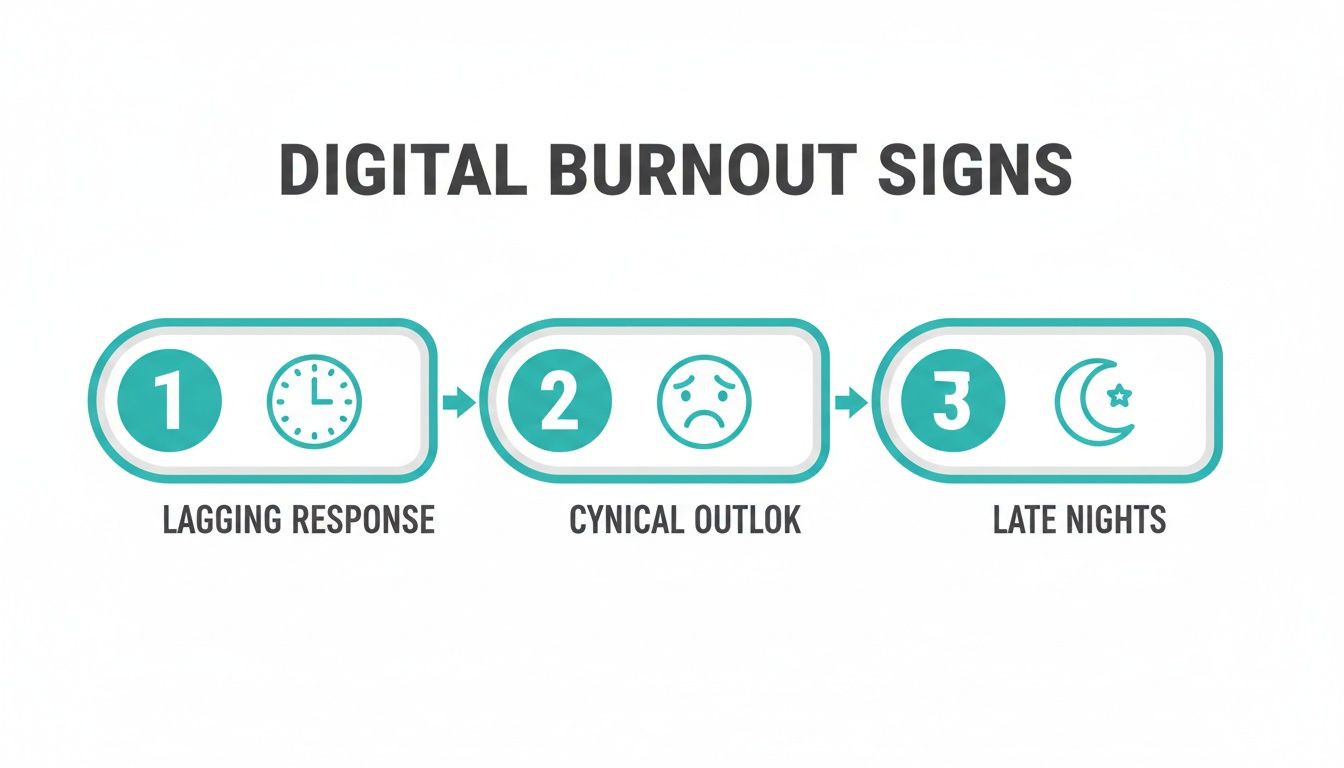
Being able to connect these subtle digital behaviors to the bigger issue of exhaustion is a critical leadership skill.
Taking Decisive Action for Instant Relief
Now for the most important part: act on what you learned. Based on your friction audit, identify one or two things you can change immediately to lighten their load. The goal is for your team member to leave that meeting feeling heard, supported, and noticeably less overwhelmed than when they walked in.
Here are a few powerful, immediate moves you can make:
- Reassign or Postpone a Task: Find one project or responsibility that can be moved off their plate, even just for a little while.
- Block Off Focus Time: Literally open their calendar with them and block out two
no-meetings, no-interruptions
windows for the coming week. Protect that time fiercely. - Automate a Repetitive Answer: Identify a question they are constantly peppered with. Use a tool like SAI to capture the answer once, so they never have to be the sole source of that information again.
By tackling these small, nagging issues, you create immediate breathing room. That last point is crucial—the endless cycle of repeat questions in Slack is a major cause of context switching. If this is a real pain point for your team, check out our guide on ending repetitive Slack questions for good.
Building a Culture That's Burnout-Proof by Design
Putting out individual fires is completely draining, both for the person burning out and for you as a manager. Let’s be honest, the real win against burnout isn't about heroic, last-minute interventions. It's about fireproofing your culture so the flames never have a chance to ignite in the first place.
This means shifting from a reactive stance to a strategic one. You have to build a culture where always on
is seen for what it is—a system bug, not a badge of honor. It’s about making intentional changes to the way you work that protect your team's most valuable resources: their time, focus, and energy.
Get Real About Performance: Outcomes Over Online
Time
That little green dot in Slack is probably one of the most misleading metrics in modern work. It tells you someone is logged in, but it says absolutely nothing about their productivity, focus, or well-being. A culture that equates online presence with performance is a fast track to burnout.
The most resilient and effective teams I've seen have made a deliberate switch to measuring outcomes, not activity. This one change creates a massive ripple effect. It gives your team the autonomy to manage their own energy, encouraging them to actually log off and recharge without feeling guilty about it.
Of course, this requires trust. You have to empower your people to find the best way to hit their goals, whether that’s in a solid four-hour block of deep work or broken up throughout the day. When you give them that trust, they almost always repay it with incredible results.
Make Asynchronous Work Your Default Setting
An async-first
approach is one of the most powerful tools in your arsenal to reduce employee burnout. It doesn't mean you banish meetings forever. It just means you start treating synchronous time—real-time meetings and instant messaging—as the scarce and valuable resource it truly is.
Instead of defaulting to a quick huddle or a rapid-fire Slack thread, you build processes that allow people to contribute on their own schedule. It’s a simple shift, but it breaks the cycle of constant interruptions that absolutely demolishes cognitive energy.
A culture of constant immediacy is a culture of constant interruption. By embracing asynchronous communication, you give your team the gift of uninterrupted thought—the single greatest prerequisite for high-quality, innovative work.
Before scheduling any meeting, just ask: Could this be a detailed Slack post, a recorded video, or even just a well-written email instead?
More often than not, the answer is a resounding yes. This one question protects everyone's calendar and leads to more thoughtful, well-constructed responses.
Set Clear Rules of the Road for Slack
Let's face it: Slack without rules is like a highway without lanes. It's chaotic, stressful, and wildly inefficient. To protect your team's focus, you need to establish some clear and simple communication protocols that everyone understands and respects.
Think about putting a few ground rules in place to cut down on the notification noise:
- Define Channel Purpose: Every single channel needs a clear, pinned purpose. This is how you stop a
#project-launchchannel from devolving into a stream of random GIFs. - Limit
@channeland@here: These should be for true, time-sensitive emergencies only. For everything else, a targeted mention or no mention at all works just fine. - Encourage Threading: Make it a team norm that all replies to a post happen in a thread. This keeps the main channel scannable and makes conversations infinitely easier to follow later.
- Respect the Status: If someone’s status says
Deep Work 🎧
orFocus Time,
don't ping them unless the building is literally on fire.
These aren't about adding red tape; they're about creating a shared respect for each other's attention.
While remote work can be a powerful antidote to burnout—IE's 2023 Global Life-Work Survey found office workers felt exhausted 41% of the time versus just 26% for remote folks—it's not a silver bullet. The same study revealed that 53% of remote workers admit to overworking. You can dive into the data in the Global Life-Work Survey 2023.
This just proves that location isn't the cure. It all comes down to building smarter workflows that actively protect people's boundaries, no matter where they're logging in from. When you do that, you're not just preventing burnout. You’re building a more focused, effective, and sustainable team where people can truly thrive.
Reclaim Your Team's Focus by Automating Repetitive Work

Imagine your most creative problem-solver, deep in thought, not being pulled away to answer a question that’s been asked a dozen times before. Picture your senior engineer finishing a critical feature without once being interrupted to point someone to the API docs.
This isn't a fantasy. It's what happens when you strategically remove the repetitive noise that quietly fuels burnout.
This is where you can shift Slack from a source of constant cognitive drain into a powerful force multiplier for your team. It’s not about adding another complex tool. It’s about getting rid of the mental friction—the endless context switching and information hunting—that grinds people down.
By automating away the relentless hum of repetitive questions, you give your team back their most valuable and finite resource: uninterrupted time to solve real problems and do the work they were actually hired to do.
The Power of One Answer Everywhere
The old way of working creates a huge drag on your team. It probably feels painfully familiar: people are constantly digging through old channels, searching for project specs, HR policies, or brand guidelines. Every search is a mini-project, a frustrating detour that shatters concentration.
Now, picture the alternative. An employee needs the guest Wi-Fi password for a client. Instead of pinging the office manager and waiting, they just ask SAI in a channel and get an instant, accurate answer. That one small interaction saves time for two people and, more importantly, protects the focus of the person who would have been interrupted.
The goal isn't just to answer questions faster. It's to create a system where your best people never have to become human search engines, freeing their mental bandwidth for high-value work.
When an answer is automated, it becomes a durable asset for the whole company. A single well-crafted response can prevent dozens—or even hundreds—of future interruptions, directly helping to reduce employee burnout over time.
Escaping the Interruption Tax
Every time someone is pulled away from a task to answer a question, they pay an interruption tax.
It’s not just the few minutes it takes to reply; it’s the 15-20 minutes it can take to fully regain focus on the original task. That tax adds up fast, leaving people feeling frazzled and exhausted by the end of the day.
This is especially draining for your subject matter experts, who become single points of failure, their days fractured by endless shoulder taps. By automating the answers to common questions, you essentially eliminate this tax.
- Before Automation: A new sales rep asks in the team channel,
Where can I find the latest case study for enterprise clients?
A senior account executive stops what they're doing, finds the link, and posts it. - After Automation: The new rep asks the same question. SAI instantly provides the correct link, having learned the answer from a previous conversation. The senior AE remains completely undisturbed, deep in their own workflow.
This shift does more than just save time. It creates an environment where deep work is the default, not a luxury. It signals that you value and protect your team's focus—a powerful cultural statement. For an even deeper look, you can explore how workflow automation can transform your work in our detailed guide.
Building Your Team's Instant Brain
Imagine a world where your team never has to open another resource, search through multiple folders, or dig through old Slack channels for information again. Instead, they just ask a question in Slack and get an instant, reliable answer.
This is the transformation. It's not about creating a clunky, manual knowledge base that no one ever updates. It's about building an intelligent, self-organizing brain for your team that lives right where they work. With a tool like SAI, this brain learns organically from the conversations already happening.
What does this feel like in practice?
- Information just flows: Knowledge is no longer siloed with a few experts. It's instantly available to everyone, freeing your best people to focus on innovation.
- New hires are productive on day one: They can find answers to hundreds of common questions without having to interrupt anyone, feeling empowered and self-sufficient.
- Consistency is effortless: Everyone gets the same, up-to-date answer every single time, which cuts down on costly errors and confusion.
The real change, though, is the feeling of relief. The mental load of having to remember everything, find everything, and answer everything for everyone else simply dissolves. In its place, you get a calmer, more focused, and more resilient team ready to tackle bigger challenges without burning out.
Your Top Questions Answered
When you're trying to tackle burnout, it’s natural to have questions. You want to make things better, not accidentally add more chaos to the mix. Let's walk through some of the most common concerns I hear from managers about building healthier, more sustainable ways of working in Slack.
How Can I Actually Measure If These Changes Are Working?
Let’s be honest, you can’t manage what you don’t measure. Gauging your impact on something as personal as burnout requires looking at both feelings and facts. You need a mix of the soft and the hard data to see the whole story.
On the qualitative side, make this a regular part of your 1-on-1s. It doesn't have to be a big formal thing. Just ask, On a scale of 1-5, how has your workload felt this week?
That simple question can crack open a real conversation about what's actually on their plate.
For the hard data, anonymous quarterly pulse surveys are your best friend. Make sure you include specific questions about work-life balance, psychological safety, and whether they feel supported by management. What you're looking for over time are positive trends. When those scores go up, you can bet you'll also see voluntary turnover and unplanned absences go down.
A tool like SAI gives you a fantastic, direct metric: the number of interruptions it's prevented. Seeing how many questions were answered automatically is a tangible way to measure reclaimed focus time for your team.
How Do I Introduce a New Tool Without Piling On More Stress?
This is a classic fear, and it's a valid one. The last thing an overwhelmed team needs is another piece of software to learn. The trick is to frame any new tool as a stress reducer, not another item on their to-do list. When you introduce something like SAI, you're not giving them work; you're taking it away. It's their new intelligent assistant.
My advice? Start small and targeted. Pick one channel that is a notorious black hole for repetitive questions—think #it-support or #sales-questions. Frame it as a small experiment. Announce you're testing a way to automate the routine answers, freeing up the human experts for the tricky stuff that actually requires their brainpower.
Because a tool like SAI learns directly from your existing conversations with zero setup, the payoff is immediate. It doesn't feel like a new chore. It feels like a massive relief from the daily grind of typing out the same answer for the tenth time.
What’s the Real Difference Between Burnout and Stress?
People throw these terms around interchangeably, but they are fundamentally different states. And if you don't know the difference, you can't apply the right fix.
Think of it this way: stress is a state of over-engagement. It's that frantic feeling of urgency, hyperactivity, and intense pressure. You feel like you're drowning in responsibilities.
Burnout, on the other hand, is a state of disengagement. It’s marked by cynicism, emotional exhaustion, and a feeling of being completely detached from your work. Instead of drowning, you just feel empty and drained.
Here’s the connection: chronic, unmanaged stress is the most common path to burnout. The strategies we've talked about—especially automating interruptions and protecting deep work time—are all about cutting off that chronic stress at the source. By removing the constant, low-level friction from the workday, you stop the over-engagement from ever escalating into total disengagement.
Ready to give your team back their focus and stop burnout before it starts? With SAI, you can automate answers to repetitive questions right inside Slack, instantly reducing interruptions and context switching. Add SAI to a channel for free and see the difference it makes. Learn more and get started today at sai-bot.ai.
