Slack vs Teams An Essential Guide for Modern Businesses
At their core, Slack and Teams are built on two completely different philosophies. Slack is an agile, integration-first communications hub, while Teams is the collaborative backbone of the Microsoft 365 ecosystem. The right choice for you boils down to a simple question: does your company prefer a best-of-breed toolset or an all-in-one, single-vendor platform?
Choosing Your Company's Digital Headquarters

Picking between Slack and Microsoft Teams isn't just about selecting a new piece of software. It’s a foundational decision that will define your company's daily rhythm—how your people talk, work together, and find information.
Forget just ticking off features on a checklist. Instead, think about the real-world impact. Consider the friction your teams deal with right now: hunting for that one document, re-asking the same questions, or losing key context in a flood of emails and messages. Imagine a world where that friction just… vanishes.
The right platform should feel less like a tool you have to manage and more like an extension of your team's collective brain, actively making work simpler and faster.
This guide goes beyond the surface-level talking points. We'll dive into how each platform’s core DNA affects day-to-day work, giving you a clear picture of what it’s actually like to live inside each ecosystem. This will help you pick the one that truly fits your company culture and drives you forward.
For a broader look at other options, check out our guide to the best internal communication tools for 2025.
Core Philosophies at a Glance
Before we get into the nitty-gritty, you have to understand the foundational mindset behind each tool. They were designed to solve different problems for very different types of organizations.
| Aspect | Slack | Microsoft Teams |
|---|---|---|
| Primary Goal | To act as the central nervous system that connects all your other best-in-class software. | To be the collaboration layer for everything happening within the Microsoft 365 universe. |
| Ideal User | Agile, tech-forward teams that demand a great user experience and connect lots of different tools. | Organizations already heavily invested in Microsoft products like Office, Outlook, and SharePoint. |
| Key Strength | Its flexibility is second to none, with a beloved user interface and a massive app directory. | Deep, seamless integration with Microsoft 365 provides a completely unified experience. |
| Collaboration Style | Fosters dynamic, channel-based conversations and a culture of asynchronous work. | Encourages a more structured, meeting-focused workflow centered around files and calendars. |
How Daily Collaboration Feels Different

Choosing between Slack and Microsoft Teams isn't just a feature-for-feature comparison; it’s about defining your company's collaborative heartbeat. These platforms create fundamentally different work environments, shaping how ideas spark, decisions get made, and projects actually get done.
You're really choosing between two philosophies: the fluid, dynamic discussion of a workshop versus the structured, procedural coordination of a corporate office.
Let's imagine a fast-paced creative agency burning the midnight oil on a major product launch. Conversations are flying between design, marketing, and development. In Slack, this energy is organized into a web of focused channels—#launch-creative, #q3-marketing-campaign, #dev-website-updates. The whole place feels like a bustling, open-concept studio where anyone can pop into a relevant discussion, get the gist from a thread, and toss in an idea without needing a formal invitation.
This fluidity is Slack’s secret sauce. It’s built for spontaneous collaboration and lets people see what’s happening across different teams, making it feel less like a rigid office and more like a shared creative space. The focus is on asynchronous communication, letting people contribute when they’re ready, not just when a meeting is scheduled.
Slack: The Dynamic Digital Workshop
Think about a typical workflow. A designer drops a new mockup in the #launch-creative channel. A copywriter immediately hops into a thread to brainstorm headlines, while a project manager adds an emoji reaction to signal approval. The entire interaction happens right there, is easy to find later, and doesn't clutter the main channel.
This approach changes the way work gets done by:
- Sparking 'Happy Accidents': Public channels let employees stumble upon projects and conversations outside their immediate bubble, leading to unexpected ideas and solutions. It's the digital version of the
water cooler
moment. - Flattening the Org Chart: The open format empowers everyone, including junior team members, to contribute to high-level discussions. This fosters a far more inclusive and innovative culture.
- Breaking the Meeting Addiction: By using threads for deep dives, teams can hash out complex issues without blocking off an hour on everyone's calendar. It protects that precious, deep-focus time.
For organizations that live and breathe agility and rapid iteration, Slack’s environment is electric. It’s custom-built for teams that need to move fast, pivot on a dime, and value transparent, ongoing dialogue over scheduled events.
Teams: The Organized Corporate Office
Now, picture a large enterprise navigating a complex compliance audit. Here, the priorities are structure, documentation, and clear ownership. This is where Microsoft Teams truly shines. Each Team
is a formal container for a department or major project, with channels inside dedicated to specific workstreams.
Working in Teams feels like being in a well-organized corporate headquarters. Chat is just one piece of a much larger puzzle, tightly woven into meetings, calendars, and a powerful file system backed by SharePoint. A conversation about an audit document doesn't just float in a chat window; it’s anchored to the document itself, which lives in the Team's dedicated file library. Scheduling a follow-up meeting is a one-click action that automatically links the conversation and all relevant files.
This structured workflow offers a different kind of advantage:
- Guaranteeing Process and Order: The formal structure of Teams and channels ensures conversations and files are always neatly filed away in the right departmental or project context. Nothing gets lost.
- Centralizing the Microsoft 365 Universe: For any business already running on Microsoft 365, Teams is the command center. There’s no context switching to co-author a Word doc, check a calendar invite, or pull up a Power BI report—it’s all in one window.
- Enabling Top-Down Governance: The architecture is designed for control. It's built to make life easier for admins who need to manage permissions, enforce compliance policies, and maintain a crystal-clear audit trail.
The Slack vs. Teams debate isn't about which app has a better chat function. It's about deciding what kind of collaborative culture you want to build. Do you need a vibrant, open workshop that fuels creative momentum, or a structured, predictable office that guarantees process and control? Your answer reveals more than just a software preference—it’s a fundamental choice about how your organization is designed to win.
Turn Your Team Chat Into Your Smartest Employee
Here's a hard truth: your company's most valuable knowledge isn't sitting in a perfectly curated database. It’s being created, debated, and then lost every single day inside the fast-moving river of your team's chat conversations.
This creates a hidden productivity tax that everyone pays. Just think about the daily friction. The endless scrolling to find that one link someone shared last week. The constant pings that pull senior team members away from deep work to answer the same questions over and over. It's a silent killer of momentum.
This isn't just a small annoyance. It's a fundamental workflow problem that lets institutional knowledge bleed out of your business, one conversation at a time.
The Daily Grind of Finding Answers
Imagine your workday without the constant hunt for information. No more switching between tabs, searching through shared drives, or digging through old email threads. No more interrupting a coworker, hoping they have the file you need. This is the reality for most teams—a constant, low-grade friction that drains focus and slows progress.
Every time someone asks, Where's the Q4 marketing deck?
or What's our refund policy again?
, it kicks off a costly chain reaction. The person asking stops what they're doing. The person they ask gets pulled away from their own critical tasks. It’s a tax on the focused time of your most valuable people.
This pain is especially sharp in Slack. Its fluid, real-time nature is what makes it so great for collaboration, but it's also what makes information so hard to pin down later. The native search often surfaces a firehose of messages, leaving you to piece the real answer together yourself.
What if finding answers was as easy as asking a question? Imagine never having to open another app or search another folder again. Just ask, and the right information finds you.
This isn't about a slightly better search bar. It's about completely changing the way your team accesses the collective intelligence they build every single day.
From Chat Chaos to an Intelligent Hub
Now, picture a different reality. A new hire needs the latest project specs. Instead of asking their manager, they just ask SAI directly in Slack: @SAI, what are the specs for Project Phoenix?
and instantly get the correct document. That’s it. No waiting, no interruptions, no context switching.
This is the transformation that happens when you integrate an AI assistant like SAI directly into your channels. It turns your chat from a place where knowledge is lost into the single source of truth where knowledge is instantly found.
- Your One-Stop Answer Engine: Imagine your team never opening another resource—no Confluence, no Google Drive, no shared folders. They just ask SAI in Slack and get precisely what they need.
- Instant, Accurate Responses: When a question pops up, the AI delivers an immediate, contextually correct answer synthesized from past discussions and connected documents.
- Fewer Interruptions: Senior team members are shielded from repetitive questions, freeing them up to focus on the high-impact work you hired them for.
- 24/7 Knowledge Access: Your team gets the information they need, when they need it, no matter the time zone or who's online.
This shift transforms your communication platform from a simple messaging tool into your smartest, most reliable team member—one that never forgets, works around the clock, and helps everyone else do their best work.
How a Conversational AI Changes the Game
When a new hire joins, they no longer need to spend weeks tapping colleagues on the shoulder for basic info. They can just ask SAI in a channel and get up to speed in days, not months. This massively shortens onboarding time and lightens the load on managers and mentors.
Or think about your support team. When they hit a tricky customer issue, they can instantly surface solutions from similar cases resolved in the past, without ever needing to escalate or dig through old tickets. That means faster resolutions and happier customers. To get a better sense of the mechanics, check out our guide on what is conversational AI and how it can boost your workflow in Slack.
The impact is profound. The daily hunt for information just... stops. Repetitive questions fade away. Your team stops wasting time searching and starts spending more time doing what you hired them to do. That's the crucial difference between just having a chat tool and having a true digital headquarters that actively makes your business smarter.
4. Integrations and Ecosystem: How Your Tools Connect
A collaboration tool is only as good as the other apps it talks to. When you're looking at Slack vs. Microsoft Teams, you're not just picking a chat app; you're choosing an entire philosophy for how your company's digital toolkit should work. This is a big deal. It's the difference between your team constantly flipping between browser tabs and having a truly integrated command center.
So, what’ll it be? A flexible, best-of-breed hub that connects all your favorite tools, or a deeply unified ecosystem that lives and breathes Microsoft? One is about choice and customization, the other about seamless consistency. Getting this right is critical to cutting down the friction in your team's day-to-day work.
Slack: The Open Hub for Best-in-Class Tools
Slack was built from the ground up to be the central nervous system for your business. The core idea is simple: you should use the absolute best software for every job, whether that's Jira for developers, Salesforce for sales, or Asana for project management. Slack's job is to bring them all together into one place.
This best-of-breed
approach is about creating a central command center where notifications, updates, and even actions from all your other applications flow into your channels.
- Kill the Context Switching: Instead of your sales team living in Salesforce and your engineers in Jira, Slack pulls key updates from both into shared channels. Imagine a sales win in Salesforce automatically triggering a
New Deal!
notification in the#project-kickoffchannel. Engineering gets instant visibility without ever leaving Slack. That's real-time alignment. - Automate Everything: With its powerful integrations, you can approve expense reports from Expensify, create a task in Asana right from a Slack message, or get your Google Calendar notifications without ever opening another app. These small wins add up to massive time savings.
- Build Your Own Solutions: Slack is famously developer-friendly. It practically begs you to build custom bots and workflows that solve your company's unique challenges, making it incredibly adaptable as you grow.
For businesses that value agility and want to cherry-pick the top tools on the market, Slack’s integration philosophy is a game-changer. It’s designed to connect disparate systems into a single, fluid conversation.
Microsoft Teams: The All-in-One Microsoft 365 Universe
Microsoft Teams plays a completely different game. Its power comes from being the native collaboration layer for the entire Microsoft 365 suite. If your company already runs on Outlook, SharePoint, OneDrive, Word, and Excel, Teams is the glue that binds it all together. The experience isn't about connecting to external tools; it's about living entirely inside the Microsoft world.
This creates a very different kind of efficiency, one centered on deep integration, consistency, and top-down control.
- Truly Seamless Document Collaboration: This is where Teams shines. You can create, edit, and co-author a Word doc with colleagues directly inside a Teams chat or meeting. The file lives in SharePoint, the conversation is tied to that document, and you never have to ask,
who has the latest version?
again. - Unified Security and Admin: Because it’s all one system, your IT admins can manage permissions, compliance, and security policies from a single control panel. For large, regulated enterprises, this level of centralized governance is often non-negotiable.
- A Predictable Experience at Scale: Everyone in the organization uses the same integrated toolset. This creates a standardized workflow that’s far easier for IT to manage and support, especially in companies with thousands of employees.
Ecosystem Philosophy: Slack vs. Teams
To put it simply, these two platforms are built on fundamentally different beliefs about how work should get done.
| Aspect | Slack | Microsoft Teams |
|---|---|---|
| Core Philosophy | An open, central hub that connects the best-of-breedtools you already use. |
A deeply integrated, all-in-one ecosystem for the Microsoft 365 suite. |
| Primary Strength | Flexibility and choice. Connects thousands of third-party apps with deep workflow automation. | Seamless integration with Microsoft apps (Word, Excel, SharePoint). A single, unified environment. |
| Ideal User | Agile teams and companies that use a diverse set of specialized software (e.g., Jira, Salesforce, Asana). | Organizations heavily invested in the Microsoft 365 ecosystem, especially large enterprises. |
| Developer Focus | Highly extensible and developer-friendly, encouraging custom apps and workflows. | Focused on extending Microsoft 365 capabilities within the Teams framework. |
This table gets to the heart of the matter. Your choice really depends on the DNA of your existing tech stack and company culture.
Market data reveals that Microsoft Teams has a 38% market share, a number heavily influenced by its bundling with Microsoft 365. But user sentiment tells a more nuanced story. Slack consistently earns higher satisfaction scores, with a G2 score of 4.5 compared to Teams' 4.3, and boasts almost four times as many integrations. You can read more user comparisons on morningmate.com to get a feel for real-world experiences.
Ultimately, if you’ve built your company on a diverse set of best-in-class apps, Slack will feel like the natural hub to pull it all together. Our list of the 12 best apps for Slack highlights just how powerful those connections can be. But if your organization is standardized on Microsoft, the deep integration of Teams offers an undeniable advantage.
Making the Right Choice for Your Organization
Let's be clear: the Slack vs. Teams debate isn't about finding a single best
platform. It’s about finding the right platform for your company's DNA—how you work, what you value, and where you're headed. This decision goes way beyond a feature list; it's about choosing an ecosystem that will shape a more productive, agile work culture for years to come.
So, where do you start? The most critical fork in the road is almost always your company's relationship with Microsoft 365.
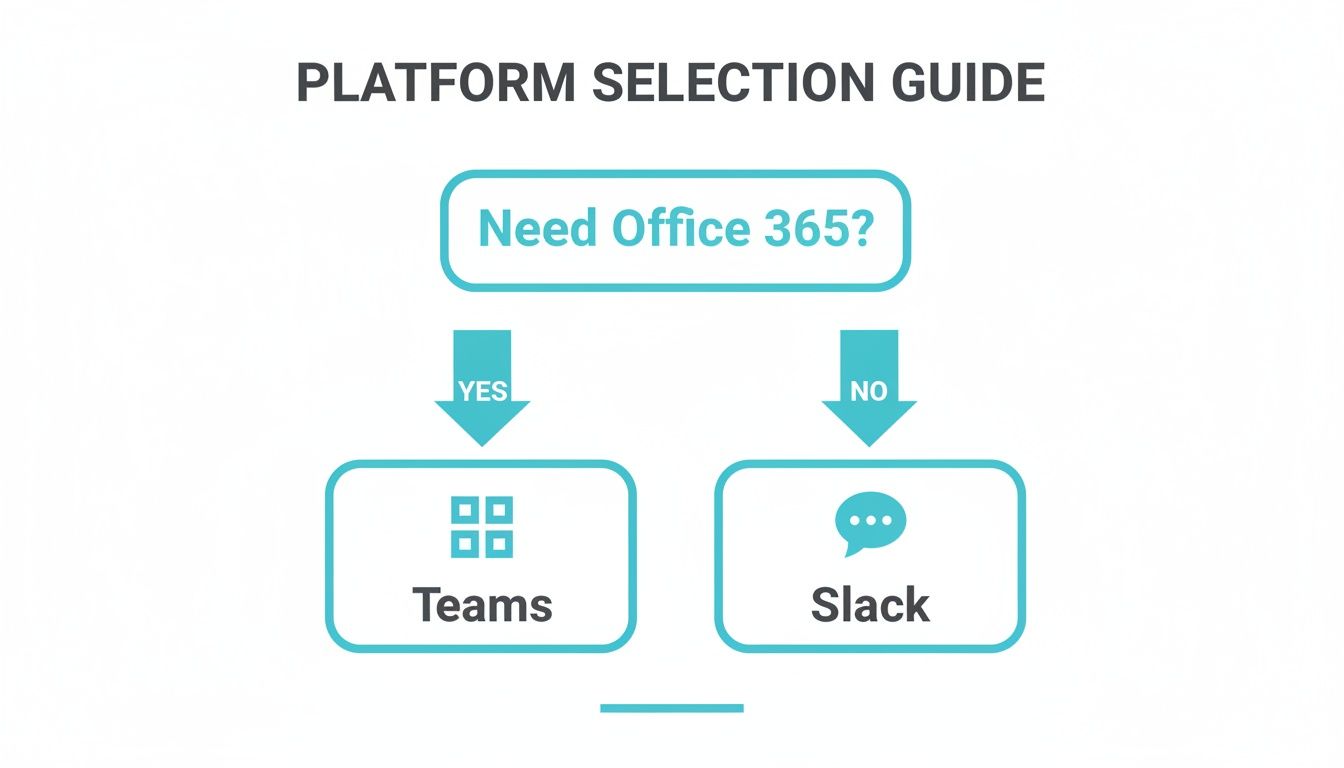
As you can see, if your teams live and breathe in Office 365 day in and day out, Microsoft Teams is often the most logical and frictionless path forward. But if that's not your reality, the choice becomes more nuanced.
When to Choose Slack: Your Hub for Agility
Slack is the undisputed champion for organizations that live and die by user experience, flexibility, and a rich, best-in-class integration ecosystem. It truly shines in businesses where speed and adaptability are the name of the game.
You'll find it's the right fit for:
* Tech-Forward Companies: For software, product, and engineering teams, Slack’s developer-first API and seamless connections to tools like Jira, GitHub, and Asana are non-negotiable. It becomes the operational command center where code commits, conversations, and project updates all flow together.
* Creative and Media Agencies: In these high-speed, collaborative worlds, Slack’s fluid channel structure is perfect for the spontaneous brainstorming and rapid-fire feedback that great creative work depends on.
* Companies Focused on Culture: If you value transparency and a flatter hierarchy, Slack is your tool. Its open-by-default philosophy encourages cross-departmental conversations and empowers anyone, at any level, to jump in with an idea.
The core promise of Slack isn't just better chat. It’s about building a more connected and automated workflow. It’s for teams who want to assemble their own digital headquarters using the best tools on the market, period.
When to Choose Teams: Your Unified Microsoft Command Center
Microsoft Teams is the obvious choice for any organization already deeply invested in the Microsoft 365 ecosystem. Its power isn’t as a standalone chat app, but as the connective tissue that weaves Word, Excel, SharePoint, and Outlook into a single, unified experience.
Teams is the logical home for:
* Large Enterprises: For corporations with thousands of employees, the centralized admin, security, and compliance features managed from a single Microsoft portal are a massive win for IT.
* Regulated Industries: Government agencies, healthcare providers, and financial institutions lean on Microsoft's robust security posture and granular governance controls to stay compliant.
* Organizations Standardizing Costs: When Teams is already included in your Microsoft 365 subscription, the value proposition is hard to ignore. It offers an all-in-one solution without adding another vendor and another bill.
The numbers don't lie. Microsoft Teams has surged to become the market leader, boasting a staggering 320 million monthly active users by 2024. This growth is heavily fueled by its inclusion in Microsoft 365 bundles, giving it an unmatched distribution advantage. For a closer look at the data, you can check out the full research on Teams' market dominance.
Amplify Your Choice and Solve for Weaknesses
Ultimately, this decision is about empowering the culture you want to build. For companies that land on Slack for its fantastic user experience and flexibility, the biggest headache is often knowledge getting lost in the fast-paced scroll of conversation. This is where you can get strategic.
Instead of accepting that valuable answers will get buried, you can actively fix the problem. Imagine a workspace where your team never has to dig through old channels or ping an expert for a question that’s already been answered a dozen times. That's the difference an AI assistant like SAI can make.
By adding SAI to your Slack channels, every question and answer helps build an intelligent, self-service knowledge base. Your team can simply ask SAI and get the info they need, instantly. This solves Slack's single biggest weakness, maximizes your investment, and turns your communication hub into the smartest person on your team.
Still on the Fence? Answering Your Top Questions
Choosing between Slack and Microsoft Teams always comes down to a few key questions. Let's tackle the most common ones I hear from team leads and admins to help you make the right call for your organization.
Is Slack or Teams Better for Small Businesses?
This really boils down to your existing tech stack and company vibe.
If your team thrives on a mix of best-in-class tools—think Google Workspace, Asana, or Zendesk—Slack is almost always the better fit. Its user-friendly design and massive integration library make it the perfect command center for a nimble, tech-savvy team. It just works, connecting everything you already rely on.
On the other hand, if your business is already standardized on Microsoft 365, Teams is the no-brainer. It’s baked right into the ecosystem you're already paying for, offering deep, native connections to Outlook, Word, and Excel. For a Microsoft-centric shop, it’s a cost-effective and unified path that simplifies things for everyone.
Can Slack Completely Replace Internal Email?
Not entirely, but it can get you about 90% of the way there. Slack is brilliant at killing the endless reply-all chains for project updates, quick questions, and team announcements. It pulls all that fast-moving, internal chatter out of the inbox and into a place built for it.
Where does email still win? For formal documentation and, most importantly, for talking to anyone outside your company—clients, vendors, partners. The best setup I’ve seen is using Slack for virtually all internal work and keeping email for formal records and external communication.
How Does an AI Assistant Solve Slack's Biggest Weakness?
Here’s the paradox of Slack: its greatest strength—fluid, real-time conversation—is also its biggest Achilles' heel. Crucial information gets buried in a blink. Decisions are made, context is shared, and then it's all lost in the endless scroll. This forces people to constantly interrupt your experts to ask the same questions over and over, which is a massive productivity killer.
An AI assistant like SAI flips this problem on its head. It quietly listens to the conversations in your channels, learning from every Q&A. When a question gets answered once, SAI remembers it forever.
The next time someone asks that same question, SAI instantly delivers the answer right in the channel. It’s a game-changer. Slack stops being just a messaging app and becomes a living, self-updating knowledge base that works around the clock. No more manual wikis, no more bugging your senior devs. Your team’s collective wisdom is finally captured and put to work.
Stop losing valuable time to repetitive questions in Slack. SAI learns from your team’s conversations to provide instant, accurate answers, turning your chat into a self-organizing knowledge base. Get started for free and see the difference today at https://sai-bot.ai.
