The Ultimate SOP Document Format for Business Clarity
A solid SOP document format is the secret weapon of any high-performing team. It's what turns all that scattered tribal knowledge floating around in people's heads into a reliable, easy-to-find resource for everyone. This isn't just about writing documents; it's about creating a single source of truth that cuts out the friction and guesswork for good.
Stop Searching and Start Doing

Just picture your team’s day without the endless hunt for information. No more sifting through forgotten shared drives, bugging colleagues for the fourth time, or just guessing at the right way to do something. Imagine a day where your team never has to open another resource or search in multiple places again. They just ask in Slack and get the exact answers they're looking for, instantly.
That’s the difference a well-defined Standard Operating Procedure (SOP) system makes. It puts an end to the constant context switching and searching that absolutely kills productivity, letting your team stay in the zone and get things done.
End Information Bottlenecks for Good
The real price of disorganized knowledge isn't just wasted time—it's the momentum you lose every single time someone has to hit pause and ask, Wait, how do we do this again?
It adds up. Studies show that even one hour of unproductive labor a week can cost a mid-sized company almost $5,900 annually for every single employee. That's what happens when new hires are left to figure things out on their own or when two veterans handle the same critical task in completely different ways.
A consistent SOP document format gives you real, tangible wins by:
- Capturing Expertise: It locks down crucial institutional knowledge before your most experienced people move on, making sure their insights don't walk out the door with them.
- Accelerating Onboarding: New team members can get up to speed and start contributing way faster when they have a clear, step-by-step playbook for their core responsibilities.
- Eliminating Guesswork: When every important procedure is documented, your team can move forward with confidence, knowing they’re following the one, correct, company-approved method.
The ultimate goal here is to build a system where your team never has to open another tab or search ten different places for an answer. They just ask in Slack and get the exact information they need, right away.
From Static Documents to a Living Resource
Let's be honest, the big problem with old-school SOPs is that they end up in a digital graveyard—a folder somewhere that no one’s looked at in years. They become outdated and useless almost immediately. The trick is to make your team’s knowledge a living, breathing part of your daily workflow.
When your SOPs are structured the right way, they become the fuel for an AI assistant like SAI, working directly inside Slack.
This move transforms your documented processes from static files into an intelligent, on-demand knowledge base. A team member can ask, How do I process a refund?
and get an immediate, actionable answer pulled straight from the official SOP. This is your first real step toward building a team that’s truly self-sufficient and ridiculously efficient.
The Anatomy of a High-Impact SOP
What’s the difference between an SOP that becomes a team staple and one that just collects digital dust? It all comes down to the structure. A truly great SOP doesn't just list steps; it tells a complete story, leaving absolutely no room for confusion or guesswork.
Think of it as the architectural blueprint for consistency. When an SOP is built right, anyone—from a seasoned pro to a brand-new hire—can pick it up and nail a task perfectly, every single time. This anatomy is the foundation of a reliable SOP document format that your team will actually want to use.
Let's break down the essential components that turn a simple document into a powerful operational tool. These aren't just suggestions; they are the pillars of an SOP that truly works.
Key Components of a Modern SOP
| Component | Purpose and Key Elements |
|---|---|
| Purpose Statement | Answers the whyright upfront. Explains what problem the procedure solves and what a successful outcome looks like. |
| Scope & Responsibilities | Defines the boundaries of the procedure—when it applies and when it doesn't. Clearly lists who owns the process, who executes the steps, and who needs to be kept in the loop. |
| Required Materials | Lists any tools, software, links, or resources needed to complete the task. This prevents delays and confusion. |
| Step-by-Step Instructions | The core of the SOP. Provides clear, sequential, and action-oriented instructions. Each step should be a single, distinct action. |
| KPIs & Metrics | Defines how success is measured. What metrics are tied to this procedure? (e.g., response time, completion rate). |
| Revision History | Tracks changes, dates, and authors. This is crucial for accountability and ensuring everyone is using the most current version. |
By including these elements, you move beyond a simple checklist and create a comprehensive guide that builds competence and confidence across your team.
Nailing the Why
With a Purpose Statement
Every effective SOP kicks off with a crystal-clear purpose statement. This is your chance to answer the why
in one or two sentences. It immediately tells the reader what problem this procedure solves and why following it is so important.
Forget vague titles like Client Onboarding.
A strong purpose statement gets specific: To ensure every new client is onboarded consistently within **48 hours**, providing them with all necessary access and welcome materials to guarantee a positive initial experience.
See the difference? This simple framing transforms the document from a chore into a critical tool for success.
Defining Scope and Responsibilities: Who Does What?
With the purpose locked in, you need to define the scope and responsibilities. The scope sets the guardrails—it tells the user exactly when to use these instructions and, just as importantly, when not to.
Defining roles is equally critical. You want to eliminate any doubt about who owns each part of the process. I always recommend breaking it down like this:
- Owner: Who is the single point of contact responsible for this entire procedure?
- Actors: Which specific roles or team members are hands-on, executing the steps?
- Stakeholders: Who needs to be informed or consulted along the way?
Getting this right prevents tasks from falling through the cracks and finally ends the I thought someone else was handling that
problem. If you want to explore different layouts, we’ve put together a deep dive on various SOP formats and templates that can help.
A great SOP creates a world of total clarity. Imagine a new team member confidently handling a complex task on their first try because the document spelled out not just the steps, but their exact role in the bigger picture. That's the power of this structure.
The Heart of the SOP: Step-by-Step Instructions
Finally, we get to the core of your document—the actual step-by-step instructions. This is where the real work gets done. The language here needs to be clear, direct, and action-oriented. Each step should represent a single, distinct action.
Number your steps sequentially to create a logical flow that’s impossible to misinterpret. Use simple language and ditch the jargon whenever you can. Your goal should be for a brand-new hire to understand the instructions as easily as a ten-year veteran. When your most important processes are broken down this way, your team stops wasting energy figuring things out and starts executing flawlessly.
Designing SOPs for Real-World Use
Let's be honest. A brilliant SOP with every single detail covered is completely useless if no one can actually read it. Smart formatting isn't just about making things look pretty; it's about making information easy to find, understand, and act on when the pressure is on. This is where we turn a dreaded wall of text into a scannable, user-friendly guide that your team will actually thank you for.
The gap between a document that gets used daily and one that collects digital dust often boils down to simple design choices. Your mission is to make it faster for a team member to find an answer in the SOP than it is for them to tap a coworker on the shoulder. A clear, well-structured SOP document format is how you win that race.
A few simple techniques can dramatically improve how well your team understands and adopts these guides, turning them into go-to resources instead of forgotten files.
Creating a Clear Visual Hierarchy
Great formatting starts with a solid visual hierarchy. Think of it like a map for your document. Descriptive headings and subheadings create a logical flow that lets the reader’s eye jump from one key point to the next. This means someone can scan the document and find the exact section they need without having to read every single word.
For processes that have to happen in a specific order, this structure is non-negotiable. Always, and I mean always, use numbered lists for step-by-step instructions. This simple trick removes any guesswork about the order of operations—something that's absolutely critical for complex or high-stakes tasks.
Here are a few formatting conventions that make a world of difference:
* Numbered Lists: Use these only for steps that must be done in a specific sequence. No exceptions.
* Bulleted Lists: These are perfect for highlighting materials, resources, or tips that don't need to be in any particular order.
* Bold Text: Be strategic. Use bolding to make critical actions, warnings, or key terms pop. If you bold everything, nothing stands out.
Imagine a crisis. Your team doesn't have time to wade through a dense paragraph. They need to find the
Emergency Shutdownheading instantly and follow five numbered steps without a second thought. That's the power of scannable formatting.
The Power of Visuals
Sometimes, words just don't cut it. No matter how eloquently you describe a complex user interface, it will never be as clear as a simple screenshot with an arrow pointing to the right button. Adding visuals is one of the single most effective ways to boost understanding and slash the risk of errors.
A well-placed screenshot, a simple diagram, or even a short GIF can clarify a tricky process in seconds. Instead of trying to describe which menu to open or which checkbox to tick in a software tool, just show it. This not only saves the reader time but also gives them the confidence of knowing exactly what they’re supposed to see on their own screen.
Think of visuals as your shortcut to clarity. They break up long blocks of text, making the entire document less intimidating and more engaging. When you combine a logical text structure with helpful visuals, you create an SOP that isn't just informative—it's genuinely helpful and incredibly easy to follow.
Writing Procedures People Will Follow
Let's be honest, nobody gets excited to read a dry, technical manual. An SOP shouldn't feel like one. Think of it less as a list of instructions and more as a conversation with your team, a way to share your expertise and build unshakeable confidence. The right tone and language can transform a boring document into a go-to resource people actually want to use.
The goal here isn't just to list steps. It's to explain the 'why' behind them. This is what separates a world-class SOP document format from one that just collects digital dust. You’re not just documenting a process; you're giving your team the context they need to make smart, independent decisions. That's how you build true consistency and understanding.
Write for Your Audience
Who are you writing this for? The answer changes everything. A brand-new hire needs every single detail spelled out, while a seasoned pro might just need a quick reminder on a process they only do once a quarter. Tailoring the level of detail is absolutely critical.
If you’re writing for someone new, ditch the jargon and define every acronym. For the veterans, you can get straight to the point, focusing on the critical steps and potential gotchas they need to watch out for. It all comes down to empathy. Put yourself in their shoes and write the exact document you'd want to read in their situation.
Think of your SOP as a conversation with your future teammate. It should feel less like a rigid manual and more like a trusted colleague guiding them through a task, ensuring they feel supported and capable from the very start.
The Power of Explaining the Why
Simply listing steps is the easy part. The real magic happens when you provide context. When your team understands why a certain step is so important—how it impacts product quality, keeps a customer happy, or protects sensitive data—they're infinitely more likely to follow it to the letter.
This isn’t just about getting people to comply; it’s about creating a culture of ownership. In fact, this idea is so powerful that many professional and academic programs require SOPs that focus almost entirely on the why,
asking applicants to detail their goals and the reasoning behind their choices. It’s solid proof that context is king. You can see how these narrative-driven SOPs are built to get a feel for this approach.
Cut the Jargon and Keep It Simple
Your procedures need to be understood by everyone, instantly. The quickest way to make an SOP useless is to cram it full of technical jargon, internal acronyms, and corporate-speak that only a handful of people get. Always, always choose simple, clear language.
Here are a few simple rules to live by:
- Use Active Voice: Instead of
The request is approved by the manager,
writeThe manager approves the request.
It’s direct and clear. - Keep Sentences Short: Long, winding sentences are hard to follow. Break complex thoughts into simple, bite-sized ones.
- Define Your Acronyms: The first time you use an acronym, spell it out. No exceptions.
When you focus on clarity and context, you’ll see adoption go through the roof. Learning how to write an SOP your team actually uses isn't about creating more documents; it's about building a reliable knowledge base that empowers your entire team to do their best work.
Bringing Your SOPs to Life with AI
So, you’ve put in the hard work and created the perfect SOP. That's a huge step, but it’s only half the battle. The real magic happens when you pull that knowledge out of a dusty folder and make it instantly available right where your team works.
Think about it. A beautifully crafted procedure is useless if no one can find it when they need it. The goal is to stop the endless searching that kills your team’s focus and energy. With a tool like SAI, every process you document becomes part of an intelligent knowledge base that lives right inside Slack. Your team stops digging through shared drives or bugging coworkers and starts getting instant answers.
From Static Files to Instant Answers
What happens when someone on your team has a question right now? They probably stop what they’re doing, open a new tab, search a drive, and maybe ping a colleague—a classic productivity killer. A solid SOP document format is the foundation, but AI is what makes it dynamic.
When you connect your knowledge to SAI, a simple question like, How do I onboard a new enterprise client?
doesn't trigger a frantic search. Instead, it gets an immediate, precise answer pulled directly from the right SOP.
- No more searching: Answers are delivered right in the flow of conversation.
- No more interruptions: Team members get what they need without distracting others.
- No more guessing: Everyone follows the single, correct, up-to-date procedure.
This helps you build a self-sufficient team that moves faster and with more confidence because the right information is always just a quick question away.
This is where having a clear, well-structured SOP really pays off. The process below outlines the core ideas for writing documentation that both people and AI can easily understand.
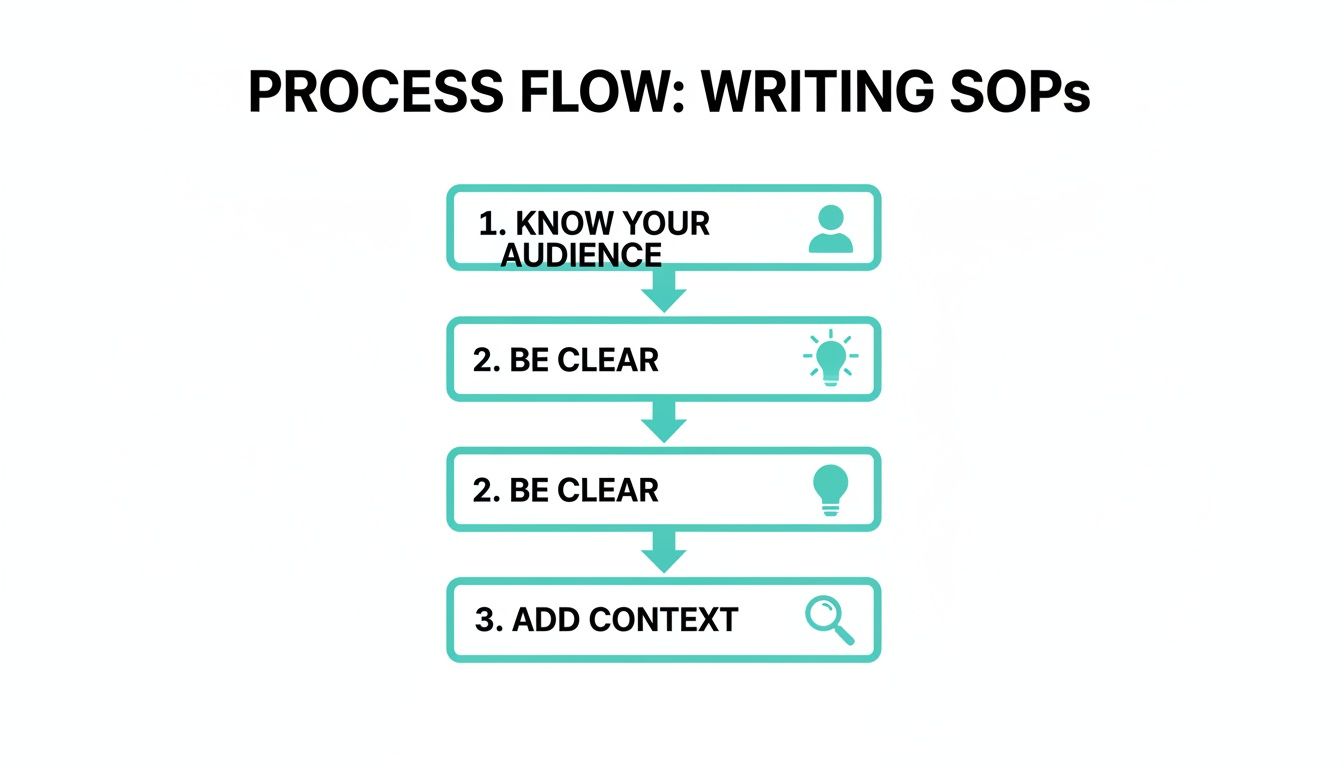
As you can see, it all comes down to knowing your audience, writing with clarity, and providing enough context. Get that right, and your documentation becomes truly actionable.
The End of Repetitive Questions
Here’s where it gets really good: you can finally put an end to answering the same questions over and over. Every time someone asks about a process, that knowledge is captured and ready for the next person. Your knowledge base gets smarter with every interaction, freeing up your senior team members from being human search engines.
Imagine your team's day without the constant hunt for information. Instead of opening multiple docs or waiting for a reply, they just ask SAI in Slack and get the exact answer they need, instantly. That’s the future of team knowledge.
This is about more than just efficiency; it’s about giving your team back their focus. When people can stay locked into their work without constant detours, they produce higher-quality results and feel less bogged down by friction.
If you're ready to make your team's knowledge more accessible, our guide to the best AI knowledge management tools is a great place to start. By making your SOPs the backbone of an intelligent system, you don’t just improve a process—you change how your entire team gets work done.
Got Questions About SOPs? We've Got Answers.
Even with a killer SOP document format in hand, questions are bound to pop up. It’s totally normal. Moving from just writing documentation to actually living by it is where the real magic—and the real challenges—happen.
Let’s tackle some of the most common hurdles teams face when they start getting serious about standardizing their processes. Getting these details right from the start is the difference between an SOP that gathers digital dust and one that becomes your team's most valuable player.
How Often Should We Review and Update Our SOPs?
This is a big one. As a rule of thumb, plan to review every single SOP at least once every 6 to 12 months. But—and this is a big but—don't wait for a calendar invite if something changes. Your SOPs need to be living documents, not relics carved in stone.
The moment a process changes, the SOP needs to change with it. A review should be triggered immediately if:
* You roll out a new piece of software or a critical tool update.
* The team restructures, and key roles or responsibilities shift.
* A company-wide policy that touches the procedure is updated.
The single best way to keep this from falling through the cracks? Assign a clear owner
to every SOP. This creates accountability and ensures your knowledge base stays trustworthy. After all, a dangerously outdated SOP is often worse than no SOP at all.
What's the Difference Between an SOP and a Checklist?
I get this question all the time, and it’s a crucial distinction. Think of it this way: a checklist is just a simple to-do
list. It tells you what to do, but not much else. An SOP, on the other hand, is the full story. It’s the playbook that explains the why, the who, and the how behind every single task.
An SOP is the complete narrative. It defines the scope of the work, clarifies who owns each step, and provides the detailed context needed to do the job right. A checklist might be a helpful little component within a larger SOP, but it can never replace it.
How Can We Get Our Team to Actually Use the SOPs?
Here’s the million-dollar question. Because a brilliant SOP that nobody reads is completely useless. The secret isn't about forcing people to comply; it’s about making the SOP the absolute easiest path to getting the right answer.
Here’s a simple strategy that works wonders:
1. Build Them Together: When your team has a hand in creating the process, they're instantly invested. They'll trust a document they helped build, and their frontline expertise will make the SOP a thousand times more practical.
2. Make Them Ridiculously Easy to Find: Don't make people hunt through forgotten folders. The best approach is to bring the knowledge directly into the tools they already use every day, like Slack. When the answer is just a quick question away, people will use it.
3. Lead by Example: This is for the managers. When someone asks a question that's covered in an SOP, don't just give them the answer. Point them to the official document. This simple, consistent action drills home the message: the SOP is the single source of truth.
Imagine your team never having to hunt through shared drives, interrupt a colleague, or guess at the right process ever again. SAI makes this a reality by turning your team's knowledge into an on-demand AI assistant right inside Slack. Stop answering the same questions and start building a self-sufficient team. Add SAI to a single channel for free and see the difference today.
